

Onyx Boox Note Air 5c: E-Ink Productivity & Planning Guide
Complete Guide — Jump to Any Section
- What Is the Onyx Boox Note Air 5c?
- Full Specifications
- Key Upgrades Over the 4c
- Using the Boox 5c for Productivity and Planning
- Key2Success Planner on the Boox 5c
- How It Compares to Other E-Ink Devices
- Who Is the Boox 5c For?
- Explore All Boox 5c Guides
- Key2Success Planner Shop
- Frequently Asked Questions
The Onyx Boox Note Air 5c is one of the most capable e-ink tablets available in 2026 — and one of the best devices available for serious digital planners. At $529, it sits in a clear premium tier: more flexible than the reMarkable Paper Pro, more focused than an iPad, and built specifically for the kind of deep reading, handwritten note-taking, and PDF-based planning that professionals do every day.
This guide covers everything: full specs, what actually changed from the 4c, how to use it as a daily planning device, how the Key2Success Planner runs on it, how it compares to competing e-ink devices, and who should actually buy it. It also links out to the full content cluster of in-depth guides on specific workflows and use cases.
If you are researching the Boox 5c for productivity and planning, this is the starting point. Every question has an answer here — and if you want to go deeper on any topic, the linked guides below cover each one in full.

What Is the Onyx Boox Note Air 5c?
The Onyx Boox Note Air 5c is a 10.3-inch color e-ink tablet from Onyx International, designed for handwritten note-taking, PDF annotation, reading, and light productivity tasks. It is the fifth generation of the Note Air line and the direct successor to the Note Air 4c.
Unlike the reMarkable Paper Pro or Supernote A5X2, the Boox 5c runs a full Android 15 operating system with unrestricted Google Play access. This makes it one of the most versatile e-ink devices on the market — you can install any Android app, sync notes through cloud services without a subscription, and use it alongside existing productivity tools like Microsoft OneNote, Evernote, or Google Drive.
The device is built around three core use cases: handwritten note-taking, PDF annotation and planning, and light reading. It is not designed to replace an iPad for media consumption or creative work. It is designed to replace paper — and specifically to replace paper in the kinds of professional workflows where paper's limitation is that notes do not sync, cannot be searched, and do not connect to anything else.
The Boox 5c is the "Swiss Army Knife" of e-ink devices. If you want maximum flexibility — open apps, no subscriptions, PDF + annotation + cloud sync in one device — it is the strongest option in the category at this price point.
Full Specifications
| Specification | Onyx Boox Note Air 5c |
|---|---|
| Display | 10.3" Kaleido 3 color e-paper, flat cover-lens glass |
| B&W Resolution | 2480 × 1860 at 300 PPI |
| Color Resolution | 1240 × 930 at 150 PPI — 4,096 colors |
| Processor | Octa-core with BSR (BOOX Super Refresh Technology) |
| RAM | 6 GB |
| Storage | 64 GB internal + microSD up to 1 TB |
| Operating System | Android 15 with Google Play Store |
| Stylus | BOOX Pen3 — 4,096 pressure levels, tilt sensitivity, built-in nib storage |
| Connectivity | Wi-Fi, Bluetooth 5.1, USB-C (OTG + audio) |
| Front Light | Yes — warm and cold temperature adjustment (CTM) |
| Security | Fingerprint reader (power button) |
| Audio | Dual speakers, built-in microphone |
| Battery | 3,700 mAh — approx. 4–6 hours continuous writing, up to 30 hours reading |
| Dimensions | 225 × 192 × 5.8 mm (8.9" × 7.6" × 0.23") |
| Weight | 430–440 g (approx. 15.2 oz) |
| Keyboard Cover | Optional — pogo pin connector, pass-through USB-C charging (~$100) |
| Cloud Storage | 10 GB Onyx Cloud included free, no subscription required |
| Firmware Support | Free updates guaranteed for 3+ years from launch |
| Price | ~$529 USD |
Key Upgrades Over the 4c
The 5c is an iterative upgrade rather than a complete redesign — same display technology, same form factor, same core experience. But the specific improvements address real pain points that 4c users reported, and they add up to a noticeably better daily experience.
- Android 15 vs Android 13 — longer software support life, better app compatibility with newer applications, improved security. For professionals using productivity apps that receive frequent updates, this matters significantly over a 3–4 year device lifecycle.
- BOOX Pen3 with built-in nib storage — the single most impactful hardware improvement. Spare nibs are stored inside the pen body itself. Replace a worn or broken nib in seconds, anywhere, without needing the original packaging or a desk.
- Pogo pin keyboard connector — supports the optional Boox Magnetic Keyboard Cover. Not available on the 4c at all. Turns the 5c into a light laptop-adjacent device for typing-heavy sessions.
- Faster fingerprint reader — noticeably more responsive than the 4c. Small individually, meaningful across dozens of daily unlocks.
- Improved real-time ink rendering — reduced screen refresh lag during active writing. Handwriting appears character-by-character at normal writing speeds rather than in batches after a brief delay.
For a detailed comparison, see: Onyx Boox Note Air 5c vs 4c: Is It Worth the Upgrade?
Using the Boox 5c for Productivity and Planning
The Boox 5c earns its place as a productivity device through a combination of hardware and software that creates a focused, distraction-reduced environment for daily planning work. Here is how the core workflows operate.
Daily Planning with PDF-Based Systems
The Boox 5c handles PDF files natively through NeoReader, its built-in PDF reader and annotation app. Load any PDF-based planner via Boox Drop (wireless file transfer) or USB, open it in NeoReader, and the hyperlinks built into most structured planners work immediately — tap a month tab to navigate to that month, tap a date to jump to that day's page. The color e-ink display makes color-coded time blocking, highlighted schedule sections, and visual planner layouts readable in a way that monochrome e-ink screens cannot match.
Handwritten Notes with Cross-Device Sync
Because the 5c runs Android 15 with Google Play, you can install Microsoft OneNote and write notes by hand on the device that sync automatically to Windows, iOS, and Android. This is the core of the meeting notes workflow: write on the Boox 5c during a meeting, pick up your Windows machine after, and the notes are already there. No transfer, no export, no steps. For professionals who take a lot of notes in meetings, this sync capability alone justifies the device.
The Writing Toolbar
The built-in writing toolbar includes five pen types (ballpoint, fine-tip, pencil, brush marker, highlighter), adjustable thickness and color, an eraser with stroke and lasso modes, scribble-to-erase, a straight line tool, and a lasso selection tool for copying and moving handwritten content between pages. The toolbar is fully configurable and can be positioned at any screen edge.
Focus and Distraction Reduction
The e-ink display does not produce the visual stimulation of an LCD screen, making social media, video, and notification feeds feel unnatural and sluggish on the device. This hardware-level friction makes the Boox 5c a naturally focused device — you configure it with only the apps you need, and the display technology does the rest. Built-in reading and focus modes lock the device into single-app operation for deep planning sessions.
For a full guide to the distraction-free planning workflow: E-Ink Tablets for Focus and Planning: How the Boox 5c Supports a Distraction-Free Day
Key2Success Planner on the Boox 5c
The Key2Success Planner is a PDF-based digital planning system available in four editions — Personal, Professional, Business, and Executive — and is one of the best-suited planners for the Boox 5c specifically. Here is why the combination works well, and how to get it running.
Why K2S Works on E-Ink
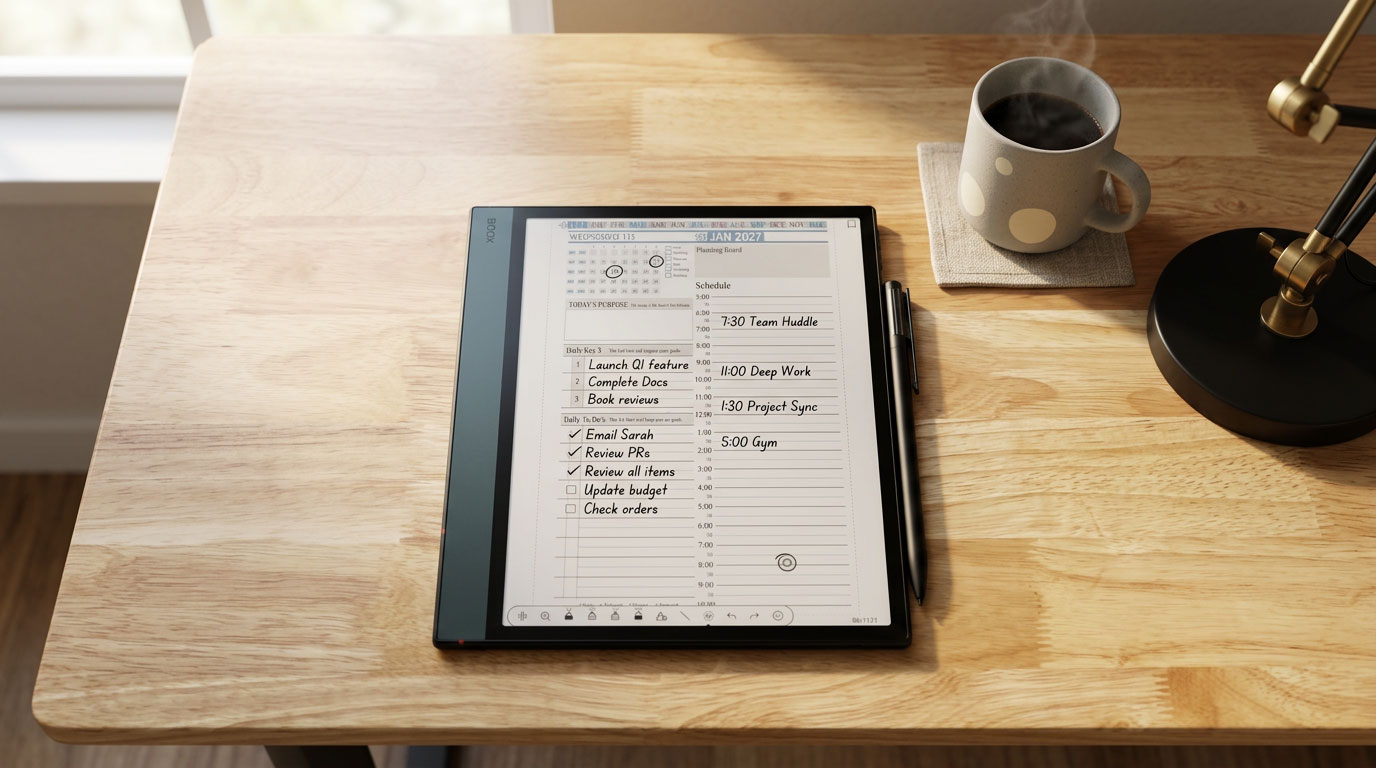
The Key2Success Planner uses a structured daily layout with time blocking, a Daily Key3 section for your three most important priorities, a to-do list, and space for notes. The layout is designed for handwriting — it is not a digital checklist app, it is a planning system built around the deliberate act of writing your priorities by hand. The Boox 5c's color display makes the color-coded K2S layout more readable than any monochrome e-ink device, and the improved stylus makes writing on it feel close to writing in a physical planner.
Loading the Planner
Download your K2S Planner edition from key2successplanner.com. Transfer the PDF to the Boox 5c via Boox Drop (open the app on the device, navigate to the Boox Drop IP address in a browser on your computer, drag and drop). Open in NeoReader. The hyperlinked navigation — tap a month to jump to it, tap a date to open that day — works immediately.
The Daily Key3 Framework
Every day with the K2S Planner starts the same way: identify the three actions that will have the most meaningful impact on your day. Not a full task list — three priorities. Stephen Covey called it putting first things first. James Clear showed that consistent small daily actions compound into transformational results. The Daily Key3 is the practical implementation of both principles — and the Boox 5c creates the focused environment in which that morning planning practice can happen without distraction.
Annotation Tools for the K2S Workflow
- Color highlighters — use 3–4 colors for time-block coding (meetings, deep work, personal, flex)
- Ballpoint pen at 0.9mm — optimal for body text in K2S daily page fields
- Lasso copy/paste — carry incomplete to-dos forward from one day to the next in seconds
- Scribble-to-erase — correct entries without switching tools
- Straight line tool — draw clean schedule dividers in time-blocking sections
Full walkthrough: How to Use the Key2Success Planner on the Onyx Boox Note Air 5c
How the Boox 5c Compares to Other E-Ink Devices
The Boox 5c competes against three primary alternatives: the reMarkable Paper Pro, the Supernote A5X2, and the Amazon Kindle Scribe. Here is how they stack up for a planning and productivity workflow.
| Feature | Boox Note Air 5c | reMarkable Paper Pro | Supernote A5X2 | Kindle Scribe |
|---|---|---|---|---|
| Price | ~$529 | ~$779 | ~$499 | ~$339 |
| Subscription required | None | $2.99/mo for full features | None | None |
| Color e-ink display | Yes — Kaleido 3 | Yes — Color Paper | No — monochrome | No — monochrome |
| Open Android / app store | Yes — Android 15 + Google Play | No — closed Linux OS | Limited Android, no Play Store | No — Amazon ecosystem only |
| OneNote / GoodNotes | Yes — full Play Store | No | Limited | No |
| PDF annotation with hyperlinks | Yes | Yes | Yes | Limited |
| K2S Planner compatible | Yes — PDF + OneNote | Yes — PDF version | Yes — PDF version | Basic PDF only |
| Stylus nib storage | Built into pen | In case/cover | Separate kit | Separate kit |
| Keyboard accessory | Yes — pogo pin cover | No | No | No |
| MicroSD expansion | Yes — up to 1 TB | No | No | No |
| Writing feel | Very good — slight improvement over 4c | Excellent — widely regarded best feel | Excellent — ceramic nib, premium texture | Good |
| Best for | Versatile productivity, planning, apps | Pure writing, distraction-free focus | Deep writing, privacy-focused users | Reading + light notes |
For a full deep-dive comparison: Onyx Boox 5c vs reMarkable Paper Pro: Which Is Better for Digital Planning?
Who Is the Boox 5c For?
Best Fit
- Professionals who take a lot of handwritten notes in meetings and need them to sync to other devices
- Digital planners using PDF-based systems like Key2Success who want a color display and responsive stylus
- People who find iPads too distracting for focused planning work
- Heavy readers who want a single device for both reading and note-taking
- Android users who want flexibility without a monthly subscription
- Anyone already on the Boox 4c who uses it daily and wants the improved pen and Android 15 longevity
Not the Best Fit
- Users who want the absolute best writing feel and do not need apps — the reMarkable Paper Pro and Supernote edge ahead here
- Casual note-takers who would be better served by a $339 Kindle Scribe
- People who primarily need a media consumption device — the e-ink display is not built for video or fast-moving content
- Users who do not yet have a consistent daily planning practice — start with the K2S Planner on your existing device first
Explore All Boox 5c Guides
This pillar page connects to a full series of in-depth guides covering every major aspect of using the Onyx Boox Note Air 5c for productivity and planning. Each article goes deep on one specific topic.
Key2Success Planner — Find Your Edition
The Key2Success Planner is used by professionals in 52 countries across every major platform — GoodNotes, OneNote, reMarkable, Samsung Notes, Supernote, Onyx Boox, and all PDF annotation apps. It is available in four editions based on your role and planning depth, plus device-specific and specialty versions.
Frequently Asked Questions About the Onyx Boox Note Air 5c
How much does the Onyx Boox Note Air 5c cost?
The Onyx Boox Note Air 5c retails at approximately $529 USD. There is no subscription required for core functionality — cloud sync, app access, and firmware updates are all included. The optional Magnetic Keyboard Cover is available separately for approximately $100. This makes it significantly more affordable than the reMarkable Paper Pro (~$779 plus a $2.99/month Connect subscription for full features).
Can you install apps on the Onyx Boox Note Air 5c?
Yes. The Boox 5c runs Android 15 with full Google Play Store access. You can install any Android app including Microsoft OneNote, Evernote, Google Drive, Dropbox, Kindle, and any PDF annotation tool. This is one of the key differentiators from competitors like the reMarkable Paper Pro (closed Linux OS) and Amazon Kindle Scribe (Amazon ecosystem only).
What is the battery life on the Onyx Boox Note Air 5c?
Battery life varies by use. Continuous handwriting with the front light on yields approximately 4–6 hours. Reading with the light off can last up to 30 hours. With typical mixed daily use (planning sessions, reading, light app use), most users report 3–5 days per charge. The 3,700 mAh battery is not as long-lasting as basic e-readers, but is substantially better than an iPad for comparable daily use.
Is the Onyx Boox Note Air 5c worth it for digital planning?
For serious digital planners — especially those using PDF-based systems like the Key2Success Planner — the Boox 5c is one of the best devices available. The color e-ink display supports color-coded planning layouts, the open Android ecosystem allows OneNote sync and any annotation app, the improved Pen3 stylus makes handwriting feel natural, and the distraction-reduced e-ink environment supports focused daily planning. At $529 with no subscription, it offers better value than the reMarkable Paper Pro for most productivity users.
How does the Boox 5c compare to the reMarkable Paper Pro?
The Boox 5c wins on price ($529 vs ~$779), flexibility (open Android vs closed Linux), app access (full Google Play vs no third-party apps), and value (no subscription vs $2.99/month for full reMarkable features). The reMarkable Paper Pro has a slight edge on pure writing feel and a more focused, distraction-free environment by design. For professionals who need apps like OneNote, the Boox 5c is the stronger choice. For users who want pure writing with minimal digital overhead, the reMarkable Paper Pro remains compelling despite its higher cost.
Does the Onyx Boox Note Air 5c work with the Key2Success Planner?
Yes — and it is one of the best devices for the K2S Planner. Load the PDF version via Boox Drop, open in NeoReader, and the hyperlinked navigation works immediately. The color display makes the K2S color-coded layout readable and functional. You can also install the Key2Success Planner for OneNote on the device via the Play Store for full cross-device sync. The K2S Planner is available in Personal, Professional, Business, and Executive editions.
Bottom Line: The Right Device for the Right Practice
The Onyx Boox Note Air 5c is not the perfect device for everyone. No device is. But for a specific type of professional — someone who writes a lot by hand, plans deliberately every morning, takes notes in meetings that need to sync to other tools, and wants a device that removes distraction rather than adding it — the Boox 5c is as close to the right tool as anything currently available at this price.
The hardware improvements in the 5c over the 4c are real and meaningful. The Android 15 ecosystem extends the device's useful life significantly. The Pen3 nib storage solves a real, practical problem. And the color e-ink display makes planning layouts — especially color-coded systems like Key2Success — function the way they were designed to function.
The device supports the practice. But the practice has to exist first. If you do not have a daily planning habit, start there. The Key2Success Planner works on any device you already own — iPad, phone, Windows laptop, reMarkable. Build the habit. Then, when you are ready for a device that protects that habit by removing everything competing for your attention, the Boox 5c will be exactly what you need.
About the Author
Branden Bodendorfer is an entrepreneur, coach, and creator of the Key2Success Planner — a digital planning and productivity system used by professionals in 52 countries. With deep roots in Central Wisconsin, Branden has been building planning systems and helping individuals and organizations reach their goals since founding his first business in 2004.
His entrepreneurial journey spans co-founding Premier Printing in 2004, launching TriMedia in 2010 — a marketing and communications firm that grew multiple regional media brands reaching over 100,000 people per month — and developing the Key2Success Digital Planner beginning in 2013. He currently serves as Director of Marketing for Wheelers Family Auto Group , a six-rooftop Chevrolet and GMC dealer group in Central Wisconsin.
Branden is a passionate photographer, videographer, and drone pilot whose aerial and nature work has been featured on ABC World News, ESPN Monday Night Football, CNN, the NBC Today Show, and Disney platforms. He has been nominated for SBA Entrepreneur of the Year and recognized with Small Business of the Year awards. His coaching programs focus on entrepreneurship, leadership, marketing, and personal development.
Full Bio | brandenbodendorfer.com | Key2Success Planner | LinkedIn
Sources & References:
Onyx Boox Note Air 5c Official Product Page — shop.boox.com | Good e-Reader — Boox Note Air 5c Review, November 2025 | Android Central — Boox Note Air 5c Review, February 2026 | E-Ink Reviews — Boox 5c vs reMarkable Paper Pro, November 2025 | Branden Bodendorfer — Onyx Boox 5c Digital Note Taking (YouTube), March 2026

