

The 2027 Planner Built for GoodNotes
A fully hyperlinked GoodNotes PDF planner for iPad, iPhone, and Mac. Choose your edition, add the tools you want, and start planning in minutes.
The Key2Success GoodNotes Digital Planner is a goal, schedule, and task system delivered as a fully hyperlinked PDF built for GoodNotes on iPad, iPhone, and Mac. It comes in five editions, from Personal at $29.99 to Complete at $269.99. Every date, tab, and page is linked, so you tap any day, week, or month and jump straight to that page.


Key2Success GoodNotes Digital Planner
Or pick individual tiles - $9.99 each ▾
The 2027 Key2Success GoodNotes Planner is a complete goal, schedule, and task system built as a fully hyperlinked PDF for GoodNotes. Every edition builds on the one before it, so you can start where you are and upgrade as your planning grows. Every date, tab, and page is linked, so you tap any day and jump straight to it.
In every edition
- Annual, monthly, weekly & daily pages
- Section-tabbed navigation
- Goal-setting & review framework
- Task & project tracking tiles
- Note & brainstorm sections
- Delivered as a hyperlinked PDF file
Fully hyperlinked: the GoodNotes PDF has date-to-date linking built in, so you tap any day, week, or month and jump right to it - no scrolling.
Editions & pricing
| Edition | Best for | Price |
|---|---|---|
| Personal | Daily life, habits & goals | $29.99 |
| Professional | Work planning & productivity | $49.99 |
| Business | CRM, projects & team work | $99.99 |
| Executive | Leadership & full business system | $149.99 |
| Complete | Every app + every edition | $269.99 |
The GoodNotes edition runs anywhere GoodNotes runs. Import the PDF once and it syncs across your Apple devices through GoodNotes and iCloud.
| Platform | Works with |
|---|---|
| iPad | GoodNotes 5 or GoodNotes 6 |
| iPhone | GoodNotes on iOS |
| Mac | GoodNotes on macOS |
You will be planning in minutes:
- Buy and download your PDF file from the confirmation page and email.
- Open GoodNotes on your iPad, iPhone, or Mac and import the PDF as a new document.
- Turn on iCloud sync in GoodNotes so it is on every Apple device.
- Tap a tile or date and start planning.
Want us to set it up for you? Add Remote Installation Support above before you add to cart.
Step-by-step training for setting up and getting the most out of your GoodNotes planner. Watch in order or jump to what you need.
GoodNotes Editions at a Glance
Every edition builds on the one before it. Start where you are and upgrade any time. Prices shown are the current 2027 launch price.
| What you get | Personal$29.99 | Professional$49.99Popular | Business$99.99 | Executive$149.99 | Complete$269.99 |
|---|---|---|---|---|---|
| Annual, monthly, weekly & daily pages | ✓ | ✓ | ✓ | ✓ | ✓ |
| Vision Board & Year-View | ✓ | ✓ | ✓ | ✓ | ✓ |
| Weekly & Quarterly Review | ✓ | ✓ | ✓ | ✓ | ✓ |
| Notes / Journal & Ideal Week | ✓ | ✓ | ✓ | ✓ | ✓ |
| Meeting & Project pages | − | ✓ | ✓ | ✓ | ✓ |
| Budget & Habit Tracker | − | ✓ | ✓ | ✓ | ✓ |
| Expense Tracker | − | − | ✓ | ✓ | ✓ |
| Professional Builder tools | − | − | ✓ | ✓ | ✓ |
| CRM Toolkit | − | − | − | ✓ | ✓ |
| Communication Planner & Team Development | − | − | − | ✓ | ✓ |
| 30-minute session with Branden | − | − | − | ✓ | ✓ |
| Every app, PDF & e-Ink versions + all tiles | − | − | − | − | ✓ |
GoodNotes Planner Page Layouts
Formatted for GoodNotes so each page works like a sheet of paper you can write or type on. Tap any layout to view it full size.
Customize with Tiles & Stickers
Tiles are functional building blocks you copy into any page to build your own templates. Drop in a habit tracker, budget, meeting page, or project board in seconds. Add tiles right in the buy box above, or grab them any time.
2026 GoodNotes Editions
Want to start planning today? The 2026 GoodNotes planner is ready now. Bundle it with 2027 in the buy box above — get the 2026 Personal planner free, or save 80% on your matching edition.
It is obvious a lot of thought went into this. The more I use it, the more I get out of it.
Verified GoodNotes buyerCustomer service was fantastic. I had my planner installed and syncing across devices in no time.
Verified buyerBranden personally helped me through setup. His support was above and beyond.
M. Oliver, verified buyerInstall & Training
You need GoodNotes on your iPad, iPhone, or Mac. Import the PDF once and it syncs everywhere through iCloud. Do it yourself with our guide, or let us set it up with you.
Install it yourself
Follow the step-by-step GoodNotes guide to import your planner PDF and sync it across your iPad, iPhone, and Mac.
GoodNotes Install GuideHave us install it
Add Remote Installation Support and we will set the planner up with you in a live 20-minute screen share, scheduled within 3 business days.
Remote Installation Support · $9.99Free training library
Every page has a walkthrough video plus pro tips in the Key2Success training series. Free to follow at your own pace.
Training ResourcesChoose your app
Not sure GoodNotes is the right fit? Compare note apps and devices so your planner works the way you do.
Choose the Right AppCommonly Asked Questions
Is the planner a subscription?
Which devices and versions of GoodNotes does it work on?
Is the GoodNotes planner fully hyperlinked?
Can I type in the planner as well as handwrite?
How does the planner sync across devices?
Can I bundle the 2026 planner and save?
Prefer a different app?
Turn GoodNotes Into Your Planning System
Pick your edition, add the tiles and support you want, and start planning today. Instant download, works on iPad, iPhone and Mac, with an optional 5-day money-back guarantee at checkout on Personal and Professional.
Choose Your Edition
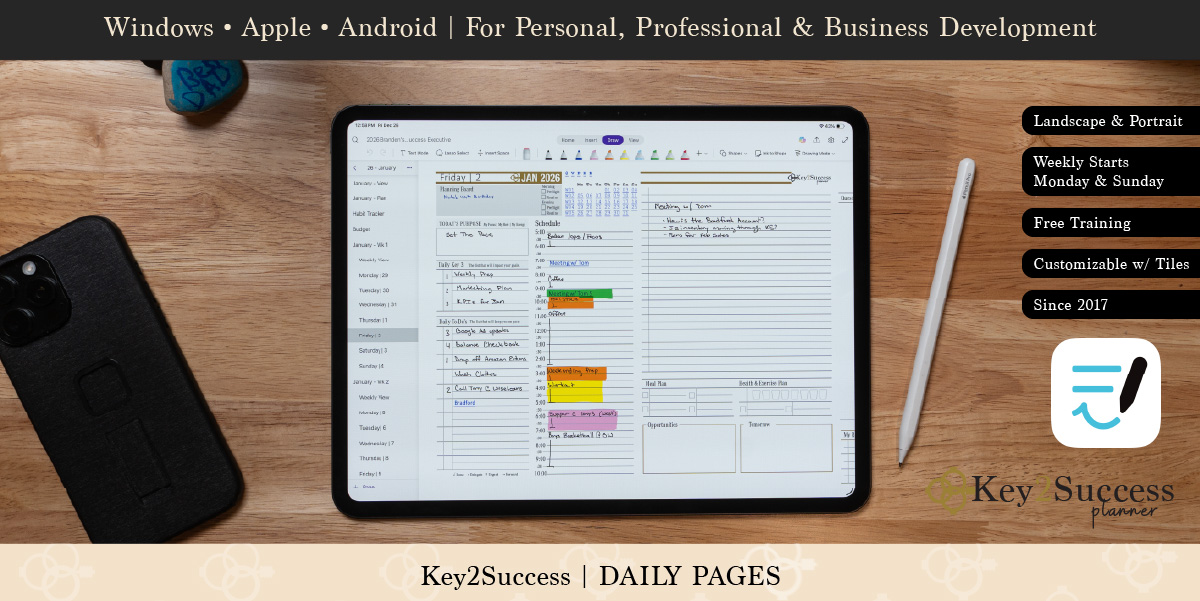
Key2Success™ daily planner pages are designed to keep you focused on the action steps that will drive your success.
Unlocking the Key2Success™ starts each day with determining where you will dedicate most of your attention. This is commonly a project, developing a habit, building a relationship, or self-improvement.
The next key is indicating the 3 most important assignments that will drive home your goals – we call these the Key3™.
The Key2Success™ daily page provides you with a task list, a timeline of your day, note section, important calls, and opportunities. We will uncover how to make the most out of this page through our membership channel. So make sure to subscribe to our newsletter and Youtube page.
As the creator of the Key2Success Digital Planner, Branden Bodendorfer envisioned a tool that would seamlessly organize visions and streamline yearly planning. The goal was to provide a flexible solution, allowing users to effortlessly engage with their digital planner on devices like the Surface Pro or iPad, using applications such as OneNote or GoodNotes. Within the 2023 Key2Success Digital Planning System, the Vision Board stands out as a personal favorite. Tailored to assist users in mapping out their entire year, this feature serves as a compass, guiding goals and actions throughout the entire planner.
The Annual Keys page in the Key2Success Digital Planner is designed to help kickstart your digital planning year in the best way possible – by providing you a space to outline your goals for the year.
There are four development areas included in the Annual Keys: Self, Relationships, Career, and Community. Each section contains a goal area for you to add your goal statement and the motivation behind it. Understanding why you have a goal is important because it will help you stay focused on your goal. Keep in mind that these four areas are interconnected
Key2Success™ Weekly Plan page has been created as a tool to develop your week.
As you wind down each week and set your agenda for the upcoming week, the Key2Success™ Weekly Plan page is there to remind you of your accomplishments, review the business that is unfinished, and make adjustments to your time management.
Utilizing this tool each week will drive your success. Focusing on work, relationships, and yourself, while scheduling your week around the Key3™, will lift your weekly results.
Starting with the big events in your year, the key developments in your week, to focusing on what matters most each day, the Bodendorfer Key2Success™ planner has been developed to serve as a funnel for your planning.
Branden Bodendorfer himself uses this planner daily and will coach you through the year on how he manages it all.
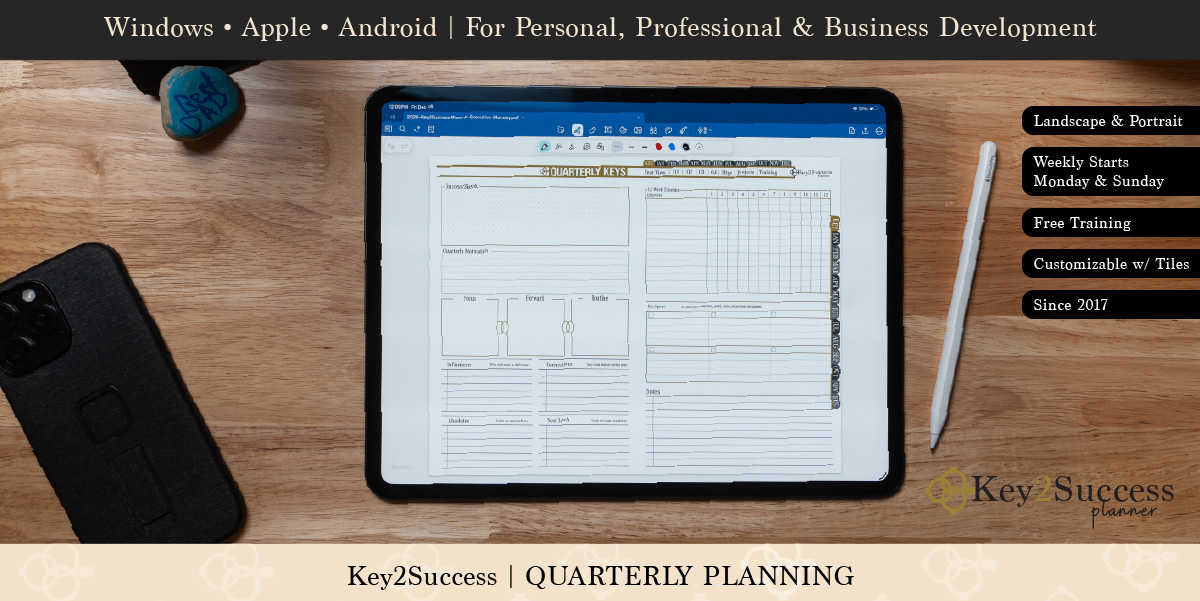
Quarterly Keys pages are there to help you measure your progress in key areas throughout the year, sketch your success, and develop a timeline to help maintain your focus on your goals.
Key2Success™ Goal Planner page is your blueprint to success.
We all have dreams and we can reach them! Setting goals is an essential step in reaching your dreams and setting new heights.
The cornerstone for success is having continued focus on your goals and maintaining a priority is key to unlocking your potential. Motivation will drive you. These components are embedded in the Key2Success™ Planner
Having a spot to jot down your notes and journal your ideas is useful when digital planning. The notes and journaling pages are basic basics designed to help you explore your ideas.
Your Ideal Week starts by determining what is going to matter most this week. What is going to take up most of your attention? Then follows the Vision Board, which is a freestyle brainstorming space to write down what you want your week to look like. Think of it as a means of enabling a habit in your life. Write down what you want brought to the surface this week.
Set agendas, document attendees, plan next steps with the Meeting Page. Designed to help you prepare, maximize your time at meetings, and organize your thoughts and plan afterwards.
We all have projects we want or need to accomplish and the Key2Success Project pages are designed to help outline your vision, action steps, and tasks that will help a project succeed. Start with the “sketch” area, then move onto projects, a planning board, action steps, tasks, and notes.
We all have habits that we want to develop and habits that we want to break. The Key2Success Habit Tracker is new to the system and a powerful tool to helping you achieve success with your habits. Set goals, outline a routine, keep notes, and list and monitor the habits you want to develop and change – all on one convenient spread.
Keeping track of expenses doesn’t have to be chaotic, thanks to the Key2Success Expense Tracker. Keep track of receipts in one convenient spot. There are spots to record date, expense account, period thru, amount, customer, vendor, and status. Import a photo of the receipt right into the designated space. Come tax time, you’ll be more organized than ever!
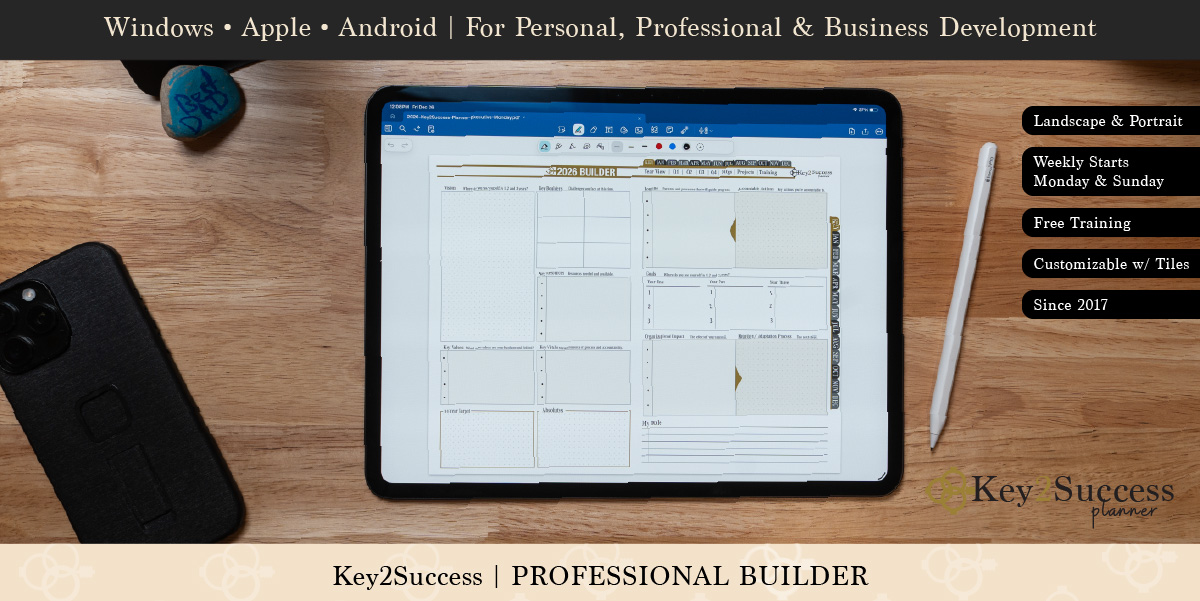
The Key2Success Digital Planner Professional Builder section provides the staple for you as a professional to set goals and create a plan to achieve them.
Whether you want to help grow your career or expand your organization, this is the tool that we wanted to roll out to the community to help set priorities and absolute goals.
This one page is designed to change how you look at digital planning and planning in your career. Frame up your vision, understand challenges, and determine what is most important. Answer the key question: What do we have to achieve before we reach the next level?

