reMarkable Paper Pure Review: The $399 Setup Nobody Shows
The reMarkable Paper Pure is a $399 black-and-white e-ink tablet built for distraction-free writing. It has no apps, notifications, or front light, which is the point. Paired with a planning system like the Key2Success Planner, it works as a focused productivity tool, not just a digital notebook.
This reMarkable Paper Pure review skips the spec-sheet argument about the missing front light and color and looks at the thing that actually matters for working professionals: what the $399 e-ink tablet does for your focus and your output. Branden Bodendorfer walks through the device, the new Marker, and how the Paper Pure improves on the now-discontinued reMarkable 2.
Filmed in June 2026, right after the Paper Pure started shipping, this is a hands-on look from someone who has used reMarkable tablets for years and runs a planning system on one every day. You will see the updated pen tools, the eraser and lasso, layers, multi-device sync across up to five tablets, and custom pages built with Key2Success Tiles.
By the end you will know whether the reMarkable Paper Pure fits how you work, how to turn a blank device into a real productivity system with the Key2Success Planner, and where the color reMarkable Paper Pro makes more sense instead. For the full hardware breakdown, see the official reMarkable Paper Pure page.
Video Transcript
There are a dozen videos on YouTube right now talking about the newly released reMarkable Paper Pure and how it does not have a front light and is not in color. I am going to show you how this device, this $400 investment, can change your focus, your productivity, and help you grow your professional life and your business.
I am Branden Bodendorfer, creator and founder of the Key2Success Planner. There are so many influencers and YouTubers talking about the reMarkable Paper Pure and how it lacks a front light and color. But I am going to show you how this $400 device can change your productivity and focus. That is the beautiful part about it. It does not have a browser. It does not have notifications, apps, or text messages, none of the interruptions you get throughout your day. When you use the Pure, you take your notes, and that is it. It is a digital notebook. You can focus on the things that matter most and capture your thoughts and ideas. That second brain helps you capture ideas and write a plan to move you through the action steps toward success.
For $400 you get the device and a stylus. This Marker is a new-generation Marker, one of the updates over the reMarkable 2, which has been discontinued. In an upcoming video I will compare the Paper Pure with the reMarkable 2, so if you are deciding between the two generations or thinking about upgrading from a reMarkable 2, subscribe to the channel. For a few dollars more you can upgrade to the Marker Plus, which adds an eraser on the end so you can write and erase.
It does not have a front light, and it does not have color like the Paper Pro, and I will compare that in an upcoming video too. But this device is faster, has higher contrast when writing, and uses a new inking style that matches the Pro. The back of the case is made with recyclable materials and held together with screws, so you can fix and update the device. It is not a one-and-done like other tablets.
As we jump into the device, I will show some quick features to get you started with note-taking. There is a full tutorial in the playlist on our YouTube channel that covers notebooks, quick sheets, tags, and folders so you can build a system. Inside a notebook you can choose your pen tool: ballpoint, fine liner, highlighter, pencil, mechanical pencil, calligraphy pen, marker, shader, and paintbrush. Over the years they have expanded these tools, and as a longtime reMarkable user it is great to see. I am still a fan of the paper ballpoint, which has a rollerball-like feel, and you can now change line thickness, from a thin line to a medium line to a thick line. You can already see how much faster it is than previous generations.
You can also change color. The color will not show up on the black-and-white screen, but it creates a contrast difference, and if you sync this tablet with another tablet, the color shows there. One of the beautiful things about this device is that your notes sync to an app you can view on a desktop or other tablets, and you can pair up to five other e-ink tablets to the same account. So if you have a Pro or a Paper Pro Move, you can see your work across all of them.
With the faster speed, pinch and zoom is much easier to use. If you like working in landscape, being able to pinch, zoom, and reposition with two fingers is a big improvement, and the reaction speed is far faster. I have always liked landscape but struggled with pinch to zoom before. Now I love jumping between pages and getting to a note faster, then zooming back out to a full-screen view.
The eraser has been updated so you can erase by thickness or by selection. You can erase directly, or flip the Marker Plus upside down for the same effect. With the lasso tool you can select an area and erase it, cut it, or copy it, then tap another page to drop it in. That is useful for managing to-dos or combining notes from one page to the next. Layers let you bring images into your notebook and write over them, so you can drop in a picture and annotate it. From the desktop app you can drop files right into your notes.
If you like to customize your system, our Tiles, the digital stickers, now work fully across the entire reMarkable lineup. There is a short video in the description that shows this, and in the next video I will show how to use Tiles to build personalized pages, contact sheets, recipe cards, SWOT analysis, and decision-making journals. Those tools are available on the Pro, the Pure, and the legacy reMarkable 1 and reMarkable 2.
You can also create tags. Make a tag for an open to-do, tie a marketing tag to a page, or create a new one. From the home screen you can tap a tag and see every page with it. If you are looking for a productivity hack, the open to-dos tag is a great one. Across your planner, project notebooks, and quick sheets you might have a to-do on a page you have not finished. The open to-dos view lets you find and complete them, which beats a notification you dismiss and never act on.
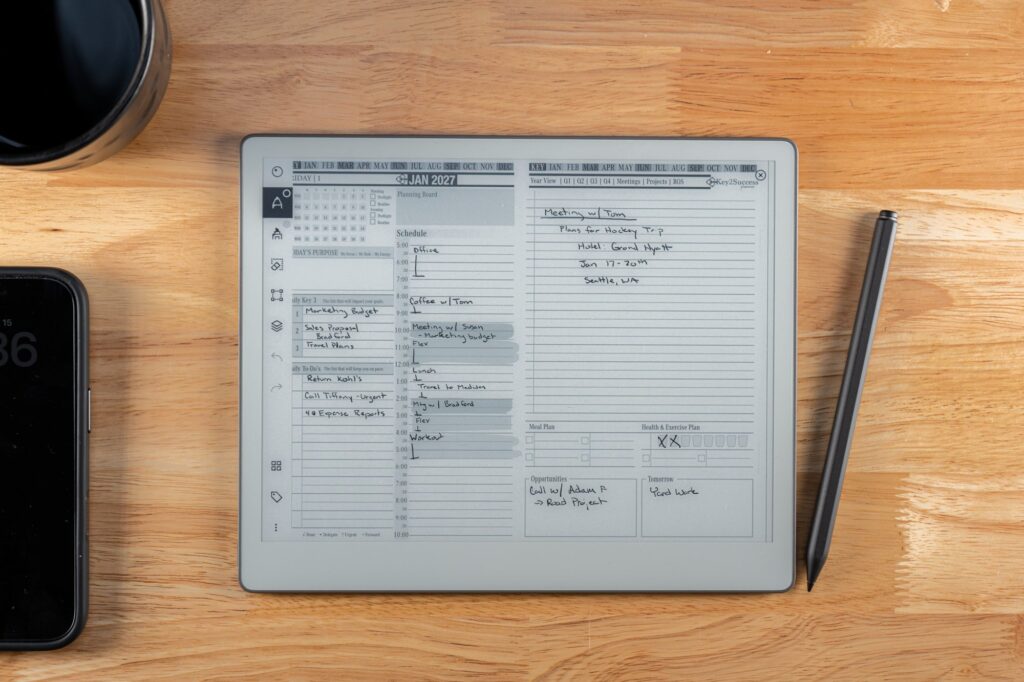
Beyond the note-taking tools, how do you really maximize productivity with this tool? I believe it is by incorporating a planning system. Not a set of cute templates off Etsy, but a system that takes you from capturing ideas to focusing on what matters most and setting priorities. Franklin Covey told us one habit of successful people is putting first things first. If you choose three key things each day that make a big impact, you will find success week after week. We are not looking for monumental shifts. We are looking for a 1% adjustment each day. In Atomic Habits, James Clear talks about how 1% growth compounded over time makes a huge difference. That is what a planning system does.
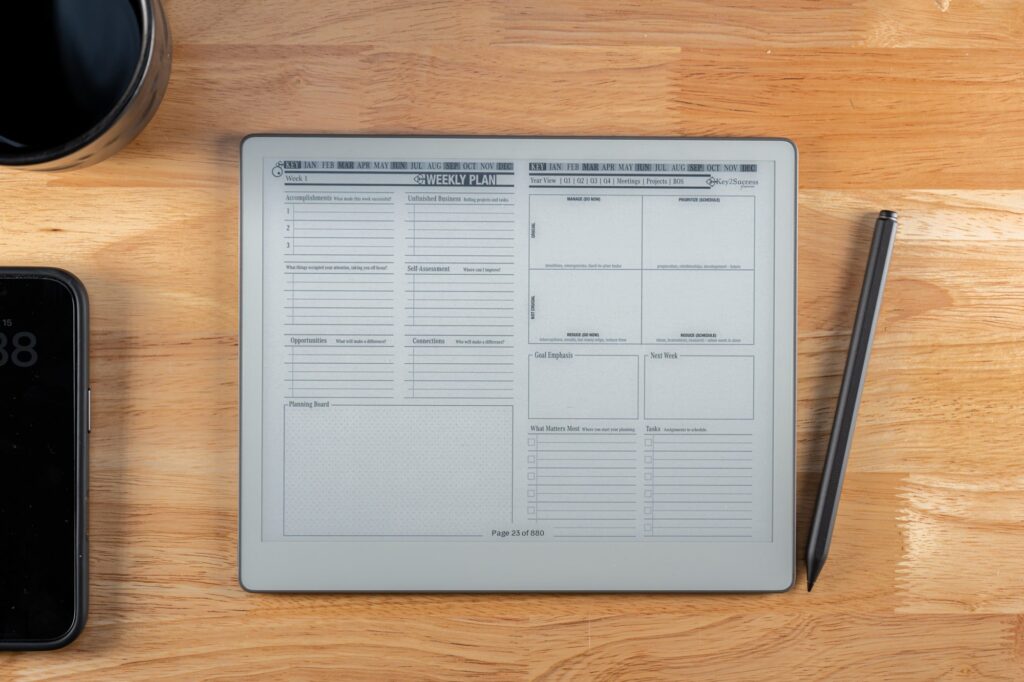
I created the Key2Success Planner, and so many people have benefited from it. Those who use e-ink devices, where the distractions are gone, are the ones who see the system bear fruit. Inside, there are tools to build your vision: a vision board, a bucket list, annual keys, the four cornerstones to success, your monthly plan, your ideal week, a year-to-view, and daily pages where you can see your schedule and take notes.
Where does a planning system make a difference? Maybe you are in one of two camps. Maybe you find yourself missing the mark each week, not completing what matters most. Or maybe you are busy every day but do not see the progress at the end of the month. That is where our planning system comes in. We have two training programs. One builds the framework, taking your thirty-thousand-foot ideas down into daily activities so your momentum adds up. The other helps you put first things first, prioritize each day, and build a system to get things done, using a four-quadrant approach to see results. The training is free.
The other reviews talked about this device by its shortcomings: no color, no front light. But I have not worked too often in the dark, and color does not make the difference between success. Success is black and white. You either pass or fail at life, and being able to take your focus and energy and put it into a plan is what matters most. Get rid of the distractions, find focus, and put your energy on the things that deserve your attention. I am Branden Bodendorfer, creator and founder of the Key2Success Planner. If you want to learn this system or talk one-on-one, I am here to help you coach through your big ideas. It starts with a plan. Lord willing, I will see you in the next video.
Frequently Asked Questions
Is the reMarkable Paper Pure worth it for $399?
For focused, distraction-free work, yes. The reMarkable Paper Pure has no browser, notifications, or apps, so it works as a dedicated digital notebook. Paired with a planning system like the Key2Success Planner, it becomes a productivity tool rather than just a note-taker.
What is the difference between the reMarkable Paper Pure and the reMarkable 2?
The reMarkable Paper Pure has a faster processor, higher writing contrast, a new-generation Marker, and a repairable screw-together build made with recycled materials. Storage also moves from 8 GB on the reMarkable 2 to 32 GB on the Paper Pure. The reMarkable 2 has been discontinued.
Does the reMarkable Paper Pure have a front light or color screen?
No. The reMarkable Paper Pure is black and white with no front light, so it is best used in a well-lit room. The color reMarkable Paper Pro is the model with a Canvas Color display and an adjustable reading light.
Can you use a digital planner on the reMarkable Paper Pure?
Yes. The Key2Success Planner is a hyperlinked PDF that runs on the reMarkable Paper Pure and across the reMarkable lineup, including the Paper Pro and legacy reMarkable 2. You can import it through my.remarkable.com, the desktop app, or USB, and build your own pages with Key2Success Tiles.
Will my old reMarkable 2 Marker work on the Paper Pure?
No. The reMarkable Paper Pure uses new pen technology, so Markers made for the reMarkable 2 are not compatible. The Paper Pure includes a Marker, and the Marker Plus with a built-in eraser is available as an upgrade.
Who created the Key2Success Planner?
Branden Bodendorfer created the Key2Success Planner, a digital planning system used by professionals in dozens of countries to capture ideas, set priorities, and turn goals into daily action.
Your Next Steps With the reMarkable Paper Pure
- Decide whether a distraction-free, black-and-white device fits your work, or whether you need the color reMarkable Paper Pro instead.
- If you buy the Paper Pure, add the Marker Plus only if you want the built-in eraser. The base Marker comes in the box.
- Load a planning system. Import the Key2Success Planner, a hyperlinked PDF, through my.remarkable.com, the desktop app, or USB.
- Build your own pages with Key2Success Tiles for contact sheets, decision journals, and any layout you reuse.
- Use tags and the open to-do view to keep tasks from getting buried across your notebooks.
Turn the Paper Pure Into a Real Planning System
See how the Key2Success Planner builds focus, priorities, and daily action into your reMarkable.