

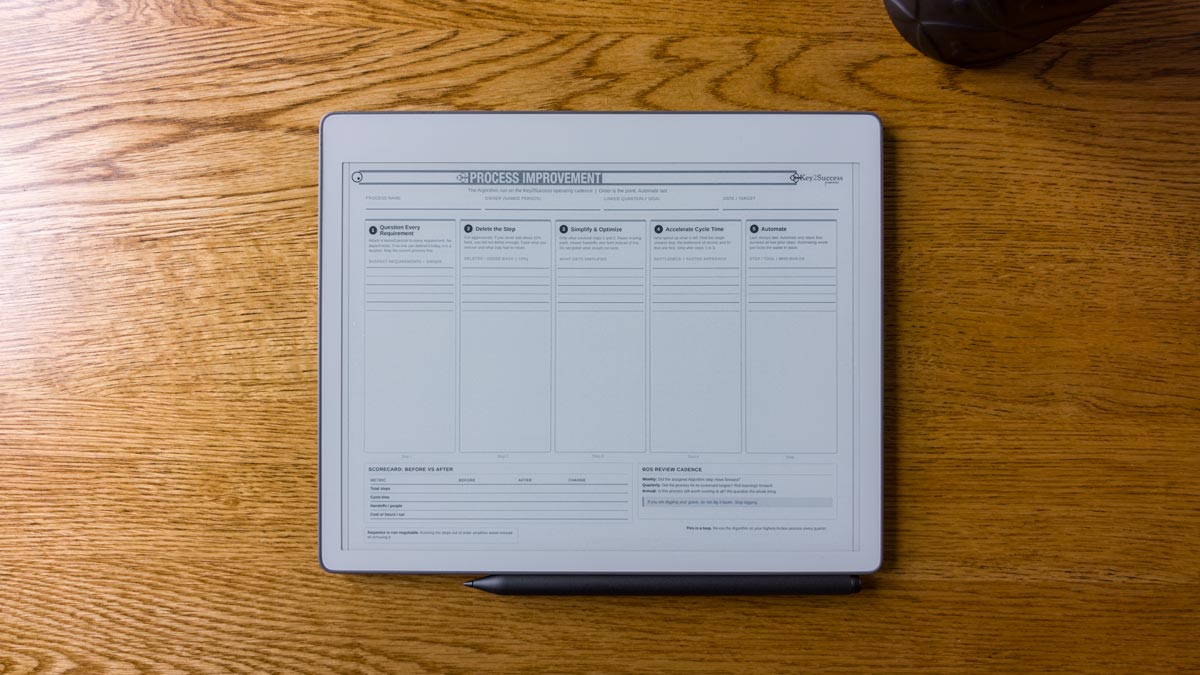
Algorithm Process Improvement Tile
$19.99
Fix any messy workflow with the Algorithm, the five-step process improvement method, using two worksheets:
- One-page Process Improvement Template
- One-page Before-and-after Process Map
- Delivered in OneNote, PDF, and PNG, so they work in OneNote, any annotation app (ie GoodNotes, Noteshelf, Samsung Notes), eInk Device (ie reMarkable, Boox Supernote) or your current notebook.
Description
This Algorithm process improvement template gives you a fixed, repeatable way to fix any messy workflow. It is built on the Algorithm, the five-step method made famous by Elon Musk at SpaceX and Tesla: question every requirement, delete the step, simplify, accelerate, then automate. Most process fixes fail because people automate before they delete and treat the work as a one-time cleanup. This pack solves both, on two worksheets you can use in 30 minutes. Use them in OneNote, in any PDF annotation app, on an e-ink device, or as a drop-in tile in your current notebook.
What’s Included
- Process Improvement Template: a one-page landscape worksheet that walks all five steps of the Algorithm, with a named-owner field on every requirement, a 10 percent add-back tracker, an automation gate you clear before you build, and a before-and-after scorecard.
- Process Map: Before & After: a one-page landscape worksheet that maps your current process beside your improved one, with K / D / S / A fate tags on every current step, a traceable “from step” link on the rebuilt flow, and a matching scorecard.
- Three formats for both worksheets: a OneNote notebook template, a PDF for any annotation app and e-ink device, and a PNG you can import as a tile into a notebook you already use.
- Get Started Guide: a short PDF that walks you through your first pass in about 30 minutes. Included free with every purchase.
- Instant download after checkout. Built to run on the Key2Success Business Operating System and the Daily Key 3, so the changes stick instead of fading.
Who This Is For
The Algorithm process improvement template is built for:
- Founders and operators cleaning up workflows that grew messy over the years
- Team leads who need a shared, repeatable way to fix how work gets done
- Solo professionals who run their own systems and want fewer steps
- Coaches and consultants who map client processes
- Anyone who has tried to fix a workflow before and watched the fix fade
How to Get Started
- Purchase and download. After checkout you get an instant download link. Save the PDFs to your device or cloud storage.
- Open in your format. Open the OneNote notebook in OneNote, import the PDF into your annotation app or e-ink device, or drop the PNG tile into your current notebook. You can also print at 11 by 8.5 inches landscape.
- Tag and map. Run the five steps on the template, tag each current step K / D / S / A, then rebuild the improved map from the steps that survive.
- Put it on a cadence. Carry the next step in your Daily Key 3 and review weekly so one cleanup turns into a standing result.
Compatibility
| Use | Devices | File Format | Notes |
|---|---|---|---|
| OneNote | Windows, Mac, iPad, Android | OneNote notebook | Open the notebook template and start writing |
| PDF annotation apps | iPad, iPhone, Android, Mac | GoodNotes, Noteshelf, Notability, Samsung Notes, and more | |
| E-ink devices | reMarkable, Supernote, Onyx Boox | Annotate directly on the device | |
| Your current notebook | Any app that accepts images | PNG | Import the worksheet as a drop-in tile |
| Print on paper | Any printer | Print at 11 by 8.5 inches, landscape |
Want the planning system that runs this on repeat?
Take the free Planner Finder quiz
to find the Key2Success edition for your device in under 2 minutes.
Algorithm Process Improvement Template: FAQ
What is included when I buy the Algorithm process improvement template?
You get two worksheets in one download: a one-page Process Improvement Template that walks the five steps of the Algorithm, and a Before and After Process Map for laying your current process next to the improved one. Every purchase also includes a free Get Started Guide for your first pass.
What file format are the worksheets delivered in?
Three formats, included together: a OneNote notebook template, a print-ready PDF for any annotation app and e-ink device, and a PNG you can import as a tile into a notebook you already use. You download all of them instantly after checkout.
How do I use these on my iPad or reMarkable?
Import the PDFs into GoodNotes or Notability on iPad, or load them onto a reMarkable, Supernote, or Onyx Boox device, then write directly on the worksheets with your stylus. You can also print them and fill them by hand.
Is this a one-time purchase or a subscription?
One-time. You pay $19.99 once and the files are yours to keep and reuse on as many processes as you want. No subscription, no recurring charge.
Do I need the Key2Success Planner to use this?
No. The worksheets work on their own. The Key2Success Planner adds the daily, weekly, and quarterly cadence that turns a single cleanup into a habit, which is what makes improvements stick. The template is the method, and the planner is the driver.
Also in the Key2Success ecosystem:
- Key2Success Planner Editions: the planning system and Daily Key 3 that run this template on repeat.
- reMarkable Paper Pure + Key2Success System: pair the worksheets with a distraction-free e-ink device.
- Key2Success Planner Finder: find the right edition for your device in two minutes.
Related Products





Be the first to review “Algorithm Process Improvement Tile”
You must be logged in to post a review.