

reMarkable Paper Pure vs Paper Pro: Which Should You Buy?
The reMarkable Paper Pure and Paper Pro share the same pen, writing feel, and software. The Paper Pro adds color, a front light, a bigger screen, and keyboard support for about $220 more. For most professionals who want distraction-free notes and planning, the $399 Paper Pure is the smarter buy.
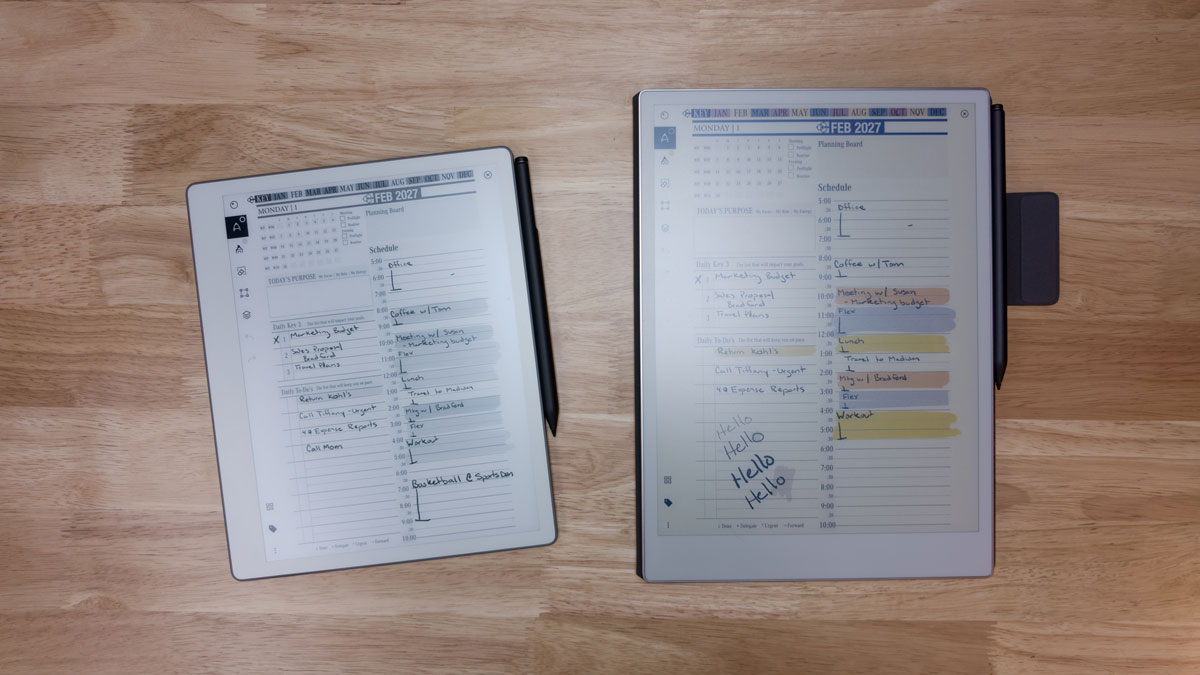
Here is the honest version most reviews skip: the reMarkable Paper Pro is the better tablet, and for most professionals it is still the wrong purchase. The reMarkable Paper Pure vs Paper Pro decision is not about which device wins a spec sheet. It is about whether color, a front light, and a bigger screen are worth about $220 per device for the work you actually do.
Both are distraction-free e-ink tablets built for handwritten notes, PDF markup, and focused meetings, and both run the Key2Success Planner as a hyperlinked PDF. This comparison breaks down what is identical, where each device pulls ahead, and who should save the money. For the complete device breakdown, see the reMarkable Paper Pure guide.
Price gap per device between the $399 Paper Pure and the $629 Paper Pro
Both use the same Marker and Marker Plus, the same writing surface, and the same reMarkable software
The Paper Pro actually has the faster hardware and lower writing latency, not the Pure
reMarkable Paper Pure vs Paper Pro: What They Share
Start with what does not change, because it is more than most buyers expect. Both devices use the exact same Marker and Marker Plus, the same textured glass writing surface, and the same reMarkable operating system. The writing feel is identical. Your notebooks, folders, tags, handwriting-to-text, and PDF import all work the same way, and both sync across the reMarkable desktop and mobile apps.
One catch worth knowing before you switch: the older reMarkable 2 pen does not work on either device. Both the Paper Pure and Paper Pro use the newer Marker lineup. And typing notes inside the reMarkable mobile or desktop app, then syncing them to the tablet, requires a reMarkable Connect subscription on both devices.
Where the Paper Pro pulls ahead
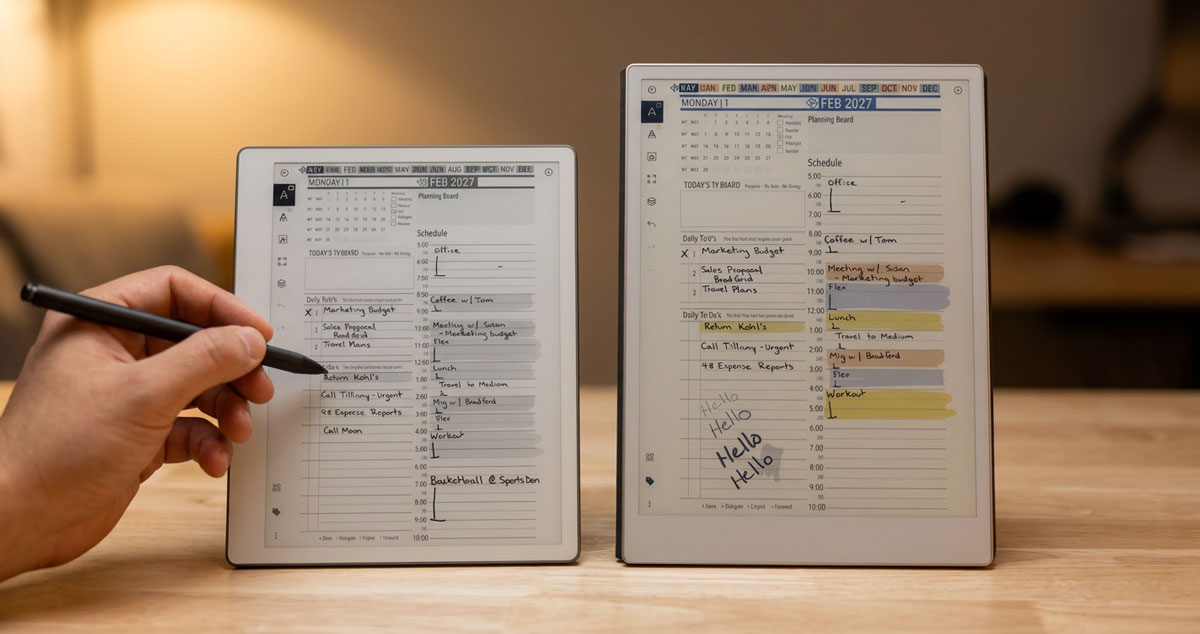
The Paper Pro earns its premium in four clear places. It has a color Canvas display where the Pure is black-and-white. It has an adjustable front light for working in the dark, which the Pure does not. It has a larger 11.8-inch screen against the Pure's 10.3 inches. And it supports a physical keyboard through the Type Folio, while the Pure has no keyboard option at all.
Here is the correction to a claim you will hear in a lot of comparisons, including my own video: the Paper Pro is the faster device, not the Pure. On paper the Pro runs a 1.8GHz quad-core processor with 12ms writing latency, while the Pure runs a 1.7GHz dual-core chip at 21ms. If raw speed is your deciding factor, it points to the Pro.
Where the Paper Pure wins
The Paper Pure wins on the things you feel every day. It is smaller and lighter, which makes it easier to hold one-handed and mark up while you stand in a meeting. Its monochrome screen has higher contrast than the color panel and refreshes cleanly, without the faint color ghosting a Gallery 3 display can show. Battery runs longer, around three weeks against the Pro's two. And it costs $220 less.
If you work in a normal, lit office, the front light you are paying extra for on the Pro rarely comes on. That is the quiet truth behind this whole comparison.
Full spec comparison
| Spec | Paper Pure | Paper Pro |
|---|---|---|
| Price | $399 (Marker included) | $629 |
| Display | 10.3" black-and-white Carta 1300 | 11.8" color Canvas (Gallery 3) |
| Resolution | 1872 x 1404 (226 PPI) | 2160 x 1620 (229 PPI) |
| Front light | No | Yes, adjustable |
| Processor | 1.7GHz dual-core | 1.8GHz quad-core |
| RAM / Storage | 2GB / 32GB | 2GB / 64GB |
| Writing latency | 21 ms | 12 ms |
| Battery | Up to ~3 weeks | Up to ~2 weeks |
| Keyboard | No | Yes (Type Folio) |
| Pen | Marker / Marker Plus | Marker / Marker Plus (same) |
Original comparison built from reMarkable spec pages, July 2026.
I put both devices on my desk and used them for real work, not just a spec sheet. I am the kind of person who wants every feature, so I expected to land on the Pro with its color and front light. What changed my mind was the form factor. The Pure's smaller body and bezel let me hold it in one hand and annotate while standing, and in a lit office the front light I was paying extra for on the Pro almost never turned on. For me, and for the team I would buy these for, the Pure did the same core job.
Which reMarkable is right for you
Choose the reMarkable Paper Pro if you need color, a front light, a bigger screen, or a keyboard. Choose the reMarkable Paper Pure if you want distraction-free notes and planning at the lowest price. For most professionals, the Paper Pure is the right call.
Buying for yourself is one calculation. Buying for a team is another. Across ten seats, the $220 gap is $2,200, and that buys a lot of Markers, folios, or planner licenses. Unless your team genuinely needs color or on-device typing, the Paper Pure comparison lands on the cheaper device for a reason.
Set it up as a planning system
Either device becomes far more useful once it stops being a loose notebook. Load the Key2Success Planner for reMarkable as a hyperlinked PDF and your calendar, projects, and goals all live on the tablet and link together. New to the system? Start with the Key2Success Planner overview, then see the full reMarkable Paper Pure guide.
reMarkable Paper Pure vs Paper Pro: FAQ
Is the reMarkable Paper Pure or Paper Pro better?
For most professionals the reMarkable Paper Pure is the better value. It delivers the same writing feel, the same Marker, and the same software as the Paper Pro for about $220 less. The Paper Pro is the better pick only if you need color, a front light, a larger screen, or keyboard support.
What is the difference between the reMarkable Paper Pure and Paper Pro?
The Paper Pro has a color display, an adjustable front light, a larger 11.8-inch screen, and keyboard support. The reMarkable Paper Pure is a smaller 10.3-inch black-and-white device that is lighter, lasts longer on a charge, and costs $220 less. Both use the same pen and software.
Is the reMarkable Paper Pure faster than the Paper Pro?
No. On hardware the Paper Pro is faster, with a 1.8GHz quad-core processor and 12ms writing latency versus the Paper Pure's 1.7GHz dual-core chip and 21ms latency. The Paper Pure's real advantages are size, weight, battery life, price, and a monochrome screen that refreshes cleanly.
Can you type on the reMarkable Paper Pure without a keyboard?
Yes, with a reMarkable Connect subscription. The Paper Pure has no physical keyboard, but you can type notes in the reMarkable mobile or desktop app and they sync to the device automatically.
Which reMarkable is best for a team or business?
For most teams the reMarkable Paper Pure is the smarter buy. It handles distraction-free notes, meetings, and planning for $220 less per device, which adds up to about $2,200 across ten seats. Choose the Paper Pro for a team only if color or on-device typing is essential.
Common Questions
Does the Paper Pure have color? No, the Paper Pure is black-and-white; only the Paper Pro has a color display.
Does the Paper Pro have a front light? Yes, the Paper Pro has an adjustable front light; the Paper Pure does not.
Can I use a keyboard with the Paper Pure? No, the Paper Pure has no keyboard option; the Paper Pro supports the Type Folio.
Do both devices use the same pen? Yes, both use the same Marker and Marker Plus.
Will my reMarkable 2 pen work on either device? No, the reMarkable 2 Marker is not compatible with the Paper Pure or Paper Pro.
Which has better battery life? The Paper Pure, at roughly three weeks versus about two weeks on the Paper Pro.
Does the Key2Success Planner work on both? Yes, it loads on either device as a hyperlinked PDF.
How much do I save with the Paper Pure? About $220 per device, roughly $2,200 across a team of ten.
Is the Paper Pure good enough for business? Yes, for distraction-free notes, meetings, and planning it is more than enough.
Which is faster overall? On specs the Paper Pro, thanks to its quad-core processor and 12ms latency.
Pick Your reMarkable in Four Questions
- Do you need a color display? Yes, choose the Paper Pro. No, keep going.
- Do you often write in the dark? Yes, choose the Paper Pro for the front light. No, keep going.
- Do you need to type directly on the device? Yes, choose the Paper Pro for keyboard support. No, keep going.
- None of the above? Choose the reMarkable Paper Pure and keep the $220.
The Bottom Line
The Paper Pro is the better tablet. For most professionals, it is the wrong buy. Buy the Pro for the color and the front light, not because bigger sounds better. For distraction-free notes, meetings, and planning, the Paper Pure does the same core job for $220 less, and that gap multiplies fast across a team.
For most professionals who plan and take notes without needing color, we recommend the reMarkable Paper Pure, because it delivers the same writing experience and software as the Paper Pro for $220 less.
About Branden Bodendorfer
Branden Bodendorfer is the creator of the Key2Success Planner, a digital planning system used by professionals in 52 countries, and a digital planning pioneer since 2013. He has used reMarkable e-ink tablets for years and helps professionals turn note-taking devices into focused planning systems.

