

Device Guides
reMarkable Paper Pure: The Complete Guide for Professionals
The reMarkable Paper Pure is a $399 distraction-free e-ink tablet that replaced the reMarkable 2 in 2026. For professionals who take handwritten notes and want to connect them to AI tools, the Paper Pure paired with the Key2Success Planner and Key2Success GPT is the most complete focused-work system available at this price point.
Base model with standard Marker stylus. $449 with Marker Plus and folio sleeve.
E Ink Carta 1300 canvas display, 226 PPI, black and white, no frontlight.
Based on one hour of daily use. 30% more life than the reMarkable 2.
Most reviews of the reMarkable Paper Pure spend their time on what the device is missing. No frontlight. No color display. No apps. That framing misses the point entirely.
The Paper Pure is built for one thing: focused, distraction-free writing. No notifications pulling you out of your thinking. No social feed one swipe away. Just you, your Marker, and the page. For professionals who take handwritten notes seriously, that restraint is not a limitation. It's the whole value proposition.
This guide covers everything you need to evaluate, set up, and use the Paper Pure as a professional productivity device. It is not a spec-sheet recap. There are plenty of those. This is the guide for people who want to know how the Paper Pure fits into a real work system, specifically one built around the Key2Success Planner and AI tools.
What the reMarkable Paper Pure is (and is not)
reMarkable launched the Paper Pure in May 2026 as the direct successor to the reMarkable 2, which had been their entry-level device since 2020. The Pure keeps everything that made the reMarkable 2 popular and upgrades the hardware underneath it.
But here is what matters more than any spec: the Paper Pure is a device that gets out of your way. Every other screen you own is competing for your attention. Your phone buzzes. Your laptop has seventeen browser tabs open. Your iPad has the same apps on it that are eating your focus everywhere else. The Paper Pure has none of that. It runs one operating system, designed entirely around writing and reading, with no mechanism for distraction to get in.
That is not a limitation. That is a deliberate product decision made by a company that has sold more than 3.5 million devices to people who want exactly that.
What it does
- Handwritten note-taking with near-paper writing feel
- PDF import, annotation, and markup
- Handwriting-to-text conversion (MyScript, 30+ languages)
- Calendar sync (Google Calendar and Outlook via Connect)
- Cloud sync and document sharing via Connect subscription
- Integration with Google Drive, Dropbox, OneDrive, Slack, and Miro (Connect required)
- Handwriting search across all notes
- Hyperlinked PDF planners (including the Key2Success Planner)
What it does not do
- Run third-party apps
- Display notifications
- Browse the web
- Show a color display (that is the Paper Pro)
- Work as a frontlit reading device in the dark (also the Paper Pro)
- Process AI on-device — AI features route through the web app and cloud
If you need those things, you are looking at the wrong device. If you do not need them, the Paper Pure is one of the cleanest tools for focused professional work available right now.
Hardware specs and what changed from reMarkable 2
| Spec | Paper Pure (2026) | reMarkable 2 (2020) |
|---|---|---|
| Price | $399 (base) | Discontinued |
| Display | 10.3" E Ink Carta 1300, 226 PPI | 10.3" E Ink Carta, 226 PPI |
| Contrast | 20% better than rM2 | Baseline |
| Processor | 1.7 GHz dual-core Cortex-A55 | 1.2 GHz dual-core |
| Response speed | 50% faster than rM2 | Baseline |
| RAM | 2 GB LPDDR4 | 1 GB |
| Storage | 32 GB | 8 GB |
| Battery | 3,820 mAh / ~3 weeks | ~2 weeks |
| Weight | 360 g (0.79 lb) | 403 g (0.89 lb) |
| Thickness | 6 mm | 4.7 mm |
| Frontlight | No | No |
| Color display | No | No |
| Stylus included | Yes (Marker) | Yes (Marker) |
The 50% speed improvement is the one that matters most in daily use. The reMarkable 2 had occasional lag when flipping between pages or opening a large PDF. The Paper Pure handles those tasks without hesitation. For a planner-based workflow where you are navigating between daily pages, meeting pages, and project pages constantly, that speed difference adds up across a full workday.
The 32GB storage is also meaningfully better. Eight gigabytes filled up faster than expected for heavy PDF users, especially anyone keeping a full year's worth of planner pages on the device. Thirty-two gives you room to keep several years of notes, multiple large PDFs, and your full planner library without thinking about it.
Paper Pure vs. Paper Pro: which one to buy
This is the question most people end up on, and the answer is cleaner than most reviews make it seem.
| Factor | Paper Pure ($399) | Paper Pro ($579+) |
|---|---|---|
| Display | Black and white only | Color gallery e-ink |
| Frontlight | No | Yes |
| Battery | ~3 weeks | ~2 weeks |
| Weight | 360 g | Heavier |
| Best for | Writing, planning, reading | Color annotation, low-light use |
| Key2Success Planner | Full compatibility | Full compatibility |
| AI GPT workflow | Full compatibility | Full compatibility |
The honest recommendation: for most professionals using the Key2Success Planner, the Paper Pure is the right device. The planning workflow does not depend on color. The AI workflow does not depend on color. The meeting note-taking workflow does not depend on color. You are writing in black ink on a white page. The Paper Pure does that better than any color e-ink device can, because it does nothing else.
The Paper Pro makes sense in one specific situation: you annotate legal documents, design files, financial reports, or other content where color information matters. If that is your primary use case, the Paper Pro earns the price difference. If it is not, the Paper Pure is the smarter buy.
How to use the Key2Success Planner on the Paper Pure
The Key2Success Planner is a hyperlinked PDF digital planning system. That means it works on any device that can open and annotate PDFs, including the reMarkable Paper Pure. There is no special installation, no third-party app required, and no subscription beyond your planner purchase.
Watch: How to use the Key2Success Planner + AI workflow on the reMarkable Paper Pure
Loading the planner
- Download your Key2Success Planner PDF from your purchase confirmation email or account.
- Open the reMarkable desktop app or web app at app.remarkable.com.
- Upload the planner PDF to your reMarkable library.
- It syncs to your Paper Pure automatically if you have Connect, or transfer via USB if you do not.
- Open the planner on your device. The hyperlinked navigation works natively in the reMarkable PDF viewer.
Daily planning workflow on the Paper Pure
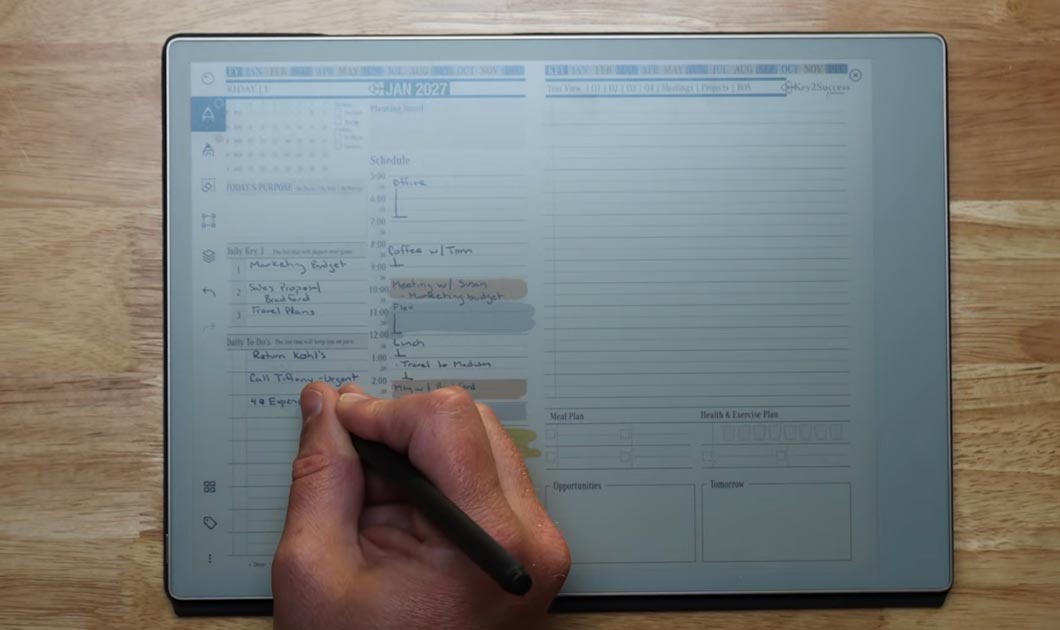
The Key2Success daily page gives you space for your Key 3 priorities, a schedule block, to-dos, and notes. That structure matters on the Paper Pure because there are no calendar notifications interrupting you. Your Key 3 is written in your own hand, in your own words, at the start of the day. No algorithm decided your priorities. You did.
Navigation between planner sections is fast on the Paper Pure — significantly faster than on the reMarkable 2. Moving from a daily page to a meeting page to a project page takes a tap, not a wait. That speed keeps you in the workflow instead of breaking out of it.
Meeting pages on the Paper Pure
One of the strongest use cases for the Paper Pure in a professional environment is meeting note-taking. When you are in a meeting with a reMarkable open and a Marker in hand, you are present. You are not buried behind a laptop. The people across the table can see you writing. That changes the dynamic in the room in a way that has nothing to do with the device's specs.
The Key2Success meeting page template gives you space for agenda, attendees, a sketchboard, tasks, and freeform notes. Everything about the meeting lives in one place. After the meeting, that page becomes the source material for your AI summary workflow.
"The calendar apps I was using before were great at blocking time. They were terrible at capturing what happened inside that time. A meeting with a client is not just a 45-minute calendar event. It is a page of notes, a list of follow-ups, and a set of decisions that need to reach the rest of the team. The Key2Success meeting page on the Paper Pure captures all of that. The AI workflow I have built around it turns those handwritten pages into team-ready summaries in under two minutes. That is the setup nobody was showing me when I bought my first reMarkable."
Key2Success Planner editions for reMarkable
Using AI with your handwritten notes
The question Branden gets most right now is some version of: "Why would I use an e-ink tablet when AI can do everything?"
The answer is that AI cannot generate your ideas. It can only process what you give it. The reMarkable is where you generate. AI is where you scale.
The workflow looks like this:
- Write on the Paper Pure. Daily plan, meeting notes, project pages. Focused, distraction-free capture with your full attention on the thinking.
- Screenshot the page. From within the reMarkable app on your phone or tablet, take a screenshot of the planner page.
- Open the Key2Success GPT. Available free with every 2027 Key2Success Planner purchase.
- Upload the screenshot and ask for what you need. A meeting summary. An email to your assistant. A priority-ranked task list. The GPT knows the templates and reads the handwriting.
- Use the output. Copy it into an email, save it as a PDF, or paste it into your project management tool.
No retyping. No reformatting. Your handwritten notes become team-ready documents in under two minutes.
What the Key2Success GPT can do
- Analyze your daily page and help you build out your Key 3 priorities
- Build meeting summaries from your meeting page screenshots
- Draft emails to your team based on your handwritten notes and schedule
- Help with time blocking based on your color palette and written priorities
- Walk you through the Professional Builder for 1-to-3-year planning
- Coach you through the Key2Success methodology when you are starting out
The Key2Success GPT is trained on the full planning system. It knows what every page template is for. It does not need you to explain the layout. You drop in a screenshot and describe what you want. That is the entire workflow.
For a full walkthrough of this workflow on video, see the reMarkable Paper Pure AI handwritten notes video.
Do you need a Connect subscription?
Connect is reMarkable's subscription service. It runs $2.99 per month (or $34.99 per year) and adds cloud backup, unlimited storage, and the integrations that let your notes move between the Paper Pure and the rest of your work tools.
Here is how to think about it:
- Without Connect: Local note-taking, PDF reading and annotation, hyperlinked planner navigation, handwriting-to-text conversion on-device. The Key2Success screenshot-to-GPT workflow works fine. No integrations with external apps.
- With Connect: Adds automatic cloud backup, Google Drive and Dropbox import, Slack and Miro sharing, calendar sync (Google Calendar and Outlook), unlimited cloud storage, and the ability to share notes as web links.
For most solo professionals using the Paper Pure as a personal planning device, Connect is worth the cost. Automatic cloud backup alone is worth $2.99 a month. For teams using the Paper Pure as a meeting tool with Slack integration, Connect becomes genuinely important.
One thing to note: Connect integrations like Slack and Miro require a Connect subscription. The Key2Success GPT workflow shown in this guide does not. If your primary goal is the handwriting-to-AI pipeline, you can run that workflow without a Connect subscription entirely.
Who the Paper Pure is actually built for
The reMarkable Paper Pure is not the right device for everyone. Here is an honest breakdown.
It is the right device if:
- You take handwritten notes regularly and want them connected to a planning system
- You are in meetings frequently and want to show up present rather than behind a screen
- You use a structured planning system like the Key2Success Planner and want a dedicated device for it
- You want to use AI to process your handwritten notes into team-facing documents
- You work primarily in daylight or well-lit environments
- You already own an iPad or laptop and want a separate focused-work device, not a replacement
It is probably not the right device if:
- You read primarily at night or in low-light environments (look at the Paper Pro with its frontlight)
- You annotate color-heavy documents like design files or legal exhibits with color coding
- You are looking for a general-purpose tablet that can replace your iPad
- You want built-in AI features on the device itself rather than a cloud-based workflow
The Paper Pure is the best writing tablet at $399 available right now. That is a specific claim for a specific type of user. If you are that user, it will not disappoint you.
Getting started: your first 30 minutes
Paper Pure setup checklist
Complete these steps in order when you first unbox the device.
- Power on and complete the initial reMarkable setup. Create or log in to your reMarkable account.
- Connect to Wi-Fi. Let the device download any pending software updates before doing anything else.
- Install the reMarkable desktop app on your computer at remarkable.com/store/desktop.
- Decide on Connect now. If you want cloud sync and integrations, activate your subscription before loading documents so everything syncs from the start.
- Upload your Key2Success Planner PDF via the desktop app or web app. It will sync to the device automatically with Connect, or transfer via USB cable without it.
- Open the planner on the device. Test the hyperlinked navigation between the daily page, weekly overview, and meeting pages.
- Write your Key 3 for tomorrow on the daily page. This is your first real use of the device. Do not skip it.
- Take a screenshot of the daily page from the reMarkable app on your phone.
- Open the Key2Success GPT (available with your 2027 planner purchase) and upload the screenshot. Ask it to help you build out your planning.
- Set the Paper Pure somewhere visible on your desk. The devices you use most are the ones you see.
Frequently asked questions
Is the reMarkable Paper Pure worth it in 2026?
For professionals who write by hand and want a focused, distraction-free device, yes. The Paper Pure delivers a better writing experience than the reMarkable 2 at the same $399 price point, with faster navigation, better contrast, and more storage. If you need a frontlight or color display, look at the Paper Pro instead.
Does the reMarkable Paper Pure work with the Key2Success Planner?
Yes. The Key2Success Planner runs on the reMarkable Paper Pure as a hyperlinked PDF planner. You load it once, navigate between pages using the built-in links, and write directly on the planner pages with your Marker stylus. The 2027 edition is built specifically for e-ink devices and includes Tiles support on app editions.
What is the difference between the reMarkable Paper Pure and Paper Pro?
The Paper Pure is $399 with a black-and-white display and no frontlight. The Paper Pro starts at $579 and adds a color gallery e-ink display, frontlight, and premium build. For most professionals focused on writing and note-taking, the Paper Pure is the better value. The Paper Pro makes sense if you annotate color documents frequently or work in low-light environments regularly.
Does the reMarkable Paper Pure require a Connect subscription?
No. The Paper Pure works without a Connect subscription for local note-taking, reading, and PDF annotation. Connect is needed for cloud sync, third-party app integrations (Google Drive, Dropbox, Slack, Miro), and unlimited cloud storage. The Key2Success GPT workflow described in this guide works without Connect.
What replaced the reMarkable 2?
The reMarkable Paper Pure replaced the reMarkable 2 in May 2026. It keeps the same 10.3-inch black-and-white e-ink display but adds a faster processor (50% more responsive), better contrast (20% improvement), 4x the storage (32GB vs 8GB), longer battery life, and a lighter body. reMarkable continues to support existing reMarkable 2 devices with software updates.
Quick answers
Does the Paper Pure work offline?
Yes. All note-taking, PDF annotation, and planner use works offline. Connect features like cloud sync require a Wi-Fi connection.
Can I use the Key2Success Planner without a Connect subscription?
Yes. Load the planner via USB transfer. All navigation and writing features work without Connect.
Does the Paper Pure have a frontlight?
No. The Paper Pure has no frontlight. It requires ambient light to read. The Paper Pro has a frontlight.
How long does the Paper Pure battery last?
Approximately three weeks based on one hour of daily use. Heavy PDF sync or continuous writing shortens that.
Is the Paper Pure waterproof?
No. The Paper Pure has no official IP water resistance rating. Treat it like a notebook, not a field device.
Can I run the Key2Success GPT without a ChatGPT subscription?
The Key2Success GPT is built on the GPT platform. A free ChatGPT account can access it with limited usage. A ChatGPT Plus subscription removes usage limits.
Does the Paper Pure support multiple users?
The Paper Pure is tied to one reMarkable account. Multiple users would need separate accounts and devices.
Can I transfer notes from my reMarkable 2 to the Paper Pure?
Yes. If you have a Connect subscription, your notes sync automatically when you log in on the new device. Without Connect, export notebooks manually and re-import them.
What screen size do I need for the Key2Success Planner layout to display correctly?
The Key2Success Planner is optimized for a 10.3-inch display, which the Paper Pure matches exactly. No scaling adjustments needed.
Does the Paper Pure stylus need batteries?
No. The Marker stylus is battery-free and charges magnetically when attached to the side of the device.
What is the Key2Success GPT?
A custom AI tool trained on the Key2Success Planner templates and methodology. It comes free with every 2027 Key2Success Planner purchase and is accessible via ChatGPT.
Is the Paper Pure good for left-handed writers?
Yes. The reMarkable software includes a left-handed mode that adjusts the toolbar position to avoid hand interference.
The case for a single-purpose device in an AI-first world
Here is the counterintuitive thing about using an e-ink tablet in 2026: the more AI accelerates everything around you, the more valuable a device that slows you down becomes. AI is very good at processing information fast. It is not good at generating original thinking. That has to come from you, and it comes from you best when you are not being pulled in twelve directions at once.
The reMarkable Paper Pure is not competing with your laptop or your AI tools. It is doing something those tools cannot do: giving you a distraction-free space to think. The Key2Success Planner structures that thinking. The Key2Success GPT scales it. That combination is the most practical productivity system I have built in twelve years of working with planning tools.
Most people will buy the Paper Pure, use it as a fancy notebook, and leave most of that value on the table. The setup in this guide is what separates a $399 paperweight from a genuine professional productivity investment.

