





2025 – 2026 OneNote Academic Digital Planner
Original price was: $39.99.$19.99Current price is: $19.99.
Available for Instant Download
Academic Digital Planner
- 2025-2026 academic year (August 25 through July 26)
- Pages for:
- Class schedule
- Professor information
- Class Notes
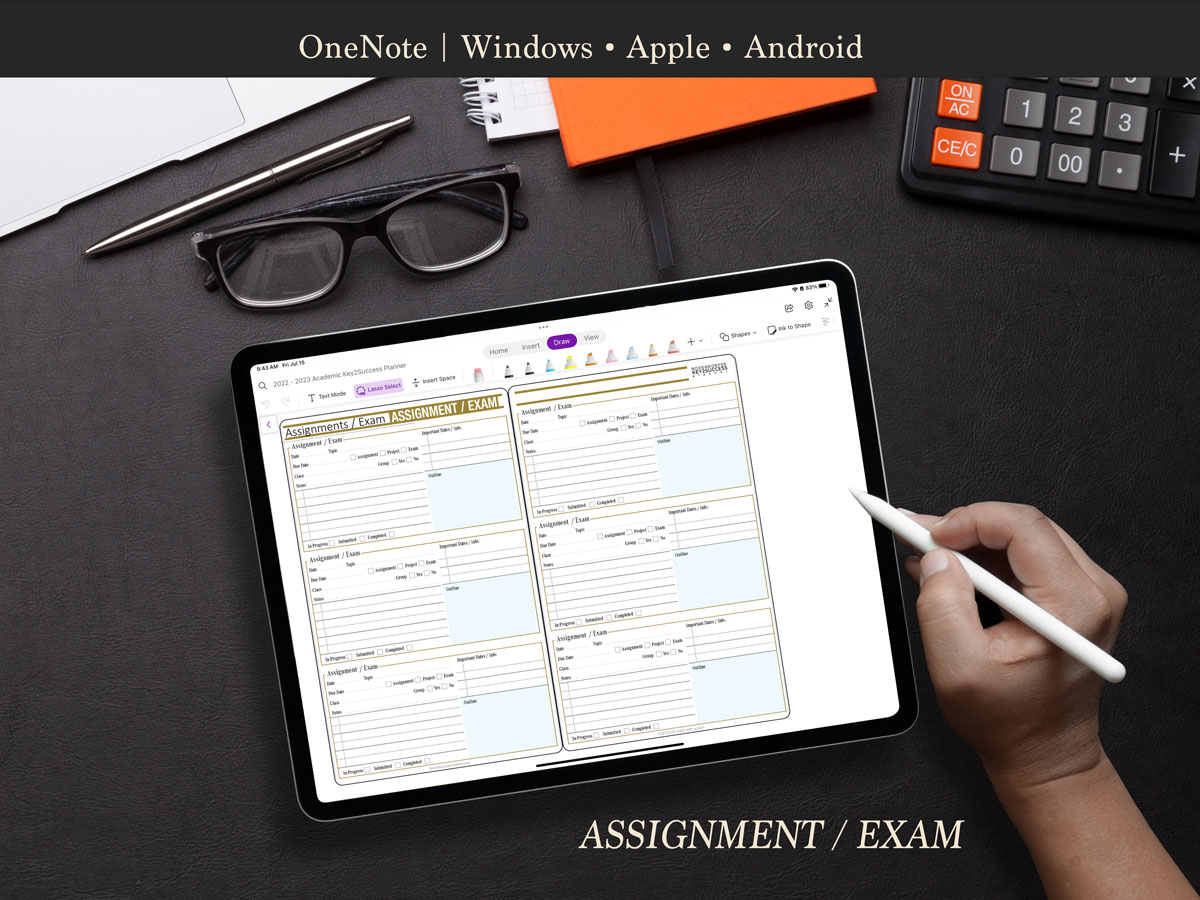
- Assignments/Exam planning pages
- Vision Board
- & much more!
|
2025 – 2026 Key2Success Academic OneNote Digital Planner |
Academic |
|
Vision Board |
X |
|
Weekly Pages / Daily Pages |
X |
|
Weekly Review |
X |
|
Goal Planning |
X |
|
Notes/Journal Pages |
X |
|
Ideal Week |
X |
|
Course Schedule |
X |
|
Class Assignments/Exams |
X |
|
Class Notes |
X |
|
Project Pages |
X |
|
Budget Planner |
X |
|
Habit Tracker |
X |
|
3 to 5 Year Educational Builder |
|
|
Installation Support |
Description
2025–2026 Digital Academic Planner for OneNote
Who Can Benefit from the 2025–2026 Academic Digital Planner for OneNote?
The Key2Success Academic Planner for OneNote is built for students who want a professional-level digital planning system. Whether you’re organizing your class notes, tracking assignments, managing your schedule, or preparing for exams, this planner is designed to help you do it all—smarter and more efficiently.
Key Pages in This Edition Include:
- Weekly Pages
- Monthly Pages
- Class Notes
- Class Schedule
- Project & Exam Planning Pages
Compatible Devices
This planner works on any device that can run OneNote. As one of the most versatile digital planning platforms, OneNote syncs across Windows, Apple, and Android devices. Please note: this is a digital download only, and it is specifically designed to work inside the OneNote application. It is not a physical notebook or printable PDF.
How Does the Application Work?
OneNote is available as a free download from Microsoft for Windows, Mac, Android, and iOS. A basic version is available at no cost, while a Microsoft 365 subscription unlocks additional features for advanced users.
How to Install the Planner
Ready to get started? Follow our step-by-step installation guide:
Install the Academic Planner into OneNote
If you run into any issues, our support team is here to help.
Watch the Video Overview
See how the OneNote Academic Planner works and explore the layout in this walkthrough video:
Support and Training
Want to get the most from your digital planning experience? We offer one-on-one training, which is available for purchase through our store. For team training or more information, email us at [email protected].
Can This Planner Sync With My Calendar?
We get this question a lot: “Can the planner sync with my calendar?” The short answer is no. But here’s why that’s a good thing: Digital planning with Key2Success is designed to make you more intentional and goal-driven—like using a paper planner, but with all the benefits of digital organization.
Read more about our philosophy:
Want to Try Digital Planning First?
Download our Sample Pack to get a feel for digital planning inside OneNote. While the academic version is not included in the sample, it gives you a strong idea of how the system works.
Other Key2Success Planner Editions
Beyond the academic edition, the Key2Success System offers powerful planners to support your entire lifestyle—personal, professional, and business goals.
The 2025 Key2Success Planner is available in four editions:
- Key2Success Personal
- Key2Success Personal Pro
- Key2Success Business
- Key2Success Business Executive
Related Products



Be the first to review “2025 – 2026 OneNote Academic Digital Planner”
You must be logged in to post a review.