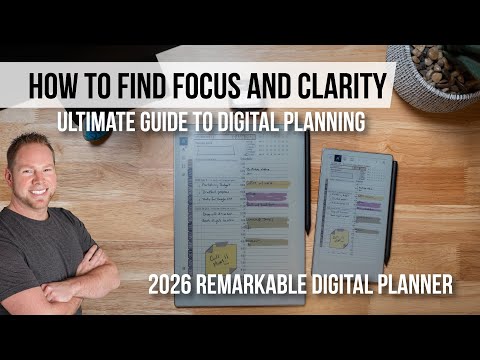
reMarkable Paper Pure: Using AI With Handwritten Notes
The reMarkable Paper Pure has no built-in AI, but you can screenshot any page and drop it into the Key2Success GPT. It reads your handwritten notes, recognizes the planner templates, and turns your daily plan, meeting notes, or project pages into summaries, email drafts, and action items in seconds.
Most reMarkable Paper Pure content focuses on what the device is missing. This video is about what it makes possible. In this walkthrough, Branden Bodendorfer shows how to connect the Paper Pure's distraction-free writing experience to AI tools using the Key2Success Planner and a custom-built GPT, so your handwritten notes actually do something after you write them.
This workflow has been running in Branden's daily business routine since the Paper Pure launched in June 2026. The core idea is simple: use the e-ink device for focused, distraction-free capture, then bring AI in to process and distribute what you wrote. The Key2Success GPT knows the planner templates, reads your screenshots, and can build meeting summaries, daily briefings for your team, prioritized task lists, and even walk you through building a 3-year business operating plan.
After watching, you will know exactly how to take a screenshot from your reMarkable, drop it into a GPT, and get something useful out the other side. No Connect subscription required for this workflow. No typing your notes into a second app. Just write on the Paper Pure the way you normally would, then use AI to turn those pages into output others can act on.
For the full breakdown of the reMarkable Paper Pure setup, features, and professional configuration, see the complete reMarkable Paper Pure guide.
If you want to see the full device setup and hardware review first, watch the $399 reMarkable Paper Pure setup video. For how this fits into a full e-ink productivity stack, check the 2026 e-ink productivity setup breakdown.
For more on the science behind handwriting and memory, Scientific American covers the research in depth.
Video Transcript
As someone that absolutely loves e-inking, handwriting, and taking notes, so many people are asking, Branden, how are you utilizing AI? And why would a tablet like the reMarkable, or taking notes on your iPad, even be relevant today when we can utilize AI?
Let me tell you, first and foremost, you are the engineer of your success. AI is an assistant to that. And what does that mean? Well, you have all the ideas, all the topical matter, and all the creativity to be the best version of yourself. These e-ink devices, being distraction-free, allow you to capture your thoughts and ideas and help you build out your plans when you have energy and focus. There's no bells, there's no whistles, there's no interruptions. It's just you, your thoughts.
And science has proven and teaches us that when we take handwritten notes, there is a connection between our hand and our notes, and our creative juices flow like no other. I can sit here in front of a computer and type out a handful of things, and if I go into AI, I can even see how my thoughts and ideas are expanded with all the tools. But there is hallucination. There are repeat patterns. There's not that personal mindset that you get from your own creativity.
But I use AI every day, and I use handwritten notes. So how do I succeed at both of them? Let me show you how I do so.
First and foremost, with the reMarkable and the Key2Success Planner, I'm able to write out my Key 3. I'm able to determine what things matter most to me. I'm able to write out my to-dos. I can even write out my schedule. Now, why would I do this over using just my Apple or Google Calendar? Those are scheduling systems, and they do really well at blocking off time, but they don't help you understand the space where your priorities are.
I have a meeting with Suzanne to go over a marketing budget, which is an important task for me. But does it give me the space where I can write out my notes, my thoughts, and my ideas, and collect them all inside my meeting pages, where I have all those notes right in front of me, like I do when I'm meeting with this particular client over here? I can't do that from a scheduling system. From a planner, I have the ability to easily navigate between my schedule and my daily pages. And this allows me to bring them both together.
But how do I bring AI into the fold? Well, if you are a 2027 Key2Success user, and if you're not already, the opportunity is still in front of you. We've built some pretty creative tools that let you take our planning system and utilize AI to help you through the process. We've built an entire GPT that has all of our training built right into it.
So if you're first starting to learn how to use a digital planning system, or you're trying to build better productivity and focus, this tool is for you, and it's free with our planning system.
What's absolutely cool about it is I can go ahead, inside the app, and take a screenshot of it. I can then jump over into my GPT, the Key2Success planning system, drop in that screenshot, and ask it, hey, help me build out my planning. It'll analyze the document. It sees the screen and knows all the templates, and it even gives you the links to where the information is so you can learn more about it. It'll read all the text. It'll help you define your purpose for the day. It'll help you build out where your Key 3 falls in your system and better optimize your notes. It'll help you with time blocking so you can see from the different color palettes where things are. It'll also help you organize your to-dos by level and what has higher priority. It'll even take your handwritten notes and build out pieces.
But where it gets really exciting is, after taking several meetings, building out different projects, having daily pages, and helping it learn what my ideal week is, I can start to use AI to coach me through the planning system, so that my energy, my focus, and my vision for the year become part of my planning.
What's even more amazing is I can start to use this as a tool to communicate to others. I can go back to that very same screenshot, that very same text thread inside ChatGPT, and say, hey, can you email my assistant an outline of my daily plan? It will take these handwritten notes and my schedule and provide an email that I can easily copy and paste and send to my assistant, showcasing my priorities, my schedule for the day, and the action items that need attention, in a manner where they're up to date on where my needs are.
But it doesn't end there. With this GPT we've built inside of AI, I can pull up a meeting page. Now, this meeting page, inside that note. I totally hate when someone comes into a meeting buried behind their computer, tapping at the keys as if they're taking notes. I'm distracted by it, and I don't know if they're fully invested in the topic at hand. But when someone is out here writing down the notes and we're engaged in the discussion, we're focused on what matters most in the agenda. There's a level of confidence between me, them, and the other people in the room that what we are discussing matters.
Another one of the GPT skills we've built inside our planning system is the ability to use this skill. Take that same screenshot, pull it into ChatGPT, and we're going to ask it a very simple question: can you help me create a summary of this meeting? Again, it knows the agenda, the attendees, what our sketchboard was, our tasks, our projects, and the notes we were taking are all embedded in the template itself. So it has that base knowledge. It understands the system. It'll analyze this for us. And then what's really cool is it'll build out that summary.
I can prompt it to create a PDF file. And when I create that PDF file, that's going to allow me to have a file. Now I can easily share it with my entire team. This helps them understand what the discussion was and what the topics were from my handwritten notes. And I can pair this with projects. I can pair it with my focus board and many other things.
But it doesn't end there. We've built a ChatGPT that helps you through all the different templates, even our Professional Builder. So if you're someone looking to create an operating system for your life or your business, something that helps you build out a one-to-three-year plan, helping you take that vision and put it into a space where you can track not only the progress you're making, but identify your challenges, your resources, your values, and how you measure success, and put it on a reasonable timeline so you know what your daily activities and action steps are. So you can build out a three-year plan that has goals for you. This will walk you through that process. It's a business operating system behind an AI tool that lets you search real-world economic demands and applies them to the plans you have today.
So when you bring a tablet that allows you to have focus and energy, it removes all the distractions of apps, bells and whistles, and notifications, and lets you take your thoughts and ideas and put them on paper, and use that paper to contribute to artificial intelligence that has a background system of not only what it means to be an entrepreneur, a manager, and a business professional, but someone who wants entrepreneurial success, sales growth, and marketing expansion, and who uses the tools together.
You've just met the Key2Success Planner built on an AI infrastructure. If that excites you, check out the link in the description and learn more about our tools. This is free to you as a 2027 and beyond user of the Key2Success Planner. Get started today and watch your journey unfold. I'm Branden Bodendorfer, creator and founder, and Lord willing, we'll see you in the next video.
Frequently asked questions
Can you use AI with the reMarkable Paper Pure?
Yes. The Paper Pure itself does not have built-in AI, but you can screenshot any page and drop it into a GPT. The Key2Success GPT is built specifically for this workflow. It recognizes the planner templates and turns your handwritten pages into summaries, action items, and email drafts without you retyping anything.
What is the Key2Success GPT?
It is a custom AI tool trained on the Key2Success Planner system and templates. It knows the page layouts and the planning methodology behind the system. You feed it a screenshot of your planner page, and it can analyze your notes, help you prioritize your Key 3, build meeting summaries, draft team communications, and coach you through your planning process. It comes free with every 2027 Key2Success Planner purchase.
Does this workflow require a reMarkable Connect subscription?
No. The screenshot-to-GPT workflow shown in this video works without a Connect subscription. You are pulling screenshots from within the reMarkable app and uploading them to a GPT session. Connect is needed for cloud sync and third-party integrations like Google Drive or Dropbox, but it is not required here.
Why write by hand when you could type directly into an AI tool?
Handwriting produces better original thinking. Research shows it engages deeper cognitive processing than typing, and the ideas that come out of a focused, distraction-free writing session are more personal and more strategic than what you get from prompting an AI cold. The e-ink workflow is about generating your best ideas first, then using AI to scale them.
Can the Key2Success GPT create a meeting summary from handwritten notes?
Yes. Screenshot your Key2Success meeting page after the meeting, drop it into the GPT, and ask for a summary. It reads your agenda, attendees, tasks, and handwritten notes from the template and builds a clean summary you can share with your team. You can also prompt it to format the output as a PDF or email draft.
What is the Professional Builder in Key2Success?
The Professional Builder is a planning template for building a 1-to-3-year business or career plan. It covers vision, goals, challenges, resources, values, and measurable milestones. Paired with the Key2Success GPT, it functions as a business operating system that can search real-world economic data and apply it to your specific plan and timeline.
Is the Key2Success Planner compatible with the reMarkable Paper Pure?
Yes. The Key2Success Planner runs on the Paper Pure as a hyperlinked PDF planner. The 2027 edition includes Tiles support on app editions and is built for the e-ink experience. The GPT integration works via screenshots from any reMarkable device, including the Paper Pure, Paper Pro, and reMarkable 2.
How is this different from using a planning app on an iPad?
The reMarkable is a single-purpose device. No notifications, no social apps, no distractions pulling you elsewhere mid-thought. The quality of thinking you get from a focused writing session on an e-ink device is different from what you get on a general-purpose tablet. The Key2Success system is built to use that focused capture time for your best thinking, then bring AI in afterward to process and distribute it.
Where do my handwritten notes go after I use the GPT?
Your notes stay on your reMarkable device and in your reMarkable cloud (if you use Connect). The GPT session uses the screenshot you uploaded during that conversation only. The Key2Success GPT does not permanently store your notes. You can export the GPT output as a PDF, copy it into an email, or save it to your project management tool.
How to set this up after watching
- Get the 2027 Key2Success Planner loaded on your reMarkable Paper Pure as a PDF.
- Open the planner to any daily page and write out your Key 3 and schedule for tomorrow.
- Take a screenshot of the page from within the reMarkable app.
- Open ChatGPT and switch to the Key2Success GPT (included with your 2027 planner purchase).
- Upload the screenshot and ask: "Help me build out my planning for today."
- After your next meeting, screenshot your meeting page and ask the GPT to create a summary.
- Use the summary output to send a team update or save a PDF record of the meeting.
See the full reMarkable Paper Pure setup
Before running the AI workflow, get the device configured the right way. This review covers the $399 Paper Pure setup nobody else is showing.
Watch the Paper Pure setup video