2026 Personal planner is FREE with any 2027 planner — or save 80% when you bundle your matching edition. Get Started
remarkable pen recommendation
Articles / News / vLog Jan 15
By Branden Bodendorfer 0 Comments

Pen Recommendations for ReMarkable

Need a new pen for your ReMarkable or simply in search of a backup just in case? ReMarkable Pen Alternatives are available. We asked Key2Success users to share their pen recommendations for ReMarkable and put together the list below of some of the best ReMarkable Pen alternatives.

ReMarkable devices use a “battery-less” stylus, meaning they don’t need to be charged. These styluses are used with different tips, known as “nibs.” The nibs wear down over time and can begin to cause issues or stop working completely. At this point, they will need to be replaced. (For example, users will report that the pen is writing without touching the screen. This means it’s time to switch the nib!)

Here are some of the more popular pen options for ReMarkable. The ReMarkable is a powerful tool for digital planning, and having a pen that you like makes it all the more powerful. Find a digital planner or diary for your ReMarkable here.
remarkable pen official
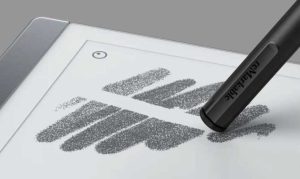
Official ReMarkable Pen / ReMarkable

Official ReMarkable Pen

This is the pen that comes with your ReMarkable. Find it on ReMarkable’s site.

Today is the best day to start planning with Key2Success digital planner, featuring a money-back guarantee, promotional savings, and a call to action for personal and professional planners.

PROS:

  • Designed for the ReMarkable, so it works great
  • Easy calibration
  • Comes with a (1) year warranty

CONS:

  • Pricier than some other options
  • Can take a while to arrive if you need a replacement
  • Some users report difficulty contacting customer service if there is an issue
 

remarkable pen alternative staedtler
Staedtler / Amazon

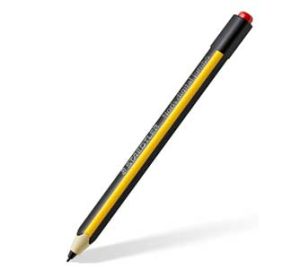
Staedtler Noris Digital Jumbo 180J 22

This pen is a popular alternative to the “official” ReMarkable pen, with many users reporting they like it better for its writing comfort and price. It is lighter and thinner than the ReMarkable pen.

Order it on Amazon.

PROS:

  • More affordable than the RM pen (on Amazon)
  • Has an eraser
  • Feels more like a felt pen than a pencil
  • Compatible with Samsung Galaxy Note 5 nibs

CONS:

  • Some users state that you lose the “writing on paper” feel because of the rubbery nibs
  • No magnet
  • Not as good for drawing (but good for writing)
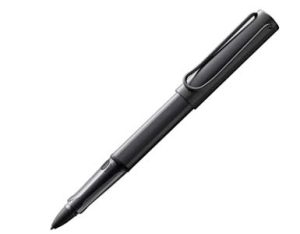
lamy Remarkable pen
LAMY / Amazon

LAMY Al-star blck EMR Digital Writing

If you like fountain pens, go with this one. Writing with the nibs feels like writing on glass, but use ReMarkable nibs for more of an authentic feel.

Order it here.

PROS

  • Ergonomic
  • Exchangeable nibs
  • Multiple pressure levels with great pressure sensitivity

CONS

  • Tips that come with it are described as “rubbery” but you can use ReMarkable tips instead
  • Angle and pressure can impact writing accuracy
  • Needs a hack to make the eraser work

Keep Your Pen Safe

Worried about losing your ReMarkable pen? Do a search for “self-adhesive digital pen holder” or “folio with pen holder” and find one that fits your needs.

These pens are NOT compatible with ReMarkable:

• GAMON NIBS
• Google Pixelbook pen
• HP Active Pen
• Mixoo Universal Stylus Pen, Disc & Fiber Tip 2-in-1
• Surface Pen
• Wacom Intuos CTH-690AK-S Art Pen
• Wacom LP190K replacement stylus for most Intuos tablets
Key2Success Planners

Choose the Application that you plan to use for digital planning.

OneNote

OneNote logo featuring a purple notebook icon, representing a digital planning tool for effective organization and note-taking.

Application works across Windows, Android and Apple. Also Web version all available. Great for Desktop, Laptop and Mobile users.

GoodNotes

GoodNotes app icon featuring a notepad with lines and a stylus, representing digital planning and note-taking tools for Apple devices.

Application works across Apple devices. Great for iPad, Mac and iPhone users. PDF Annotation App designed for Note-Taking

Noteshelf

Noteshelf app icon featuring a blue background with a white pen, representing digital planning and note-taking tools for Apple devices.

Application works across Apple devices. Great for iPad, Mac and iPhone users. PDF Annotation App designed for Note-Taking

Notability

Notability app icon featuring a pencil on a blue background, representing digital note-taking tools for Apple devices in the context of digital planning.

Application works across Apple devices. Great for iPad, Mac and iPhone users. PDF Annotation App designed for Note-Taking

Samsung Notes

Samsung Notes application icon, designed for digital planning on Samsung devices, highlighting note-taking features.

Application works across Samsung devices. Great for Samsung Tab and Samsung Galaxy Users. Including Z Fold 3, S6, S7, S8 and S22. 

reMarkable

reMarkable logo on a black background, representing ePaper devices for digital note-taking and PDF annotation.

Works with ePaper Devices, like the reMarkable, SuperNote and many more. A PDF Annotation Planner allows users to take digital notes.

Today is the best day to start planning with Key2Success digital planner, featuring a money-back guarantee, promotional savings, and a call to action for personal and professional planners.

Leave a Comment

FREE WORKSHEET | KEY2SUCCESS

Q4 Forward

Finish 2026 Strong. Set Up 2027.

The first week of Q4 wraps up October 7. Download the free worksheet and have your plan in place before then: one hour, three goals, three first moves.

Plan before October 7
00Days00Hrs00Min00Sec

Free. Instant PDF download. Print it or use it in your note app.

FREE Q4 WORKSHEET  Get your Q4 plan set before October 7.

00Days00Hrs00Min00Sec