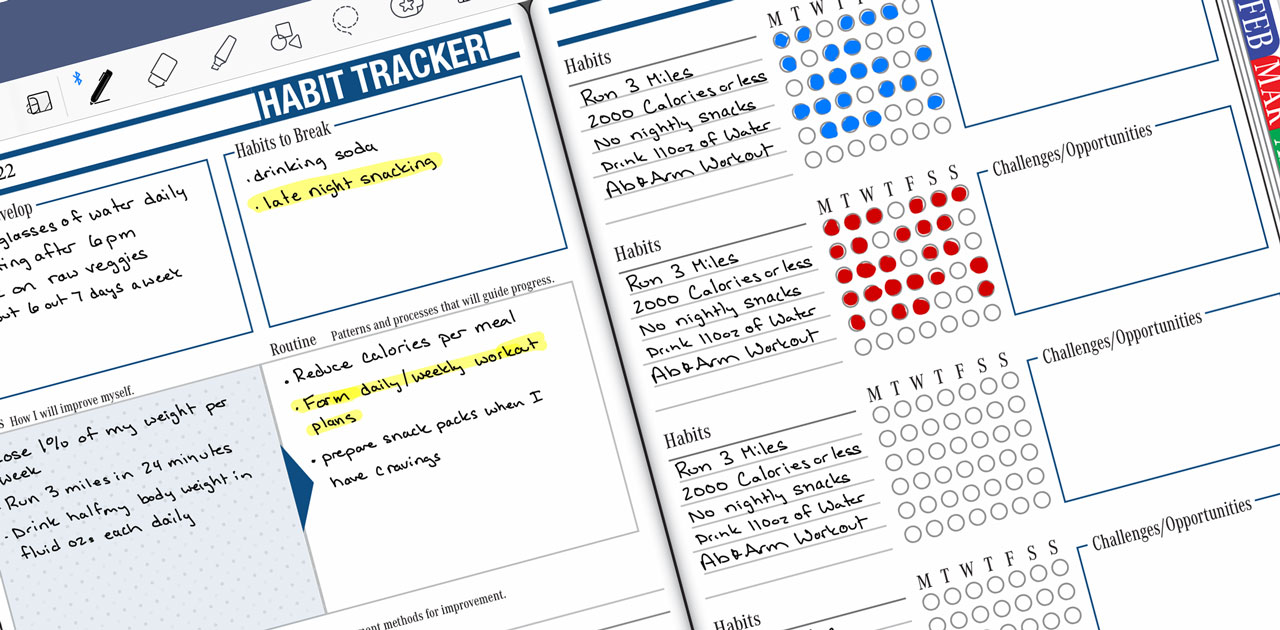
Habit tracker layout with sections for developing habits, breaking habits, routines, and tracking progress, featuring handwritten notes and checkboxes for daily goals.
Articles / News / vLog Jan 19
By Branden 0 Comments

If one of your goals is to stay in shape this year, a habit tracker is a useful tool to help achieve your fitness goals. The Key2Success Planner’s Habit Tracker is included with certain versions of the planner and includes proven methods to help you stay on track.

Whether you want to break a habit or establish one (such as getting and staying in shape), a habit tracker helps set goals, monitor progress, and evaluate areas for development. Included in the habit tracker is a section to outline goals, set a routine, take notes and reflect, and monitor progress, challenges, and opportunities.

For example, one of Branden’s goals last year was to run 1,000 miles. That meant an average run of 2.7 miles per day. To accomplish this without overtraining, Branden needed to establish some habits and goals for each milestone: day, week, quarter, year. Other related habits included diet and buying the necessary equipment. (Running outside in a Wisconsin winter is not for wimps!) It was important to continually monitor progress and stay motivated. If Branden didn’t run for a few days, he would need to run quite a bit to make up for lost time. By sectioning out his goals and using a habit tracker, he was able to achieve his goal. Then, the next year, he used the data he collected to set a new goal. This is the magic of planning!

Creating and maintaining habits – especially fitness habits – includes a dedicated effort and accountability. Digital planning as a whole can also help with this, but having a designated place to acknowledge and monitor habits is key to success! If you’d like extra help setting up your habits and goals, consider a 30-minute kickstart session with Branden!


Promotional banner for Key2Success planner offering discounts and a money-back guarantee, emphasizing digital planning benefits and a call to action for users on Samsung devices.

Key2Success Planners

Choose the Application that you plan to use for digital planning.

Customize Language Options in Key2Success Planner

OneNote logo featuring a purple notebook icon, representing a digital planning tool for effective organization and note-taking.

Application works across Windows, Android and Apple. Also Web version all available. Great for Desktop, Laptop and Mobile users.

GoodNotes

GoodNotes app icon featuring a notepad with lines and a stylus, representing digital planning and note-taking tools for Apple devices.

Application works across Apple devices. Great for iPad, Mac and iPhone users. PDF Annotation App designed for Note-Taking

Noteshelf

Noteshelf app icon featuring a blue background with a white pen, representing digital planning and note-taking tools for Apple devices.

Application works across Apple devices. Great for iPad, Mac and iPhone users. PDF Annotation App designed for Note-Taking

Notability

Notability app icon featuring a pencil on a blue background, representing digital note-taking tools for Apple devices in the context of digital planning.

Application works across Apple devices. Great for iPad, Mac and iPhone users. PDF Annotation App designed for Note-Taking

Samsung Notes

Samsung Notes application icon, designed for digital planning on Samsung devices, highlighting note-taking features.

Application works across Samsung devices. Great for Samsung Tab and Samsung Galaxy Users. Including Z Fold 3, S6, S7, S8 and S22. 

reMarkable

reMarkable logo on a black background, representing ePaper devices for digital note-taking and PDF annotation.

Works with ePaper Devices, like the reMarkable, SuperNote and many more. A PDF Annotation Planner allows users to take digital notes.

Promotional banner for Key2Success planner offering discounts and a money-back guarantee, emphasizing digital planning benefits and a call to action for users on Samsung devices.

Leave a Comment