5 Things to Know about the reMarkable Paper Pro Move
Comprehensive Overview of the reMarkable Paper Pro Move
The reMarkable Paper Pro Move is a 7.3-inch portable color E-Ink tablet designed specifically for distraction-free note-taking and reading on the go. By combining a slim, jacket-friendly form factor with a vibrant Canvas Color display and a paper-like writing feel, this device addresses the perennial challenge of bulky digital notebooks. In this guide, you’ll discover its key design and portability features, the advantages of its E-Ink Gallery 3 color display with front light, how it elevates handwriting and stylus interaction, its tailored Linux-based OS and cloud integration, plus pricing insights and ideal user profiles. These five pillars—design, display, writing performance, software ecosystem, and value proposition—frame everything you need to know before adopting the Paper Pro Move as your daily digital companion.
What Are the Key Design and Portability Features of the reMarkable Paper Pro Move?
The Paper Pro Move’s design centers on maximizing mobility without sacrificing usability. Its 7.3-inch screen sits within a 6.5 mm-thin frame and weighs just 230 g, making it one of the lightest color E-Ink tablets available. A polycarbonate back and reinforced edges ensure everyday durability, while the minimalist chassis supports one-handed operation. These design choices create a device that slips easily into a jacket pocket or small bag, yet still provides enough screen real estate for comfortable reading and sketching.
Below is a concise breakdown of its physical attributes:
- Screen Size: 7.3 inches
- Thickness: 6.5 mm
- Weight: 230 g
- Chassis Material: Polycarbonate frame with matte finish
These specifications underpin the tablet’s portability, setting the stage for an immersive color display experience in the next section.

How Does the 7.3-Inch Screen Size Enhance Portability?
The 7.3-inch display offers a sweet spot between legibility and compact dimensions. Measuring roughly 195.6 × 107.8 mm, it provides ample room for full-page notes, sketches, or document viewing while remaining small enough to fit into most jacket pockets. At 230 g, it weighs less than a paperback novel, making it comfortable for extended one-handed use. This optimized footprint reduces bag space and shoulder strain, so you can carry a full digital notebook without bulk.
What Makes the Paper Pro Move Jacketable but Not Pocketable?
Yes, the Paper Pro Move is jacketable yet not pocketable in tighter garments. Its 195.6 mm height and 107.8 mm width allow it to slide into most blazer or coat pockets, but its rigid form and 6.5 mm thickness exceed the flexibility of standard pant pockets. The device’s frame resists bending, ensuring screen integrity but limiting compatibility with snug fitting trousers.
How Does the Device’s Build Material Affect User Experience?
Injection-molded polycarbonate forms the majority of the tablet’s exterior, balancing lightweight construction with impact resistance. Unlike premium metal backs, this material absorbs shocks and resists scratches at a lower cost. Users trade off a warmer, slightly less premium touch for a device that can withstand daily transport. This durability focus complements the upcoming display innovations by maintaining a pristine viewing surface.
What Are the Main Display and Visual Features of the reMarkable Paper Pro Move?
The Paper Pro Move uses E-Ink Gallery 3 color technology to render up to 20,000 hues at a sharp 264 ppi resolution. This Canvas Color display replicates the subtleties of paper plus watercolors, improving diagram clarity and color-coded notes. An adjustable front light with multiple brightness levels ensures consistent contrast in dim or bright settings. Combined, these innovations transform static grayscale screens into lively, versatile “digital paper” that adapts to any environment.
E-Ink: Paper-like Displays for Next-Generation Devices
Electronic ink is a invention that combine all the desired features of a modern electronic display and sheer convenience and physical versatility of sheets of the paper. Therefore to create a dynamic high-resolution of E-display which is thin and flexible enough to become the next generation of papers. The E-Ink technology has been initialized and developed is well under way. Within next 5 years, it is envisioned electronic books that can display volume of the information as easy as flipping a page and permanent newspapers which update itself daily through wireless broadcast. They delivers the read-ability of paper under bio-virtually at any condition, without backlighting. Moreover E-ink displays are persistents without external power supply. It drawing current only when it take change, which means batteries are powerful and last longer.
E-INK (ELECTRONIC INK), 2017
How Does E-Ink Gallery 3 Technology Improve Color Display?
E-Ink Gallery 3 leverages advanced color filters and microcapsules to deliver richer, more accurate hues without backlight glare. By layering red, green, and blue pigments over monochrome pigment capsules, it achieves a gamut of 20,000 colors while preserving low power draw. This method maintains paper-like reflectivity and eye comfort, enabling high-contrast charts and color annotations that stay visible under natural or artificial light.
E-Ink Displays: Revolutionizing Digital Media with Paper-Like Technology
The emergence of digital technology has transformed the way we consume and interact with media, with one of the most significant innovations being the development of e-ink displays. These displays replicate the appearance of ink on paper, providing a low-power, high-contrast alternative to traditional backlit LCD screens. As a result of their advantages such as easy readability, low power consumption, and customization options, e-ink displays have gained widespread adoption in a range of devices such as e-readers, smartwatches, public signage, and transportation timetables. This paper aims to provide a comprehensive understanding of e-ink displays by examining their history, technology, current applications, advantages, and limitations. Additionally, the paper discusses the environmental and cost benefits of e-ink displays in contrast to traditional print media. The role e-ink displays can play in reducing paper waste and carbon emissions is emphasized. By exploring the unique features and benefits of e-ink displays, this paper provides a comprehensive overview of this important technology and its impact on the digital landscape.
E-Ink; Revolution of Displays, SA Rabbani, 2023
What Benefits Does the Adjustable Front Light Provide?
An integrated front light with adjustable warmth and intensity lets you fine-tune contrast from low-light reading to bright outdoor conditions. Even illumination across the screen avoids hotspots and maintains uniform color fidelity. The front light enhances night-time sketching and allows you to work in theaters, airplanes, or under desk lamps without external accessories.
How Does the Color Display Compare to Grayscale Predecessors?
Below is a comparison of the Paper Pro Move’s Canvas Color display versus the earlier grayscale models:
| Model | Color Capability | Resolution | Contrast Mode | Power Impact |
|---|---|---|---|---|
| reMarkable Paper Pro | Grayscale only | 226 ppi | Day/Night modes | Minimal |
| reMarkable 2 | Grayscale only | 226 ppi | Day/Night modes | Minimal |
| Paper Pro Move (this) | 20,000-color palette | 264 ppi | Warm/Cool front light | Comparable to grayscale devices |
The shift to full color at higher resolution unlocks new possibilities for visual note-taking and document review, bridging the gap between e-readers and tablets.
How Does the reMarkable Paper Pro Move Enhance the Writing and Note-Taking Experience?
The Paper Pro Move delivers an exceptionally responsive writing surface by combining ultra-low latency () with a textured screen that mimics paper grain. This synergy between hardware and the proprietary Canvas engine produces instant ink rendering and realistic stylus feedback. Whether journaling, sketching, or annotating PDFs, this device feels virtually indistinguishable from putting pen to paper.
What Is the Paper-Like Writing Feel and Low Latency Performance?
A finely etched glass layer provides tactile resistance against Marker tips, simulating the friction of real paper. Latency under ensures strokes appear exactly when you expect them, eliminating ghosting and lag. This combination supports fluid handwriting, fast sketch iteration, and precise control over line thickness—all while preserving battery life.
Below are three standout writing attributes:
- Surface Texture: Subtle grain replicates pen-to-paper friction.
- Rendering Speed: Strokes draw instantly with sub-20 ms latency.
- Pressure Sensitivity: Over 4,096 levels for nuanced line variation.
These capabilities lay the groundwork for advanced stylus integration and software features.
How Do Marker and Marker Plus Styluses Improve Interaction?
Both styluses magnetically attach to the tablet’s edge for seamless pairing and charging. The standard Marker offers precise ink flow for everyday notes, while Marker Plus adds an eraser tip and tilt support for shading and detailed sketchwork. Each stylus uses a battery-free electromagnetic resonance system, so there’s no charging downtime and pressure calibration remains consistent over time.
What Handwriting Conversion and Shape Recognition Features Are Included?
A built-in OCR engine converts handwritten notes into editable text in multiple languages, streamlining document preparation and sharing. Automatic shape detection transforms freehand circles, rectangles, and lines into perfect geometric figures. These tools accelerate workflows—turning raw sketches into polished diagrams without leaving the distraction-free environment.
How Does the Software and Cloud Integration Support Distraction-Free Productivity?
The Paper Pro Move runs on a custom Linux-based OS that strips away notifications, social apps, and multitasking distractions. Its single-focused interface grants quick access to notebooks, PDFs, and templates without home-screen clutter. This simplicity helps your mind stay on the task at hand, echoing the “Calm Tech” ethos certified on earlier models.
What Is Unique About the Custom Linux-Based Operating System?
By forgoing Android or iOS, reMarkable created a purpose-built environment optimized for handwriting and reading. The OS launches directly into the Canvas app, with no background processes competing for resources. This lean software footprint ensures consistent performance, instant wake-from-sleep, and extended battery life of up to two weeks under typical use.
What Are the Benefits of the reMarkable Connect Subscription?
A Connect subscription unlocks unlimited cloud storage, access to additional notebook templates, and an extended hardware warranty. Subscribers receive monthly feature updates, priority support, and integration with a growing library of productivity tools. This service keeps your notes securely backed up and continuously enhances the device’s capabilities.
How Does Cloud Synchronization Work with Google Drive, OneDrive, and Dropbox?
Seamless sync routes your notebooks and PDFs to connected cloud accounts as they’re created or updated. Files appear in dedicated folders on Google Drive, OneDrive, or Dropbox, preserving folder hierarchies and metadata. Two-way synchronization ensures that edits made on other devices—like desktop PDF editors—reflect back on your Paper Pro Move, sustaining an uninterrupted workflow.
What Is the Price, Value, and Ideal User Profile for the reMarkable Paper Pro Move?
With a base price of around USD 449 and bundle options up to USD 499 including Marker Plus and Type Folio, the Paper Pro Move sits between entry-level e-ink readers and full-size digital notepads. This positioning reflects its premium color display and portability focus. For professionals who travel light, creatives sketching on location, and students organizing notes, this tablet delivers a balanced value proposition.
Paper-Like Display Technologies: Reading Experience and Low Power Consumption
Paper-like displays are reflective and do not require a backlight. They have received much attention after electrophoretic-based electronic paper displays were commercialized in 2004. Paper-like displays combine excellent reading experience with ultra-low power consumption. In particular, their outdoor readability is superior to transmissive liquid crystal displays (LCDs) and organic light emitting devices (OLEDs). In this paper, we give an overview onvarious paper-like display technologies with emphasis of the status and future development of electrophoretic display and electro-fluidic display principles.
Review of paper-like display technologies (invited review), M Jin, 2014
How Does the Price Compare to reMarkable Paper Pro and reMarkable 2?
Below is a brief price comparison:
| Model | Base Price (USD) | Included Accessories | Key Differentiator |
|---|---|---|---|
| reMarkable 2 | 399 | Marker | Larger grayscale screen |
| reMarkable Paper Pro | 649 | Marker Plus, Folio cover | Front light, grayscale |
| Paper Pro Move (this) | 449 | Marker | Color E-Ink, ultra-portable |
The Move bridges cost and capability, offering color at a lower price than full-size color competitors.
Who Is the Paper Pro Move Best Suited For?
This device excels for on-the-road note-takers: consultants capturing meeting diagrams, artists refining color sketches, and graduate students annotating research PDFs in transit. Its light weight and jacketable profile appeal to commuters, field researchers, and minimalists who demand focus without distraction.
What Are the Pros and Cons to Consider Before Buying?
Key advantages include vibrant color display, paper-like writing, and unparalleled portability. Trade-offs involve a smaller screen area compared to 10.3-inch models and a plastic chassis that feels less premium. If your workflow emphasizes color-coded planning and you value mobility over maximum canvas size, the Move hits the sweet spot.
How Does the reMarkable Paper Pro Move Compare to Other reMarkable Models and Competitors?
While the Paper Pro retains a 10.3-inch grayscale display and the reMarkable 2 offers the original distraction-free experience, the Move shifts the focus to color and compactness. Against other E-Ink tablets—such as competing color-capable devices—the Move delivers a uniquely balanced feature set at an accessible price point. Its streamlined OS, cloud integrations, and writing performance distinguish it in a crowded market.
What Are the Key Differences Between Paper Pro Move and Paper Pro?
- Screen: 7.3 in. color vs. 10.3 in. grayscale
- Weight: 230 g vs. 525 g
- Build: Polycarbonate vs. magnesium-alloy back
- Price: USD 449 vs. USD 649
How Does Paper Pro Move Stand Against reMarkable 2 and Other E-Ink Tablets?
Compared to reMarkable 2, the Move adds a color palette and front light but reduces screen area by nearly 40%. Versus competitor color tablets, it often undercuts in price and maintains superior battery life. Its singular focus on writing and reading—without Android-style distractions—provides a calmer user experience than multi-app devices.
What Trade-Offs Should Users Expect with the Smaller Form Factor?
A smaller display means more frequent page turns and tighter margins for drawings. The narrower chassis can challenge broad-handed users, and the plastic frame offers less premium rigidity. However, the resulting gains in weight and pocketability make these compromises acceptable for mobile productivity scenarios.
How Can Users Maximize Productivity with the reMarkable Paper Pro Move?
Effective use of the Paper Pro Move involves deliberate notebook organization, strategic color-coding, and leveraging accessories that extend its functionality. By combining built-in templates with structured workflows, you can turn raw ideas into polished documents without digital clutter.
What Are Best Practices for Digital Planning and Note-Taking?
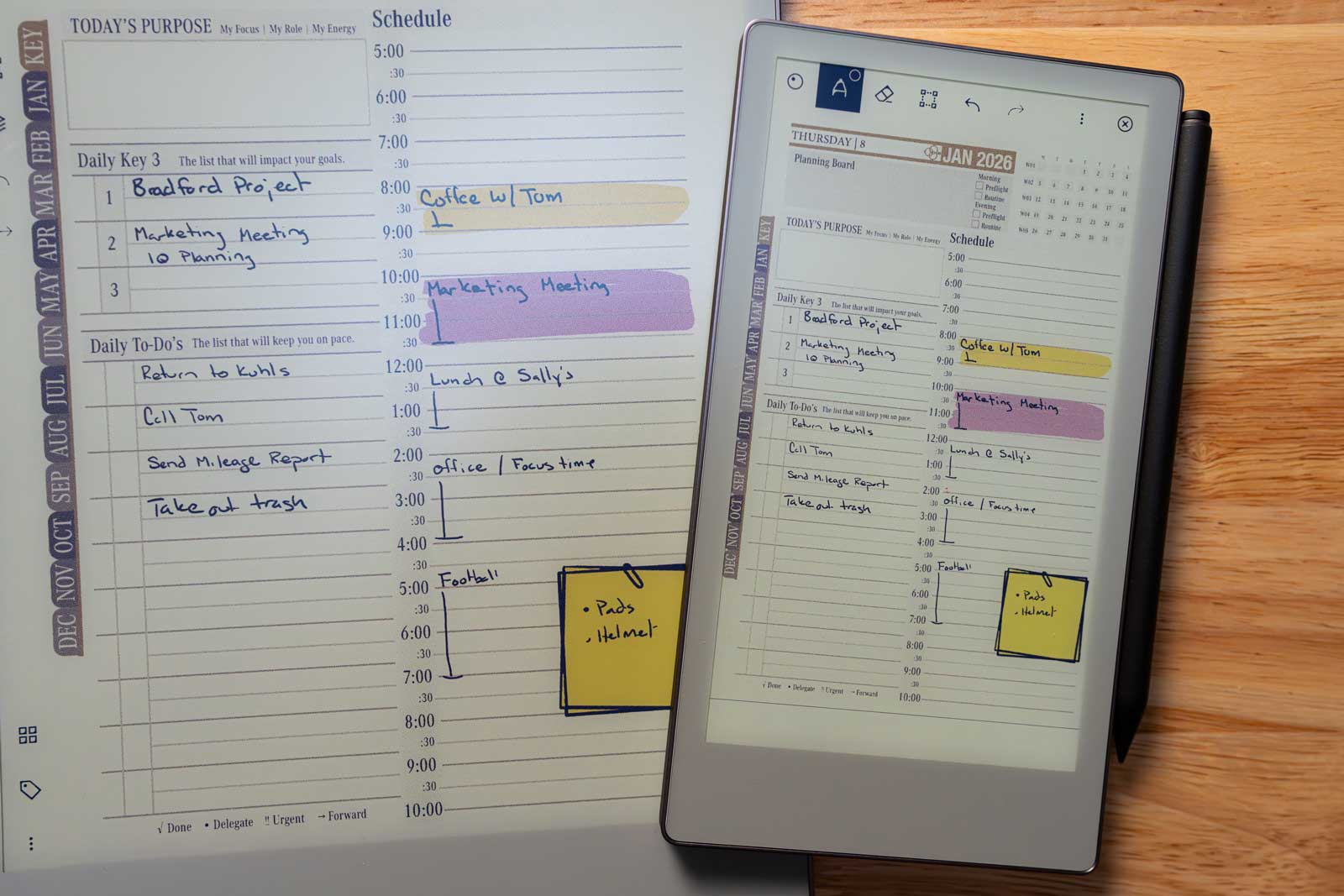
Adopt project-based notebooks with clear sectioning, use search tags for quick retrieval, and set daily review pages to reinforce memory. Incorporating headers, bullet lists, and color highlights in your notes accelerates scanning and comprehension. Regularly export completed notebooks to cloud folders to archive milestones.
Enhance Productivity with the Key2Success Planner for reMarkable Paper Pro Move
For users seeking a structured approach to goal setting and daily planning, the Key2Success Planner offers a comprehensive digital solution tailored for the reMarkable Paper Pro Move. This planner integrates seamlessly with the device’s paper-like writing experience, providing a framework for organizing your life, setting objectives, and tracking progress. It leverages the reMarkable’s distraction-free environment to help you focus on what matters most, transforming your tablet into a powerful productivity hub. Discover how it works and its benefits by watching this introductory video: Key2Success Planner Overview.
How to Leverage Color Display for Enhanced Organization?
Define a color scheme for categories—blue for tasks, red for urgent items, green for ideas—and apply it consistently across notebooks. Use the fine-tuning front light to adjust hue visibility in various environments. Color-coded diagrams and annotations improve recall and make complex information more digestible.
What Accessories Complement the Paper Pro Move for Better Use?
Beyond the standard Marker, upgrading to the Marker Plus adds tilt shading and eraser functionality. A slim Type Folio cover protects the device and offers a magnetic stand for ergonomic typing. Third-party screen protectors and portable USB-C chargers ensure reliability during extended travel.
Ready to Boost Your Productivity?
Explore the Key2Success Digital Planner, specifically designed for your reMarkable Paper Pro Move, and transform your planning experience.
What Future Innovations and AI Integrations Are Expected for the reMarkable Paper Pro Move?
Looking ahead, reMarkable CEO Phil Hess has hinted at off-device AI that could transform sketches into editable templates and provide context-aware suggestions. These developments align with broader industry trends toward “Calm Tech” and intelligent E-Ink devices that support rather than distract from deep work.
How Might Off-Device AI Enhance Productivity on the Paper Pro Move?
By processing handwriting on cloud servers, AI could convert rough sketches into polished diagrams, summarize lecture notes, or generate to-do lists automatically. This fusion of low-distraction hardware and advanced AI would accelerate idea refinement and reduce manual editing.
What Industry Trends Support the Growth of Color E-Ink Devices?
Rising demand for sustainable, low-eye-strain displays and the “Calm Tech” movement drive interest in color-capable E-Ink tablets. Recent advances in pigment layering and microcapsule engineering have made practical color E-Ink a commercial reality, broadening use cases beyond simple reading.
How Is reMarkable Positioning Itself for Future Digital Note-Taking?
ReMarkable’s roadmap emphasizes seamless AI-driven workflows, expanded cloud integrations, and continued focus on writing fidelity. By marrying a distraction-free OS with emerging intelligence features, the company aims to lead a new category of mindful, productive computing devices.
The reMarkable Paper Pro Move combines thoughtful industrial design, advanced color E-Ink display, and a purpose-built writing environment to empower focused work anywhere. Its lightweight portability, paper-like responsiveness, and growing software ecosystem make it an ideal tool for professionals, students, and creatives on the move. Whether you prioritize color-coded planning or crave distraction-free productivity, the Move offers a compelling balance of innovation and practicality.