GoodNotes vs OneNote 2026: Which Is Better for Digital Planners?
By Branden Bodendorfer, leading digital planner expert
Deciding between GoodNotes and OneNote for your 2026 digital planner? Here’s a head-to-head comparison of the two most popular apps for paperless planning, note-taking, and everyday productivity.
If you are trying to choose the best home for your planner this year, the right answer depends less on hype and more on how you actually plan. Some people want the familiar feel of writing on a hyperlinked planner PDF with stickers, tabs, and clean page layouts. Others want a more flexible system with notebooks, sections, pages, and deep Microsoft integration.
That is exactly why the Key2Success Planner is available in two purpose-built versions: a OneNote-specific edition and a PDF annotation app edition that works beautifully in GoodNotes. Key2Success has been around since 2017, and it is more than just a planner. It is a complete planning system built on real-world use, tested workflows, and years of refinement from a team that lives and breathes digital planning.

In this guide, we will compare GoodNotes vs OneNote for digital planners in the areas that matter most: handwriting feel, organization, planner compatibility, syncing, cross-platform use, pricing, and overall value. Then we will show exactly how the Key2Success Planner works in each app so you can pick the version that fits your planning style best.
Quick Overview: GoodNotes vs OneNote for Digital Planning
| Feature | GoodNotes App | OneNote App |
|---|---|---|
| Best for | Hyperlinked PDF planners, sticker planning, polished page-based layouts | Notebook-style planning, flexible note systems, Microsoft users |
| Pricing | Free tier available, paid plans for more features | Free to use, with some premium features tied to Microsoft 365 |
| Platforms | Apple devices, Windows, Android, Web | Windows, Mac, iPhone, iPad, Android, Web |
| Handwriting feel | Excellent for planner-style handwriting and annotation | Very good, especially for mixed handwriting and typed notes |
| Planner compatibility | Excellent for hyperlinked PDF planners | Best with native OneNote planners designed specifically for OneNote (like Key2Success!) |
| Navigation style | Tabs, hyperlinks, thumbnails, page-based experience | Notebooks, sections, pages, subpages, search-driven navigation |
| Sync | Good cross-device support, varies by plan and platform | Excellent through Microsoft account and OneDrive ecosystem |
| Ideal Key2Success version | PDF Planner / GoodNotes version | Native OneNote version |
Handwriting & Stylus Experience
When people compare a GoodNotes vs OneNote digital planner, handwriting is usually the first thing they care about. That makes sense. If writing in the app does not feel natural, you will not want to use your planner consistently.
GoodNotes has long been a favorite among digital planner users because it feels very close to writing on a real planner page. The overall experience is built around handwriting, annotation, page turning, and working inside imported documents like hyperlinked planner PDFs. For users who enjoy writing directly on structured planner layouts, it tends to feel intuitive from day one.
GoodNotes also supports reusable elements, which makes sticker planning and repeated planner decoration much easier. If your style includes icons, headers, labels, stamps, or decorative planning tools, that is a real advantage.
OneNote is also strong for handwriting, but it feels different. Instead of centering everything around fixed pages in a PDF, OneNote gives you a much freer workspace. You can write, type, drag note containers around, and mix content types on the same page very naturally. That makes it excellent for users who want a planner that blends structured planning with brainstorming, meeting notes, journaling, class notes, or project management.
If your main goal is a classic digital planner feel, GoodNotes usually has the edge. If you want a more flexible writing-and-thinking environment, OneNote becomes very compelling.
Organization & Navigation
This is where the difference between the apps becomes much clearer.
GoodNotes organizes content more like digital paper. You open notebooks, planners, and documents, then move through them with tabs, thumbnails, outlines, bookmarks, and hyperlinks. That is fantastic when you are using a planner built as an interactive PDF. You get a focused, page-based experience that feels close to flipping through a premium planner binder.
OneNote organizes content more like a living notebook system. You have notebooks, sections, pages, and subpages. For many users, this is the biggest reason OneNote wins. If you like creating dedicated areas for goals, projects, daily planning, reference materials, business tasks, and personal notes, the notebook structure is incredibly powerful.
For example, you might build your planning system like this:
- Notebook: Life Planner
- Sections: Goals, Calendar, Business, Health, Finances, Personal
- Pages: Daily plans, weekly reviews, project checklists, meeting notes
Or! Make life easier and buy a pre-built planning system from Key2Success. That kind of layered structure is where OneNote shines. It is especially useful if your planner is not just a place to track appointments, but the command center for your life and work.
So in the GoodNotes vs OneNote debate, the winner here depends on how you think. If you prefer polished pages and tab-based navigation, GoodNotes feels clean and focused. If you prefer building a complete productivity system with expandable structure, OneNote often wins.
PDF Import & Planner Features
If you are specifically shopping for a 2026 digital planner app, this section matters a lot.
GoodNotes is one of the best note-taking apps for planners because it handles imported planner PDFs extremely well. Hyperlinked tabs work. Internal navigation works. External links can work. You can annotate directly on the planner pages, add stickers, highlight, erase, duplicate pages, and build a very visual planning workflow.
This is why the Key2Success Planner PDF version is such a strong fit for GoodNotes users. It is designed for the classic digital planning experience many people want: elegant layouts, tap-based navigation, stylus writing, and visual customization.
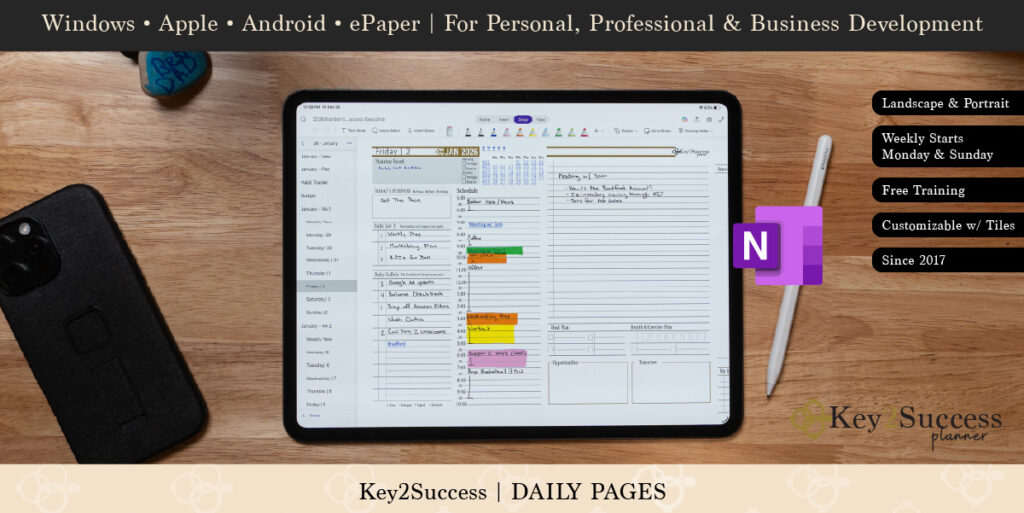
OneNote handles planners differently. Instead of relying on a hyperlinked PDF as the main planning engine, the best experience usually comes from using a planner built natively for OneNote. That is exactly where the Key2Success Planner OneNote version stands out.
Rather than forcing OneNote to behave like a PDF app, the native version takes advantage of what OneNote does best: flexible pages, expandable sections, easier restructuring, and deep integration with the Microsoft ecosystem. That means you are not just importing a planner. You are using a planning system designed around the app itself.
In plain English, here is the difference:
- In GoodNotes: Key2Success behaves like a premium interactive planner with hyperlinked PDF navigation, annotation, and sticker-friendly layouts.
- In OneNote: Key2Success behaves like a full planning workspace built inside a notebook system.
That is a major reason the Key2Success lineup works so well. You are not being forced into a one-size-fits-all format. You can choose the app experience that actually matches your planning habits.
How the Key2Success Planner Works in Each App
Key2Success has been helping digital planners since 2017, and that matters. A lot of planners look nice in screenshots, but they have not been tested long enough to become a real system. Key2Success is different. It has been refined through years of real user feedback, practical workflow improvements, and hands-on expertise from a team that understands how digital planning actually works day to day.
That means you are not just choosing between two apps. You are choosing how you want to experience a proven planning framework.
Key2Success in GoodNotes
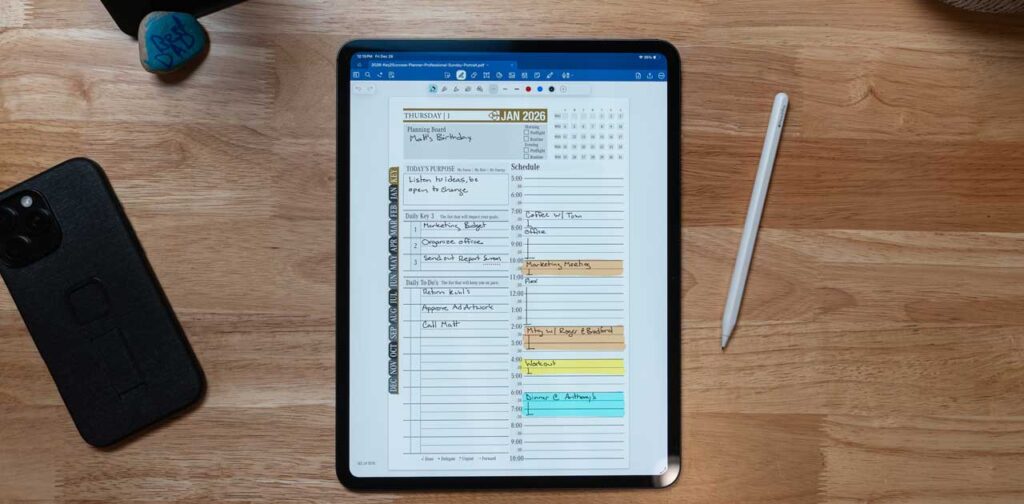
The GoodNotes or PDF annotation version is ideal for users who want a traditional digital planner experience. You can write directly on hyperlinked pages, jump between sections quickly, use stickers and saved elements, and enjoy a highly visual planning workflow.
- Hyperlinked PDF tabs for fast navigation
- Excellent stylus-based writing experience
- Sticker support and reusable planning elements
- Vertical scrolling option for easier reviewing
- Great fit for users who want a polished planner layout
Key2Success in OneNote
The OneNote version is ideal for users who want a flexible productivity hub, not just a digital paper planner. It works naturally with OneNote’s section and page structure, making it easier to combine planning with work notes, personal systems, and Microsoft-based workflows.
- Native OneNote setup designed for the app
- Infinite canvas for expanding ideas and notes
- Notebook, section, and page organization
- Easy blending of handwritten and typed content
- Strong fit for Microsoft-heavy workflows
If you love visual planning, decorative tools, and a classic digital planner feel, the GoodNotes version is likely your best fit. If you want your planner to become the center of a larger digital system, the OneNote version is hard to beat.
Sync & Cross-Platform Experience
Cross-device access matters more than ever in 2026. Your planner is not much help if it only works well on one device.
GoodNotes has expanded well beyond Apple. It now supports Apple devices, Windows, Android, and the web, which is a major improvement for users who want more flexibility than the early iPad-only era. That said, many planner users still feel the most polished GoodNotes experience is on Apple hardware, especially with Apple Pencil.
OneNote remains one of the strongest options for true cross-platform use. If you move between desktop, laptop, tablet, phone, and browser, OneNote makes that very easy. It also fits naturally into Microsoft 365 workflows, which is a big plus for business users, students, and anyone already living in Outlook, Teams, Word, Excel, and OneDrive.
So if your digital planning life is centered on iPad and stylus, GoodNotes feels excellent. If you need broader device flexibility and workplace integration, OneNote has a real advantage.
Pricing & Value
Pricing is not the only factor, but it does influence the overall value of a 2026 digital planner app.
GoodNotes offers a free entry point and paid plans depending on how much you need. For many people, the value is in the planner-specific experience. If you know you want to use hyperlinked PDFs, stylus annotation, and visual planning tools regularly, paying for that environment can make sense.
OneNote is appealing because it is easy to start with at little or no extra cost. Many users already have access through Microsoft accounts, and some premium features are unlocked through Microsoft 365. If you already pay for Microsoft 365, OneNote can feel like a very high-value option because it fits into tools you are already using.
From a pure budget angle, OneNote is often easier to justify. From a planner-first experience angle, GoodNotes is often easier to love.
Pros and Cons
GoodNotes Pros
- Excellent for hyperlinked PDF planners
- Great handwriting and annotation feel
- Strong visual planning workflow
- Sticker and reusable element support
- Ideal for planner users who want clean layouts
GoodNotes Cons
- Can feel more document-centered than system-centered
- Best experience still tends to be on Apple devices
- Not as naturally structured as OneNote for complex notebook organization
OneNote Pros
- Notebook, section, and page structure is powerful
- Infinite canvas is excellent for flexible planning
- Strong cross-platform availability
- Great for mixing handwriting, typing, files, and project notes
- Excellent for Microsoft users
OneNote Cons
- Less like a traditional planner PDF experience
- Can feel less visually polished for decorative planning
- Requires a native OneNote setup to perform at its best for planning
Who Should Choose Which?
Choose GoodNotes if you:
- Prefer a classic digital planner experience
- Love hyperlinked tabs, planner PDFs, stickers, and clean page layouts
- Mainly plan on an iPad or Apple device
- Want the Key2Success PDF version for GoodNotes or another PDF annotation app
Choose OneNote if you:
- Want your planner to be part of a larger productivity system
- Prefer notebooks, sections, pages, and subpages for organization
- Need better integration with Microsoft tools
- Want to mix planning with notes, work, school, and project management in one place
If you are still torn, here is the simplest way to think about it:
GoodNotes is better for planner lovers.
OneNote is better for system builders.
And because Key2Success offers both versions, you do not have to compromise. You can choose the app that matches how your brain works and still get the same trusted planning philosophy behind it.
Final Verdict: GoodNotes vs OneNote for Digital Planners
So, is GoodNotes better than OneNote for planners? For many users, yes, especially if you want the familiar experience of writing on a beautifully designed hyperlinked digital planner.
But OneNote is not trying to be the same thing. It is often the better choice for users who want a flexible, expandable system that goes beyond scheduling and into full life and business organization.
That is why the real winner in the GoodNotes vs OneNote digital planner comparison is the app that fits your planning style. The best tool is the one you will actually enjoy using every day.
And whichever route you choose, Key2Success gives you a proven system that has been trusted since 2017 and built with the expertise to help you do more than just write down appointments.
Try the Key2Success Planner in your preferred app:
Shop the GoodNotes / PDF Version
Shop the OneNote Version
Related Reading
Frequently Asked Questions
Is GoodNotes better than OneNote for planners?
GoodNotes is usually the better fit for users who want a traditional hyperlinked PDF planner experience with handwriting, stickers, and page-based layouts. OneNote is often better for people who want a more flexible notebook system.
Can I use Key2Success Planner in both GoodNotes and OneNote?
Yes. Key2Success offers a PDF planner version for GoodNotes and similar annotation apps, plus a OneNote-specific version designed to work natively inside OneNote.
Which is the best note-taking app for planners in 2026?
The best note-taking app for planners depends on your style. GoodNotes is excellent for planner-focused users. OneNote is excellent for users who want planning plus notes, projects, and full-system organization.
Does GoodNotes or OneNote sync better across devices?
OneNote generally has the edge for broader cross-platform consistency, especially for people already using Microsoft services. GoodNotes has improved cross-platform support significantly and remains a strong option, especially for Apple-centered users.
What is the difference between the Key2Success PDF version and OneNote version?
The PDF version is designed for annotation apps like GoodNotes and focuses on hyperlinked page navigation. The OneNote version is built specifically for OneNote’s notebook, section, and page structure.