iPad Planner for Professionals: Why Key2Success Digital Planner Is a Smart Choice
For busy professionals, an iPad planner for professionals can help stay organized. Work is no longer just about keeping a calendar. Modern work requires managing meetings, deadlines, projects, goals, notes, and personal priorities all at once. That is why many professionals are searching for the best iPad planner for professionals that can keep up with a fast-paced lifestyle.
A digital planner offers flexibility, convenience, and a more efficient way to stay on top of daily responsibilities. With Key2Success Digital Planner, professionals can plan smarter, stay focused, and keep everything in one place without carrying around multiple notebooks, sticky notes, and paper planners. Whether you use GoodNotes or Notability, this digital planner for Apple Pencil is designed to work seamlessly with your favorite iPad apps.
Why Professionals Are Switching to an iPad Planner
Traditional paper planners still have their place, but many professionals are making the move to digital tools for a reason. The best digital planner for iPad gives users the ability to organize work and life in a more dynamic and portable format.
Here are a few reasons professionals prefer digital planning on an iPad:

1. Everything Is in One Place
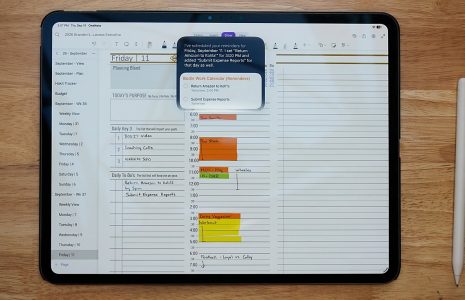
A digital planner allows you to manage appointments, to-do lists, business goals, personal reminders, and notes from a single device. Instead of flipping through pages or juggling multiple apps, you can access your plans quickly and easily.
2. Easy Navigation
With hyperlinked tabs and intuitive layouts, a well-designed digital planner makes it simple to jump between daily, weekly, and monthly views. This saves time and helps professionals stay efficient during a busy workday.
3. Portable and Convenient
Your iPad goes where you go. Whether you are in the office, working from home, traveling for business, or attending meetings, your planner stays with you.
4. Cleaner and More Flexible Planning
Digital planning makes it easy to duplicate pages, erase mistakes, move between sections, and keep your plans looking neat. For professionals who need structure but also flexibility, this is a major advantage over any paper planner.
What Makes a Great iPad Planner for Professionals?
Not every digital planner is designed with professional needs in mind. A high-quality digital planner for business owners and working professionals should support productivity, clarity, and long-term organization.
Professionals often look for features such as:
- Monthly, weekly, and daily planning pages
- Goal-setting and habit tracking sections
- Project planning templates
- Notes pages for meetings and ideas
- Task tracking tools
- Hyperlinked tabs for faster navigation
- A clean, polished design
- Undated pages for flexible use any time of year
Key2Success Digital Planner is built to support all of these needs, helping professionals create a planning system that feels organized and practical — and it works beautifully as a GoodNotes planner for professionals.
How Key2Success Digital Planner Supports Professional Productivity
Key2Success Digital Planner is designed for people who want more than just a calendar. It helps professionals structure their time, manage priorities, and maintain focus on both short-term tasks and long-term goals.
Goal Planning That Keeps You Focused
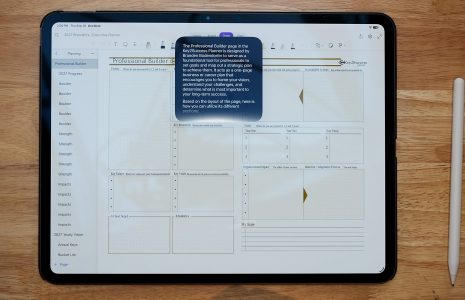
Professionals need more than a list of appointments. They need a system that helps them move toward meaningful results. Key2Success Digital Planner supports goal setting so users can break down larger objectives into manageable steps and stay accountable.
Better Time Management
Effective time management is essential in any professional role. Using an undated digital planner for iPad makes it easier to map out daily priorities, schedule important tasks, and reduce the feeling of being overwhelmed — and you can start any time of year.
A Professional Layout for Serious Planning
Many digital planners are visually appealing but not practical for work. Key2Success Digital Planner balances style with function, giving professionals a clean and purposeful layout that supports real productivity.
Helps Reduce Mental Clutter
When your schedule, notes, goals, and reminders are scattered across different tools, it becomes harder to focus. A structured iPad planner for professionals helps centralize important information so your mind is free to focus on execution.
Who Can Benefit from an iPad Planner for Professionals?
A digital planner is useful for many types of professionals, including:
- Entrepreneurs and business owners
- Executives and managers
- Consultants and freelancers
- Creatives and remote workers
- Corporate professionals
Whether you are leading a team, running a business, managing clients, or balancing work and personal life, Key2Success Digital Planner can help you stay organized and intentional.
Benefits of Using Key2Success Digital Planner on iPad
Choosing the right planner can make a big difference in your daily routine. Here are some of the practical benefits of using Key2Success Digital Planner as your go-to iPad planner for professionals:
Improved Productivity
When your priorities are clear, it becomes easier to take action. A digital planner encourages better planning habits and helps professionals stay proactive.
More Organization
With dedicated sections for planning, notes, and goals, you can create a system that keeps your work organized and easy to access.
Better Work-Life Balance
Professionals often juggle career responsibilities with personal commitments. A digital planner helps you see the full picture so you can plan more realistically and avoid burnout.
Reusable and Flexible
Unlike paper planners tied to a specific year, the Key2Success undated digital planner can be started at any time. This gives professionals more flexibility and long-term value.
Tips for Getting the Most Out of an iPad Planner
To make the most of your digital planning routine, consider these simple strategies:
Set Aside Time to Plan Each Week
A weekly planning session can help you review upcoming priorities, prepare for meetings, and make adjustments before the week gets too busy.
Use Daily Pages for Top Priorities
Instead of writing down everything at once, focus on your most important tasks for the day. This improves clarity and helps you make progress on what matters most.
Track Projects and Goals in One Place
Professionals often manage multiple moving parts. Keeping project plans and goals inside your planner helps you stay aligned and avoid missing key steps.
Keep Notes Organized
Meeting notes, ideas, and action items can quickly become disorganized. Using dedicated note pages within your planner makes information easier to find later.
Why Key2Success Digital Planner Stands Out
The best iPad planner for professionals should feel like a reliable productivity partner. Key2Success Digital Planner stands out because it is built to support structure, clarity, and consistent progress.
It is ideal for professionals who want:
- A digital planning system that is easy to use
- A clean and focused design compatible with GoodNotes and Notability
- Tools for scheduling, goal setting, and organization
- A planner that supports both business and personal productivity
For professionals who value efficiency and intentional planning, Key2Success Digital Planner offers a practical solution that fits into everyday work life.
Frequently Asked Questions
Is Key2Success Digital Planner compatible with GoodNotes?
Yes. Key2Success Digital Planner is designed to work with popular iPad annotation apps including GoodNotes and Notability, making it easy to write, highlight, and navigate using your Apple Pencil.
Is the Key2Success planner undated?
Yes, the Key2Success Digital Planner is undated, which means you can start using it at any point in the year without wasting pages. This makes it a flexible long-term planning solution.
Is Key2Success Digital Planner worth it for professionals?
Absolutely. If you are looking for a structured, goal-oriented planning system that works on your iPad, Key2Success is one of the most comprehensive and well-designed options available. It covers daily planning, weekly reviews, goal tracking, project management, and more.
Can I use the Key2Success planner on iPhone or Mac?
While the planner is optimized for iPad use with Apple Pencil, you can open it on iPhone or Mac through GoodNotes or Notability, though the best experience is on a full iPad screen.
What makes Key2Success different from other digital planners?
Key2Success is built with a professional mindset. It goes beyond a basic calendar to include goal-setting frameworks, project templates, and habit tracking — giving you a complete productivity system rather than just a pretty layout.
Final Thoughts
If you are searching for an iPad planner for professionals, choosing the right digital planner can help transform the way you manage your time, goals, and responsibilities. A good planner is not just about writing things down. It is about creating a system that supports success.
Key2Success Digital Planner gives professionals a smarter way to stay organized, focused, and productive. Whether you are managing projects, building a business, or simply trying to create more structure in your day, this digital planner for Apple Pencil can help you work with more clarity and intention.
If you want a professional planning tool that helps you stay on track and move forward with purpose, Key2Success Digital Planner is a strong choice.
Explore Key2Success Digital Planner today and upgrade the way you plan, organize, and achieve your goals.