Best Digital Planner for Professionals 2026: Why Key2Success Beats Generic Options for Goal Achievement and Productivity
In 2026, professionals are drowning in tools: scattered apps, pretty but ineffective templates, and planners that look good but fail to deliver results. If you’re tired of starting the year motivated only to lose momentum by February, you need more than another aesthetic PDF.
You need a structured digital planning system built for high achievers.
That’s exactly what the Key2Success Digital Planner delivers. Designed specifically for professionals, executives, and goal-oriented individuals, it works seamlessly in OneNote, GoodNotes, reMarkable, and other platforms — turning your device into a complete productivity command center.
Why Most Digital Planners Fall Short in 2026
The digital planner market is flooded with options:

- Beautiful hyperlinked PDFs for GoodNotes and Notability.
- Aesthetic templates focused on stickers and habit trackers.
- All-in-one apps like Notion that require constant setup.
These work fine for casual users or students, but professionals need something different. You need a system that:
- Aligns daily actions with long-term goals.
- Supports complex schedules (meetings, projects, teams).
- Adapts across devices without breaking your workflow.
- Delivers measurable results — not just pretty pages.
Generic planners often lack a proven methodology. They give you pages but no framework for prioritization, weekly reviews, or accountability. That’s where Key2Success stands apart.
What Makes Key2Success the Best Digital Planner for Professionals in 2026
Key2Success isn’t just another template pack — it’s a complete planning system inspired by proven productivity principles.
Key features that set it apart:
- Multi-Edition Options — Personal, Professional, Business, Executive, or Complete Edition.
- Core Daily System (Key 3 Method) — Focus on your top 3 priorities every day.
- 12-Week Goal Cycles & Quarterly Planning — Break big visions into actionable sprints.
- Hyperlinked Navigation — Jump instantly between yearly, monthly, weekly, and daily pages.
- Cross-Platform Compatibility — Optimized for OneNote, GoodNotes, reMarkable, and more.
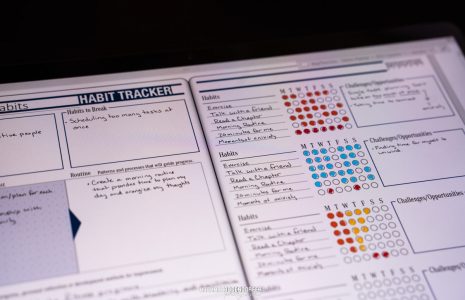
- Advanced Professional Tools — Meeting notes, project trackers, habit reflection, and customizable sections.
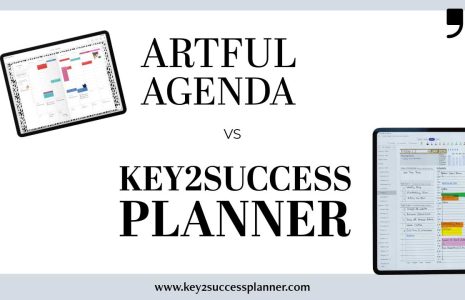
Key2Success vs. Generic Digital Planners: Head-to-Head Comparison
| Feature | Generic GoodNotes/Pretty PDFs | Notion-style Templates | Key2Success Digital Planner |
|---|---|---|---|
| Structured Goal System | Basic habit trackers | Requires heavy setup | Built-in Key 3 + 12-week cycles |
| Professional Tools | Limited (stickers, colors) | Custom but time-consuming | Meetings, Projects, Executive dashboards |
| Cross-Device Experience | Best on iPad only | Cloud but inconsistent | Excellent on OneNote + GoodNotes + reMarkable |
| Ease of Weekly Review | Manual copying | Possible but manual | Dedicated review templates |
| Long-Term Results Focus | Aesthetics first | Flexible but overwhelming | Accountability & reflection built-in |
How Key2Success Helps You Achieve More in 2026
Real professionals using Key2Success report clearer focus, better work-life balance, faster goal progress, and reduced decision fatigue.
Whether you’re an executive managing a team, a business owner, or a professional aiming for the next level, the system adapts to you.
Step-by-Step: How to Get Started with Key2Success in 2026
- Choose Your Edition — Start with Professional or Executive for complex responsibilities.
- Import into Your App — Easy setup for OneNote, GoodNotes, or reMarkable.
- Set Your Vision & Goals — Use the built-in pages to define success this year.
- Build Your Weekly Rhythm — Plan your Key 3 each week.
- Review & Adjust — Dedicated reflection pages help you improve.
We provide free training videos and chat support to make sure you succeed from day one.
Shop Key2Success 2026 Digital Planners →
Frequently Asked Questions
Is Key2Success worth it compared to free templates?
Yes — especially for professionals serious about results. The structured system saves hours every week.
Does it work with OneNote on multiple devices?
Absolutely. OneNote’s cloud sync + Key2Success hyperlinks create a seamless experience.
Can I use it on reMarkable or GoodNotes?
Yes. Optimized versions are available for each platform.
What if I need help setting it up?
We offer chat support and free training resources.
Final Thoughts: Make 2026 Your Most Productive Year Yet
The best digital planner for professionals in 2026 isn’t the prettiest one — it’s the one that actually helps you achieve meaningful goals.
Stop settling for generic templates. Take control of your productivity with Key2Success.