Boost Productivity with AI on reMarkable & Key2Success Planner
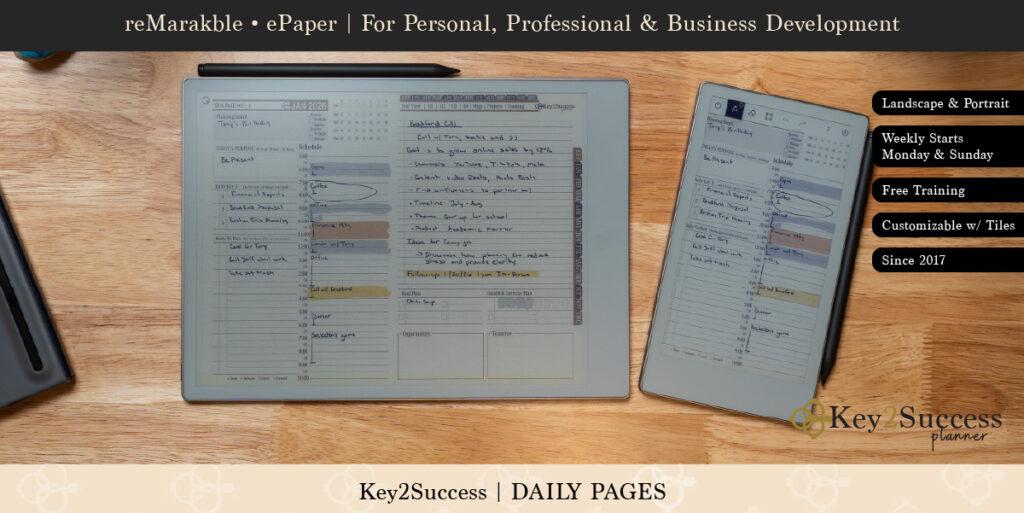
How to Use AI with reMarkable Device Featuring the Key2Success Digital Planner for Enhanced Productivity
In an era where productivity tools are evolving rapidly, integrating artificial intelligence (AI) with digital planning can significantly enhance personal and professional efficiency.
This article explores how to effectively use AI with the reMarkable device, particularly through the Key2Success Digital Planner, to streamline your planning processes. Readers will learn about the unique features of the reMarkable device that make it ideal for AI-powered note-taking and how the Key2Success Digital Planner can boost planning efficiency.
Many individuals struggle with managing their time and tasks effectively, leading to stress and decreased productivity. By leveraging AI technologies, users can transform their planning experience into a more organized and efficient process. This guide will cover the ideal features of the reMarkable device, the integration of AI in the Key2Success Digital Planner, practical workflows combining these tools, and tips for getting started.
AI and reMarkable: What it actually means
reMarkable’s app and device don’t have built-in generative AI like ChatGPT inside the core app itself. The note-taking and companion apps focus mainly on syncing, organizing, and converting your handwriting to typed text, not on offering things like conversational AI or content generation built into the app.

Here’s what is available:
• The mobile and desktop apps let you access your notes, sync them across devices, and convert handwriting to typed text. That conversion uses machine learning but is not an interactive AI assistant in the app.
• With a Connect subscription you can take notes or sketches from your device and send them to tools like Slack. That integration uses AI to convert your handwriting before sharing it.
• Some people pair their reMarkable with external AI tools (like ChatGPT or other services) to analyze or summarize exported notes, but that’s outside the native reMarkable app and requires separate software or workflows.
In short, the official reMarkable app doesn’t come with a built-in AI assistant for things like generating text or brainstorming, though there are AI-powered integrations and ways to connect to external AI services if you choose.
What Makes reMarkable Ideal for AI-Powered Note-Taking and Digital Planning?
The reMarkable device stands out as a premier tool for AI-powered note-taking and digital planning due to its unique features that enhance user experience. Its E-Ink technology provides a distraction-free environment, allowing users to focus on their tasks without the interruptions common with traditional screens.
This technology mimics the feel of paper, making it easier for users to engage in writing and drawing, which is essential for effective note-taking. Additionally, the device’s compatibility with various applications enhances its functionality, making it a versatile choice for digital planners.
How Does reMarkable’s E-Ink Technology Enhance Distraction-Free Productivity?
reMarkable’s E-Ink technology significantly enhances productivity by providing a reading and writing experience that closely resembles paper. Unlike traditional screens that emit blue light, E-Ink displays are easier on the eyes, reducing fatigue during long writing sessions.
Users report improved focus and retention when using the device for note-taking, as the lack of distractions from notifications and apps allows for deeper engagement with the material. Studies have shown that environments free from digital distractions lead to better concentration and productivity, making the reMarkable an ideal choice for those looking to enhance their workflow.
What Are the Benefits of AI Integration for Handwriting Recognition on reMarkable?
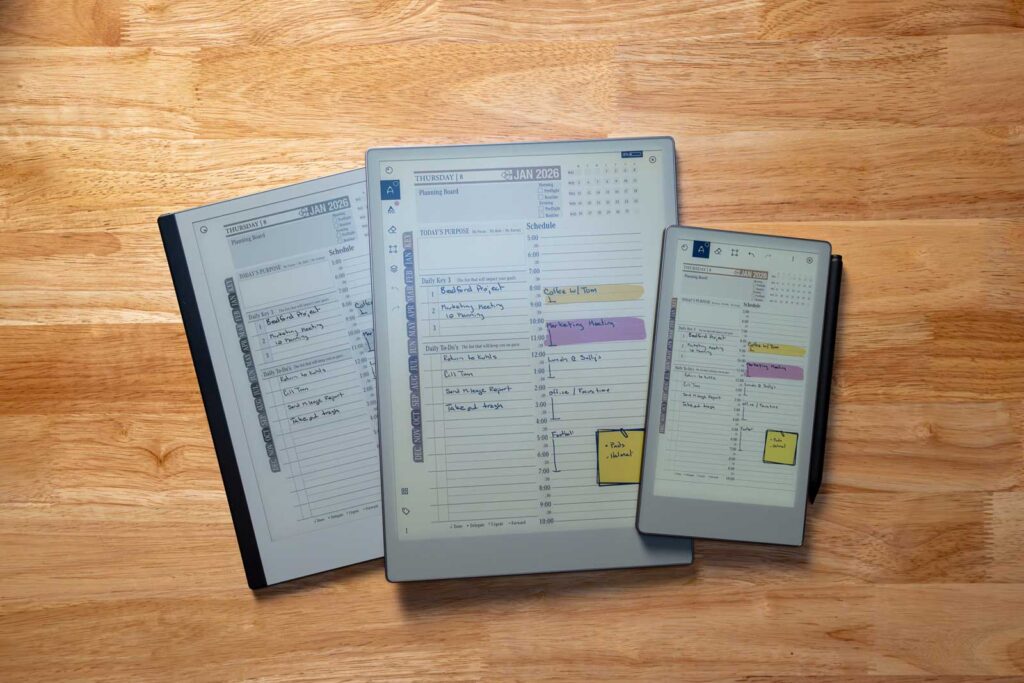
AI integration on the reMarkable device enhances handwriting recognition, allowing users to convert their handwritten notes into digital text seamlessly. This feature not only saves time but also improves the accessibility of notes, making it easier to search and organize information.
The accuracy of AI-driven handwriting recognition has improved significantly, with many users reporting high satisfaction rates. Real-world applications include transforming lecture notes into editable documents, which can be invaluable for students and professionals alike. This capability exemplifies how AI can streamline workflows and enhance productivity.
How Does the Key2Success Digital Planner Integrate AI to Boost Planning Efficiency?
The Key2Success Digital Planner is designed to leverage AI technologies to enhance planning efficiency. This planner offers various features that cater to the needs of entrepreneurs, small business owners, and professionals seeking to optimize their productivity. By integrating AI, the planner can provide personalized recommendations, automate routine tasks, and facilitate goal setting, making it a powerful tool for effective time management.
What Features Does the Upcoming 2027 Key2Success Planner AI Assistant Offer?
The upcoming Key2Success Planner AI Assistant promises to revolutionize the planning experience. This AI-powered assistant is expected to offer personalized planning capabilities, helping users set and track their goals more effectively.
It aims to integrate seamlessly with existing tools, allowing for a cohesive planning experience across different platforms. Users can expect features such as automated reminders, task prioritization, and insights based on their planning habits, all designed to enhance productivity and efficiency.
How Do Different Key2Success Planner Editions Leverage AI for Goal Setting?
The Key2Success Digital Planner comes in various editions—Personal, Professional, Business, and Executive—each tailored to different user needs. Each edition leverages AI to assist with goal setting by providing customized templates and suggestions based on user input.
For instance, the Business edition may focus on project management and team collaboration, while the Personal edition emphasizes individual goal tracking and personal development. User testimonials highlight the effectiveness of these tailored features in helping individuals achieve their objectives more efficiently.
What Are Practical AI Workflows Combining reMarkable, Key2Success Planner, and ChatGPT?
Integrating the reMarkable device with the Key2Success Digital Planner and AI tools like ChatGPT can create powerful workflows that enhance productivity. By utilizing these tools together, users can streamline their planning processes and improve their overall efficiency.
How Can Users Convert Handwritten Notes to AI-Generated Summaries and Action Items?
One practical workflow involves converting handwritten notes taken on the reMarkable into AI-generated summaries and action items. Users can write their notes during meetings or lectures, then use the device’s handwriting recognition feature to digitize the content. Once digitized, these notes can be imported into the Key2Success Digital Planner, where AI can analyze the content and generate actionable items. This process not only saves time but also ensures that important information is captured and organized effectively.
What Are Step-by-Step Guides for Using ChatGPT with Key2Success on reMarkable?
To maximize the benefits of using ChatGPT with the Key2Success Digital Planner on the reMarkable, users can follow a simple step-by-step guide:
- Capture Notes: Use the reMarkable to take handwritten notes during meetings or brainstorming sessions.
- Digitize Notes: Convert handwritten notes to text using the device’s handwriting recognition feature.
- Import to Planner: Transfer the digitized notes into the Key2Success Digital Planner.
- Engage with ChatGPT: Use ChatGPT to generate ideas, summaries, or further insights based on the notes.
- Organize Action Items: Utilize the planner’s features to organize and prioritize action items generated from the ChatGPT interaction.
Which AI Productivity Hacks Optimize Digital Planning on reMarkable with Key2Success?
AI productivity hacks can significantly optimize digital planning when using the reMarkable device alongside the Key2Success Digital Planner. These hacks focus on leveraging AI capabilities to streamline tasks and improve overall efficiency.
Further emphasizing the capabilities of AI in optimizing time, research highlights the dynamic allocation power of AI-powered scheduling systems.
AI-Powered Smart Scheduling for Work & Time Management
their ability to integrate AI, machine learning, and optimization algorithms to address work management and time allocation issues AI-powered scheduling systems dynamically allocate
22
Smart Scheduling Application, SU Abidemi, 2025
What Are Effective AI Techniques for Habit Tracking and Time Management?
Effective AI techniques for habit tracking and time management include progress tracking and data analysis. The Key2Success Digital Planner can utilize AI to monitor user habits and provide feedback on their progress. For example, users can set specific goals for daily habits.
Additionally, AI can analyze patterns in user behavior, offering insights that can lead to improved time management strategies. Note that this is done outside of the reMarkable and Key2Success ecosystems, but can be done in tandem with them.
How Does Key2Success Planner’s AI Integration Compare to Competitor AI Features?
The Key2Success Digital Planner’s AI pairing offers unique advantages over competitor products, making it a standout choice for users seeking enhanced productivity.
What Unique AI Advantages Does Key2Success Offer Over reMarkable Connect and Others?
Key2Success provides several unique AI advantages, including personalized planning features that adapt to individual user needs. Once outlined, AI pairing works great to analyze what you put in your planner.
Unlike competitors, the Key2Success Digital Planner integrates with the reMarkable device primarily through PDF imports and exports rather than a direct, seamless integration.
Additionally, its AI capabilities extend beyond simple task management, offering insights and recommendations that help users optimize their workflows. This level of personalization and integration sets Key2Success apart in the digital planning landscape.
Why Is Key2Success the Optimal AI-Powered Digital Planner for Entrepreneurs and Executives?
Key2Success is particularly well-suited for entrepreneurs and executives due to its focus on goal setting and productivity enhancement. The planner’s AI friendly outlines are designed to cater to the unique challenges faced by busy professionals, providing tools that streamline planning and decision-making processes.
User feedback consistently highlights the planner’s effectiveness in helping individuals achieve their goals, making it an optimal choice for those looking to enhance their productivity.
How Can Users Get Started with AI-Enhanced Planning on reMarkable Using Key2Success?
Getting started with AI-enhanced planning on the reMarkable using the Key2Success Digital Planner is straightforward and can lead to significant improvements in productivity.
What Are the Best Practices for Setting Up AI Workflows with Key2Success Planner?
To set up effective AI workflows with the Key2Success Planner, users should follow these best practices:
- Define Goals: Clearly outline personal and professional goals to guide planning efforts.
- Utilize Templates: Take advantage of the planner’s templates to streamline the planning process.
- Engage with AI Features: Regularly use AI tools to analyze progress and adjust plans as needed.
- Stay Consistent: Maintain a consistent routine for planning and reviewing tasks to maximize effectiveness.
For example, fill out your goals page and upload to ChatGPT for quick analysis and suggestions.
Where to Find Resources, Tutorials, and Support for AI Digital Planning Integration?
Users looking for resources, tutorials, and support for integrating AI into their digital planning can explore various options. The Key2Success website and YouTube offers comprehensive guides and tutorials on using the planner effectively.
Additionally, online forums and communities provide valuable insights and tips from other users. Engaging with these resources can help users maximize the benefits of AI-enhanced planning and stay updated on new features and best practices.
| Feature | Description | Benefit |
|---|---|---|
| Handwriting Recognition | Converts handwritten notes to digital text | Saves time and improves accessibility |
| AI Task Prioritization | Analyzes user habits to suggest task order | Enhances productivity and focus |
| Personalized Planning | Adapts to individual user needs | Increases goal achievement rates |
In conclusion, integrating AI with the reMarkable device and the Key2Success Digital Planner offers a powerful solution for enhancing productivity. By leveraging the unique features of these tools, users can streamline their planning processes, improve task management, and ultimately achieve their goals more effectively.