
Digital Note-Taking Comes to iPhone: Apple Pencil + Key2Success Planner
Apple Pencil digital planning is here on iPhone for the first time through iPhone Duo, Apple’s new foldable. Since iOS 27.2 on October 26, 2026, the USB-C Apple Pencil writes on both the inner and outer displays, and Key2Success Planner users can run their pages in GoodNotes, OneNote, or Apple Notes from their pocket.
Watch: Apple Pencil on iPhone Duo, Hands-On
This is the hands-on version of this article: Apple Pencil (USB-C) pairing, the settings I turned on first, and my Key2Success pages in Apple Notes, OneNote, and GoodNotes. Read the full transcript, setup steps, and FAQ on the video page.
For almost ten years I’ve done my planning by hand on a screen. First an Android tablet with an S Pen, then an iPad with an Apple Pencil, with an iPad Mini as the option I could actually stuff in a bag. Apple Pencil digital planning on an iPhone was never part of that setup, because iPhones don’t take a Pencil. That changes with iPhone Duo, Apple’s first foldable, now that iOS 27.2 has turned its 7.6-inch inner display into a real writing surface.
Here’s the thesis, up front: most of the coverage on iPhone Duo has focused on the bigger screen. The bigger deal is that it’s finally a screen you can write on, and it’s a screen you already carry. An iPad is a second device. iPhone Duo, with Apple Pencil support live, is just your phone.
One honest note before we go further. Apple confirmed Apple Pencil support at its September 9, 2026 announcement, but only for the Apple Pencil (USB-C), not the Apple Pencil Pro. There’s no magnetic charging surface on the fold, so Pencil Pro isn’t in the picture. iPhone Duo launched October 23, 2026, and Apple delivered Pencil support three days later in iOS 27.2, far sooner than the “later this year” it promised, per MacRumors’ reporting. Everything below comes from my own first week writing on it.
Why a phone you can write on changes everything
Digital planning has always had a device problem. GoodNotes and OneNote are great software. Handwriting is the better input method, and I’ll get to the research on that in a minute. But for years, doing it well meant carrying an iPad on top of your phone. You could plan beautifully at your desk and then leave the whole system behind the second you walked out the door without your bag.
iPad Mini helped. It’s smaller, it fits in a jacket pocket if the jacket’s forgiving, and it’s what I’ve carried for on-the-go planning for a few years now. But it’s still a second device, a second thing to charge, a second thing to remember. iPhone Duo doesn’t ask you to remember anything extra. It’s the phone that’s already in your hand.
That’s the actual shift here, and it’s a narrower one than the headlines will make it sound. iPhone Duo isn’t a better tablet. It’s a phone that, with Apple Pencil support live, stops forcing you to choose between “the device I planned on” and “the device I have on me.”
What’s live today, and how it actually writes
Apple Pencil works on iPhone Duo today. The phone launched October 23, 2026 on iOS 27.1, and iOS 27.2 turned on Pencil support on October 26. Only the $79 Apple Pencil (USB-C) is supported. It offers tilt sensitivity without pressure sensitivity, double tap, or haptics, and you pair it with a USB-C cable.
I’d rather over-explain this than let anyone buy the wrong pencil or the wrong expectations. Here’s what’s confirmed, and how it actually writes.
Confirmed
iPhone Duo is real, announced September 9, 2026, and it’s Apple’s first foldable iPhone. Pre-orders opened October 16 and the device launched October 23 on iOS 27.1. Apple Pencil support arrived in iOS 27.2 on October 26, and it works with only the Apple Pencil (USB-C), not the Pencil Pro. Both the 5.4-inch outer display and the 7.6-inch inner display accept pencil input.
How it writes: my first week
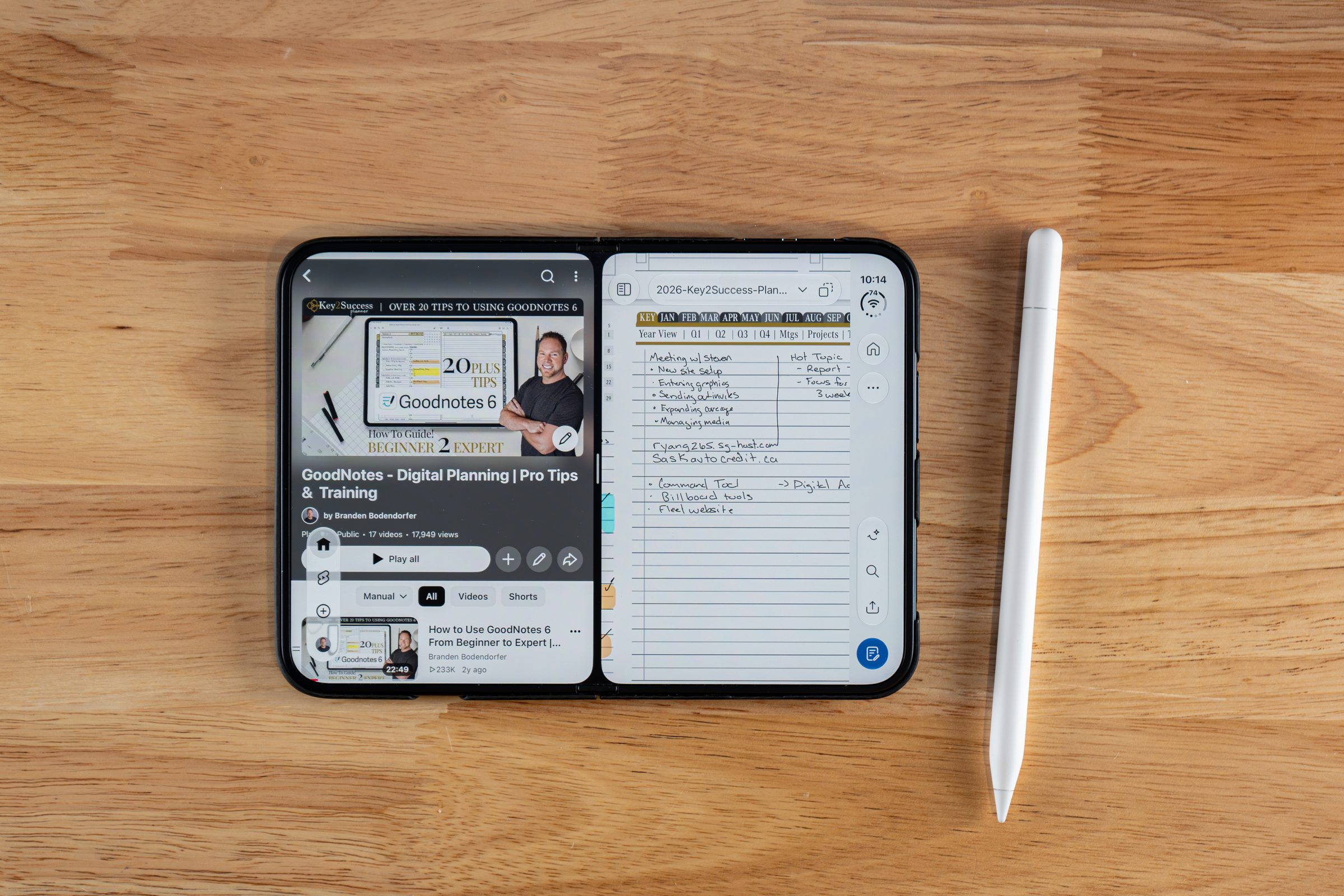
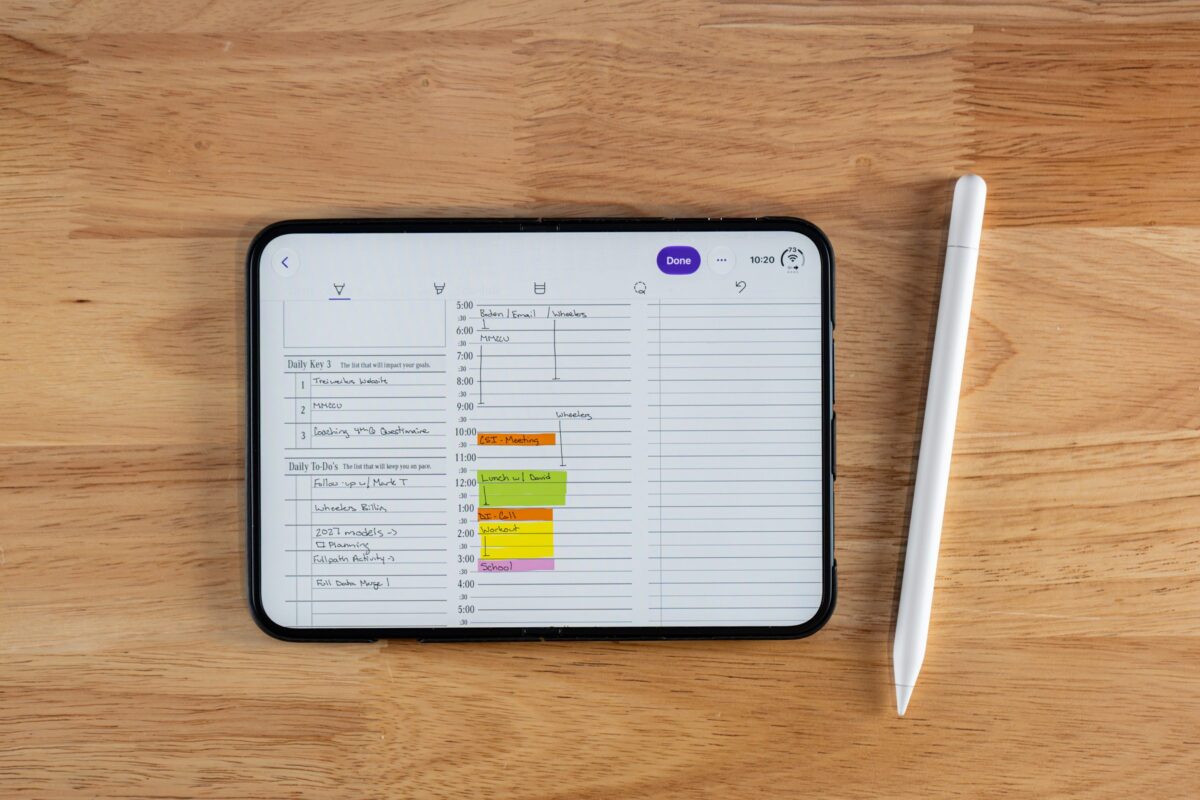
I expected tiny screen, small results. Instead, the writing experience held up next to my iPad. In Apple Notes, turning on Auto Refine handwriting subtly cleans up your letters. OneNote opened my daily plans and took handwriting, highlighting and lasso without trouble, though it doesn’t offer line thickness or color options on the Duo yet. GoodNotes shipped a dedicated iPhone Duo update with a two-layer toolbar, a reading mode, and layouts for folded and unfolded use, and its pens, colors and lasso match the iPad version. Sync works the way it already did, through iCloud and each app’s own cloud. Two settings to turn on first: Only Draw with Apple Pencil, so your finger scrolls, and Scribble, so handwriting converts to text.
The research behind why handwriting beats typing
Here’s the part that made me want to write this article instead of waiting for the pencil update to actually ship. This isn’t really about screen size. It’s about handwriting itself, and there’s real research behind why it works better than typing for the kind of thinking planning requires.
A 2023 study in Frontiers in Psychology used high-density EEG to compare brain activity during handwriting versus typing. The finding: handwriting produced broader connectivity across the brain than typing did. Typing is fast and efficient, which is exactly the problem. It doesn’t ask your brain to do the extra work that seems to be where the planning benefit actually lives.
After nearly ten years of digital planning, most of it on iPad with an Apple Pencil, this lines up with something I’ve felt every single week and never had good language for until I read that study.
That’s not a marketing line. It’s the actual difference between a typed to-do list and a planning session where I’ve worked something out by hand. Typing captures a decision I already made. Handwriting is where I make it.
My weekly planning workflow, built for a bigger screen
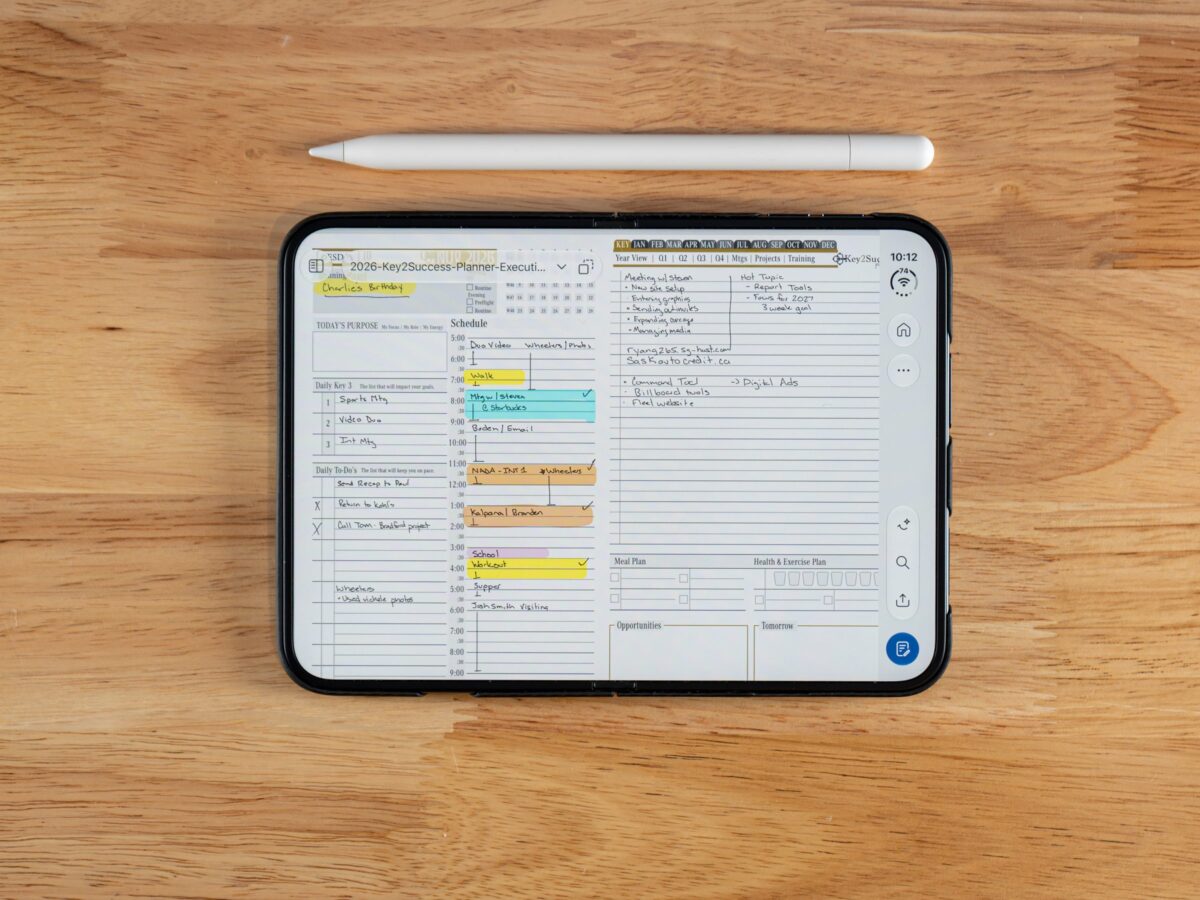
This is exactly the kind of session that gets better on a bigger foldable screen, and it’s the same three-step process I’ve run for years, regardless of what device it happens on.
Step one: the weekly planning page. I open Key2Success Planner’s weekly spread and get everything out of my head. Every project, every task, every appointment, no sorting yet, just capture. This is where a two-page spread matters. On a phone-sized screen you’re cramped and rushing. On iPad Mini it’s workable. On iPhone Duo’s 7.6-inch inner display, unfolded into book mode, you get enough room to actually see the whole week while you write, which is the point of doing this by hand instead of typing it into a list app.
Step two: run it through the Eisenhower Matrix. Everything from step one gets sorted into four buckets: critical and needs doing now, important but can be scheduled, urgent but delegable or worth minimizing, and the rest. This is a template inside Key2Success Planner, and it’s where the week actually gets planned, not just recorded.
Step three: pull three key daily tasks. Each morning, three tasks come out of that sorted list. Not ten. Three. The ones that actually move the outcome that day. Everything else waits its turn.
None of this requires iPhone Duo. I’ve run this exact process on iPad for years. What changes is that with Apple Pencil support live, this becomes a session you can run from your pocket instead of needing your bag.
Setting up Key2Success Planner for iPhone Duo
Here’s where I’ll say the thing that goes against the usual assumption. Most people assume bigger screens make planning better. What actually makes planning better is handwriting itself. Screen size just determines how comfortable that handwriting feels. iPhone Duo doesn’t work because it’s a big phone. It works because it’s finally a phone you can write on.
That matters for how you should think about setup. You don’t need a new planner edition for iPhone Duo. The GoodNotes edition of Key2Success Planner is built for exactly this kind of Apple Pencil workflow and works on iPhone Duo the same way it works on iPad. If you’d rather work across Windows, Mac, iPad, and Android too, the OneNote edition syncs the same planner across every device tied to your Microsoft account, iPhone Duo included, whether you’re writing by hand or typing.
Practical move for right now: update to iOS 27.2 or later, update GoodNotes or OneNote, import your Key2Success Planner PDF, then pair your Pencil with a USB-C cable and write one full daily page to see how it feels. If you’re new to the planner itself, the Key2Success Planner overview walks through every edition and which one fits your setup.
Get set up for Apple Pencil on iPhone Duo
- GoodNotes Digital Planners, built for Apple Pencil on iPad and iPhone Duo
- OneNote Digital Planners, one planner synced free across Windows, Mac, iPad, and Android
- Key2Success Planner Overview, compare every edition and find your fit
FAQ: Apple Pencil digital planning on iPhone Duo
Does the iPhone Duo support the Apple Pencil?
Yes. Apple Pencil support arrived in iOS 27.2 on October 26, 2026, three days after iPhone Duo launched.
Which Apple Pencil works with iPhone Duo?
Only the Apple Pencil (USB-C), priced at $79. The Apple Pencil Pro isn’t supported because iPhone Duo’s fold has no magnetic charging surface for it.
When did Apple Pencil support arrive on iPhone Duo?
October 26, 2026, in iOS 27.2. Apple had only promised “later this year” at the September announcement. iPhone Duo itself launched October 23 on iOS 27.1.
Does Apple Pencil support pressure sensitivity on iPhone Duo?
No. The Apple Pencil (USB-C) supports tilt sensitivity but not pressure sensitivity, double tap, barrel roll, haptics, or Find My, on any device it works with, including iPhone Duo.
How do I start using Key2Success Planner on iPhone Duo?
Update to iOS 27.2 or later, install GoodNotes or OneNote, import your Key2Success Planner PDF, and pair your Apple Pencil (USB-C) with a USB-C cable. Then turn on Only Draw with Apple Pencil in Settings so your finger navigates and the Pencil writes.
Quick answers
Is the Apple Pencil included with iPhone Duo?
No, it’s sold separately for $79.
Does Apple Pencil work on both iPhone Duo screens?
Yes. Both the 5.4-inch outer display and the 7.6-inch inner display accept pencil input.
Does the Apple Pencil Pro work on iPhone Duo?
No, only the USB-C Apple Pencil is supported, since the fold has no magnetic charging surface for Pencil Pro.
What iOS version does iPhone Duo run?
iOS 27.1 at launch. Apple Pencil support needs iOS 27.2 or later.
When did iPhone Duo pre-orders open?
October 16, 2026, at 5 a.m. Pacific.
When did iPhone Duo launch?
October 23, 2026.
Does GoodNotes support Apple Pencil on iPhone Duo?
Yes. GoodNotes released a dedicated iPhone Duo update with a two-layer toolbar and reading mode.
Can I use Key2Success Planner in GoodNotes on iPhone Duo right now?
Yes, including handwriting with the Apple Pencil (USB-C) on iOS 27.2 or later.
Does Key2Success Planner work across iPad, iPhone Duo, and Windows?
Yes, the OneNote edition syncs free across every device tied to your Microsoft account.
Do I need a new Key2Success edition for iPhone Duo?
No, your existing GoodNotes or OneNote edition works as-is.
Can I plan offline with Key2Success on iPhone Duo?
Yes, once your planner is downloaded into GoodNotes or OneNote, both apps work fully offline.
Will Siri be able to read my handwritten planner pages?
No. iOS 27’s Siri can create calendar events from a spoken prompt, but it doesn’t read handwriting off the page.
Weekly planning session template
The same three-step process from earlier, laid out as a checklist you can follow this week, on whatever device you’re planning on.
Weekly page: get it all down
Open your Key2Success weekly spread. Write down every project, task, and appointment for the week. No editing, no sorting, just capture.
Eisenhower sort: put it in a bucket
Run every item from step one through the Eisenhower Matrix template.
Three key daily tasks
Each morning, pull exactly three tasks from your sorted list. The three that actually move the outcome that day. Write them at the top of your daily page before anything else.
The takeaway
Most people talk about iPhone Duo like the win is the bigger screen. It isn’t. The win is that Apple finally put a pencil on a phone, and a phone is the one device none of us forget at home.
Apple Pencil digital planning on iPhone is here, and after a week of daily use, it holds up. Get your Key2Success Planner installed, run your weekly page and Eisenhower sort by hand, and you’re not starting a new habit. You’re just moving one you’ve already built onto the device that’s always in your pocket.
Sources
- Apple unveils iPhone Duo, Apple Newsroom
- iPhone Duo Only Works With the $79 USB-C Apple Pencil, Not the Apple Pencil Pro, MacRumors
- Handwriting but not typewriting leads to widespread brain connectivity: a high-density EEG study, Frontiers in Psychology, 2023
- Apple Announces iPhone 18, iPhone Duo Foldable Model Price and Availability, Variety