Planning Tips
Digital Bullet Journal: What Survives the Move From Paper, and What Doesn’t
A digital bullet journal keeps the parts of the method that make it work, rapid logging, the index, and migration, while removing the busywork that makes most people quit. In a digital planner like Key2Success, search replaces the hand-written index and automatic carry-forward replaces manual migration. What does not survive the move is the blank page and the hand-drawn artwork. If you love those, stay on paper.

Bullet journaling is a method, not a product. The question is which parts of it survive the move to a screen.
On this page
If you are looking into a digital bullet journal, you probably fall into one of two camps. Either you love the method and want it to search and sync, or you loved the idea, tried it, and quietly fell off around week three. This page is honest about both. It walks through what actually survives the move from a paper bullet journal to digital, what does not, and where Key2Success fits, which is not for everyone.

Here is the thesis up front. The genius of bullet journaling is migration, the monthly act of rewriting your open tasks by hand so you only carry forward what still matters. That same act is why most people quit. It is real work, every month, forever. A digital bullet journal can keep the discipline and drop the busywork. That trade is the whole decision.
What bullet journaling gets right
Give the method its due, because it earned its following honestly. Ryder Carroll’s bullet journal method is one of the smartest analog systems ever written down. Rapid logging, short bulleted entries for tasks, events, and notes, is faster than journaling and clearer than a to-do app. The index turns a blank notebook into something you can actually find your way around. Collections let you spin up a page for anything. And migration forces a monthly review that most planners never build in. On top of that, the blank dot grid gives you total freedom, and for a lot of people the creative, artistic side is the reason they show up.
None of that is in question. Bullet journaling is a genuinely good system. The gap is what it asks of you to keep it running.
Where bullet journalists hit friction
Most people leave bullet journaling for the same reasons: manual migration is real monthly work, the blank page is a setup tax before you can plan, and paper cannot search or sync. A digital bullet journal keeps rapid logging and the review discipline while automating the index and migration, so the system survives a busy month.
The friction is not the method. It is the upkeep the method requires.
Migration is a monthly tax. Rewriting your open tasks by hand is the point, and it is also the chore that ends most bullet journals. Miss a couple of migrations during a busy stretch and the whole system quietly falls apart.
The blank page is a setup cost. Before you can plan, you draw the layout. That freedom is a feature when you have time and a barrier when you do not. A lot of people spend more time building spreads than using them.
You cannot search it. The index is a hand-built workaround for the fact that paper cannot search. When you know you wrote something down but not where, you are flipping pages.
It does not sync. The notebook lives in one bag. If a task lands while you are away from it, you are trusting your memory until you get back to the book.
What survives the move to digital, and what doesn’t
This is the honest core of the page. A digital bullet journal is not a scan of your notebook. Some parts of the method translate and get better, and some do not translate at all. Here is the split.
Survives, and gets better
Rapid logging carries over directly. You still capture tasks, events, and notes as short entries, by hand if you want. The index becomes search. Instead of maintaining a page-number index, you search your own handwriting and jump straight to what you wrote. Migration becomes carry-forward. Open tasks move from one day, week, or month to the next without you rewriting them, so the review survives even a chaotic month. Collections become custom pages you can build once and reuse.
Does not survive
The blank page does not come with you in the same way. A digital planner gives you structure, and structure is the opposite of a blank dot grid. The hand-drawn artwork, the lettering, the washi, the painted spreads, is a real loss. You can decorate digitally, but it is not the same craft. If the art is why you bullet journal, a screen will not replace it.
| What matters | Paper bullet journal | Key2Success Planner |
|---|---|---|
| Rapid logging | Yes, the core habit | Yes, kept |
| Blank-page freedom and artwork | Bullet journal wins | Structured, not blank |
| No device, no battery | Bullet journal wins | Needs a charged device |
| Finding an old entry | Hand-built index | Search your handwriting |
| Monthly migration | Rewrite by hand | Automatic carry-forward |
| Same pages synced across devices | No | Yes, identical everywhere |
| Goals linked to the week and day | Build it yourself each time | Built in |
| Daily priority framework | Your own signifiers | Daily Key 3 |
| Reusable custom pages | Redraw each collection | Build once with Tiles |
| Setup time before you can plan | Draw the layout first | Open and go |
What you give up going digital
An honest page says this plainly, and for bullet journalists it is the biggest question of the five brands people ask us about. You give up the blank page and the craft. No dot grid to fill however you want, no hand-lettered headers, no painted monthly cover. You give up the fully analog ritual and the no-battery reliability. If the creative practice is the point for you, if bullet journaling is partly an art hobby, then digital is a downgrade and you should stay on paper. This page is not trying to talk an artist out of their notebook. It is for the people who loved the system and could not keep the upkeep going.
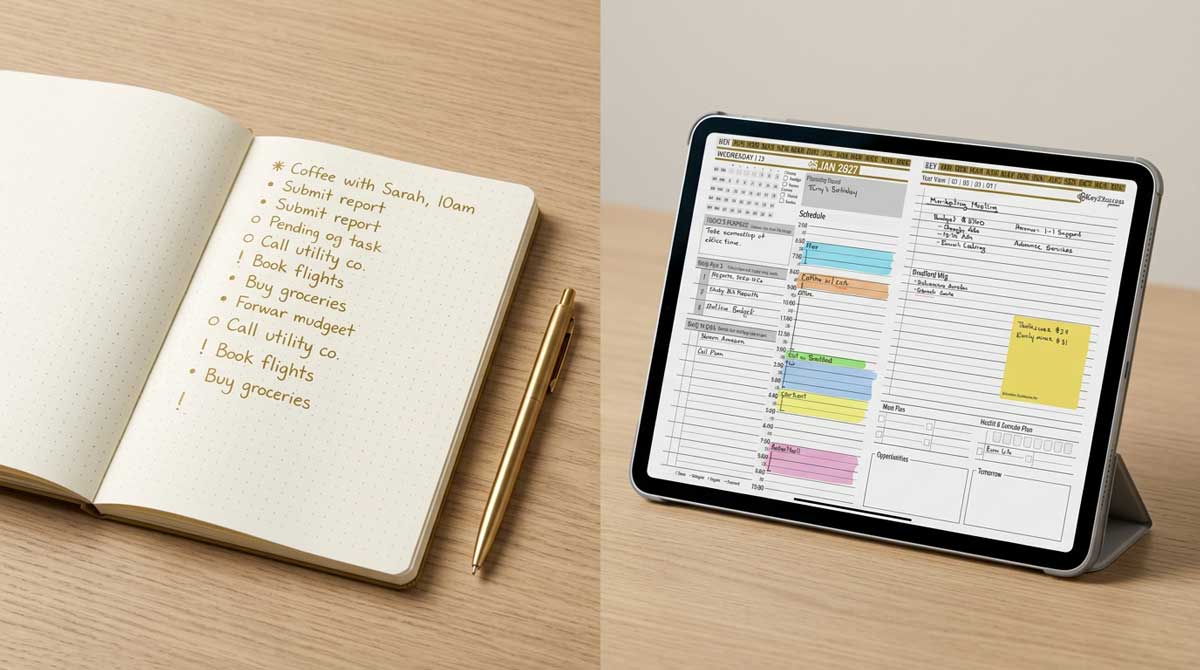
Rapid logging maps to the Key2Success daily layout, where the index becomes search and migration becomes automatic carry-forward.
How a bullet journalist moves to Key2Success, step by step
This is specific to the method, not generic advice.
Trade the index for search. Stop maintaining a page index. In a digital planner your handwriting is searchable, so finding an old entry is a search, not a lookup.
Let migration happen for you. The tasks you used to rewrite each month carry forward on their own. You still do the monthly review, deciding what matters, but without the transcription.
Keep rapid logging on the daily page. Your tasks, events, and notes live on the Key2Success daily layout, and the daily Key 3 turns your open bullets into the three that actually matter today.
Rebuild your collections as Tiles. The custom pages you used to draw, you build once with the Tiles system and reuse, which is the closest thing digital has to the blank-page freedom you are leaving.
Pick the device you know and watch the setup videos. Start on the tablet or computer you are most comfortable with. The Planner Finder quiz matches you to the planner and app for your devices, and the Getting Started series gets your first week going.
Which Key2Success edition fits a bullet journalist
The Tiles system is the natural home for a bullet journalist, because building your own pages is the closest digital gets to the freedom of a blank notebook. Most people pair it with the Personal or Professional edition for the daily, weekly, monthly, and goal structure. If your planning carries real professional weight, the Business or Executive edition adds tools no notebook offers.
I have not kept a bullet journal, so I will not pretend the artistic side means to me what it means to a devoted bullet journalist. What I can tell you is the pattern across the Key2Success community: the people who come to us from bullet journaling are almost never the artists. They are the ones who loved the logic of the system and lost the war of attrition with migration. They wanted the structure without the monthly transcription. My own move to digital came from the Full Focus Planner, where after years of paper I had a stack of books I could not search. A lapsed bullet journalist tells the same story with a drawer of half-finished notebooks.
Try Key2Success as your digital bullet journal
The Key2Success Planner runs in one app across every device. See the full planner and pick your edition on the Key2Success Planner page, or jump to the version for your app: GoodNotes, OneNote, or reMarkable.
Move from a paper bullet journal to Key2Success in 5 steps
- Replace your hand-built index with search, and stop maintaining page numbers.
- Let open tasks carry forward instead of migrating them by hand.
- Keep rapid logging on the daily page, and set your daily Key 3.
- Rebuild your favorite collections once with Tiles.
- Pick your device, run the Planner Finder quiz, and plan your first week.
Digital bullet journal FAQ
Is there a digital bullet journal that keeps the method?
Yes. A digital planner like Key2Success keeps rapid logging and the monthly review while automating the two hardest parts of a paper bullet journal: the index becomes search and migration becomes automatic carry-forward. What it does not replace is the blank page and the hand-drawn artwork.
What is the best app for a digital bullet journal?
If you want a truly blank canvas, any note app with a dot-grid page works. If you loved the bullet journal system but could not keep up the manual upkeep, a structured planner like Key2Success inside GoodNotes, OneNote, or a similar app gives you rapid logging plus search, carry-forward, and goal structure.
Does bullet journal migration exist in a digital planner?
Yes, and it is easier. Instead of rewriting open tasks by hand each month, a digital planner carries them forward automatically. You still do the review of deciding what matters, but without the transcription that ends most paper bullet journals.
Does the Key2Success layout change depending on my device?
No. The Key2Success template is built so the layout, the look, and the action steps are identical on every device. Your planner looks and works the same on your phone, your tablet, and your computer.
Can I still rapid log in a digital planner?
Yes. You capture tasks, events, and notes as short handwritten entries exactly as you would on paper. The difference is that those entries are searchable and carry forward, and your daily Key 3 highlights the three that matter most.
Common questions from bullet journalists
The takeaway
Here is the contrarian part. The thing bullet journal purists defend most, the blank analog page and hand-done migration, is exactly why the system fails for most people. The discipline is worth keeping. The transcription is not. A digital bullet journal keeps rapid logging and the monthly review and lets search and carry-forward do the busywork that used to end your notebook by March. If you bullet journal for the art, stay on paper and enjoy it. If you bullet journaled for the system and lost it to upkeep, this is how you get it back.
About the Author
Branden Bodendorfer is the creator of the Key2Success Planner, used by professionals in 52 countries, and a digital planning pioneer who has been building planning systems since 2013. His work has been featured on ABC World News, the NBC Today Show, ESPN, CNN, and Disney.
Sources
- The Bullet Journal Method, bulletjournal.com (rapid logging, index, migration, collections)