Key2Success Digital Planner: GoodNotes vs Noteshelf
A Practical Comparison for Digital Planning
Digital planning keeps gaining momentum, and the Key2Success Digital Planner stands out for users who want a structured system that blends goals, productivity, and day-to-day organization. It’s designed as a hyperlinked PDF that feels like a full planning ecosystem once you load it into the right app.
That final part matters more than people realize.
The same planner can feel very different depending on whether you open it in GoodNotes or Noteshelf. Both apps support handwriting, PDF annotation, navigation, and digital notebooks, but their strengths diverge in key areas. Below, you’ll find a clear comparison to help you choose which one works best with Key2Success.

What Makes Key2Success Unique
Before comparing the apps, it helps to understand what the planner expects from your note-taking platform.
Key2Success includes sections for:
- Annual and quarterly goals
- Monthly, weekly, and daily pages
- Meeting and project planners
- Habit tracking
- Finances and budget pages
- Vision and planning boards
- Personal development tools
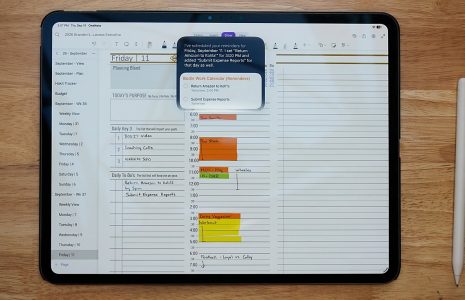
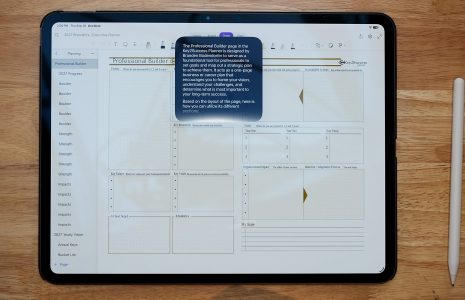
Because the system is built around internal hyperlinks, fast page-changing and smooth annotation are essential. Any app you choose should handle navigation with ease, support handwriting without lag, and allow flexible editing.
GoodNotes has long been a favorite for digital planners, and Key2Success feels natural inside the app.
Strengths
Smooth handwriting
GoodNotes offers one of the most natural writing experiences on tablets. If you rely on handwritten tasks, margin notes, sketches, or quick lists, the pen response makes planning pleasant.
Solid PDF handling
Importing the planner is easy, navigation feels immediate, and links work reliably. GoodNotes handles large files well, which is helpful because Key2Success includes many pages (and it is optimized as a file size).
Organized interface
GoodNotes lets you sort notebooks neatly and jump between sections quickly. This is useful if you use multiple files (like the Decision Journal) or keep archived planner volumes.
Great for mixed-style planning
If you type some tasks, handwrite others, insert small graphics, or add screenshots, GoodNotes keeps everything tidy.
Things to Consider
- Audio notes are not built in.
- Template customization inside the app is limited.
- If you like heavy visual decoration, GoodNotes is functional but not styled for that purpose.
Best fit
GoodNotes works well for people who want a structured planning workflow with clean writing, reliable navigation, and minimal friction. If you like to think fast, jot fast, and move on, GoodNotes aligns well with the Key2Success layout.
Noteshelf leans toward creativity and flexible customization, so it supports Key2Success in a slightly different way.
Strengths
Customization options
Noteshelf offers more notebook styles, covers, and templates. Even though Key2Success provides the planner itself, extra customization can help you style complementary notebooks. Tiles are also great for this!
Audio recording
The ability to attach audio to pages makes Noteshelf appealing for meeting notes or brainstorming sessions. This adds depth to Key2Success’s project and meeting sections.
Rich media
Noteshelf handles stickers, images, and decorative elements well. It’s a friendly space for users who combine planning with visual journaling.
Things to Consider
Handwriting feel can vary depending on zoom level and page size.
Navigation within large, hyperlinked PDFs can feel slightly slower than in GoodNotes.
Syncing and exporting may require more steps depending on your setup.
Best fit
Noteshelf suits planners who like flexibility, visual expression, and integrated audio. If you treat your planner as both a productivity tool and a creative journal, Noteshelf can enhance that experience.
Which App Works Better With Key2Success?
Here’s a simple comparison that covers the essentials. Both apps are great with Key2Success because the planner is optimized for these apps.
Navigation
GoodNotes: Fast and dependable with hyperlinks.
Noteshelf: Works fine but can feel a bit slower with very large planners.
Handwriting
GoodNotes: Smooth and consistent.
Noteshelf: Good but less polished when zooming or drawing fast.
Customization
GoodNotes: Minimal.
Noteshelf: Wide variety of styles and extras.
Media and Audio
GoodNotes: Basic media; no audio.
Noteshelf: Strong media support and built-in audio recording.
Overall Planner Feel
GoodNotes: Clean, organized, efficient.
Noteshelf: Creative, flexible, expressive.
Recommendation Based on Planning Style
Choose GoodNotes if:
- You want a clean writing experience
- You prefer fast page switching
- You use large hyperlinked planners
- You combine typed text with handwriting
- You want a reliable productivity tool without extra flair
Choose Noteshelf if:
- You like decorating your pages
- You record meetings or ideas as audio
- You enjoy personalizing notebooks
- You use planning for journaling as well as organization
Final Thoughts
The Key2Success Digital Planner is powerful on its own, but the app you pair it with shapes your entire planning workflow. GoodNotes handles the planner with speed and clarity, making it ideal for people who value precision and structure. Noteshelf introduces creativity and flexibility, especially if audio and visual enhancements matter to you.
Both apps support the planner well. The question is simply which environment matches the way you think, write, and organize your day.