Planning Tips
Erin Condren Digital Planner Alternative: Keep the Vertical Weekly, Gain Real Customization
The closest Erin Condren digital planner alternative is the Key2Success Planner. It keeps the vertical weekly layout Erin Condren fans love and adds what paper cannot do: real page-level customization, searchable handwriting, and one synced planner across every device. Erin Condren is a paper-first brand, so there is no official cross-device digital LifePlanner that syncs, only printable and third-party template files.

Erin Condren made the vertical weekly famous. A digital alternative keeps that layout and makes the customization functional, not just cosmetic.
On this page
If you are looking for an Erin Condren digital planner alternative, you probably love two things about the LifePlanner: the vertical weekly layout and the ability to make it yours. This page is an honest look at what carries over to digital, what does not, and where Key2Success fits for someone who plans the way Erin Condren taught them to.

Here is the thesis up front. Erin Condren’s customization is mostly cosmetic: covers, colors, coil, and stickers that change how the book looks. Digital customization changes what the book does. That is the difference between decorating a planner and building one, and it is the reason to move the vertical weekly you love onto a system that also searches, syncs, and connects to your goals.
What Erin Condren gets right
Give Erin Condren its due. The LifePlanner popularized the vertical weekly layout, with morning, day, and night columns that a lot of people find easier to live in than any other week view. The customization is genuinely fun: interchangeable covers, color schemes, coil options, and one of the deepest sticker ecosystems in planning. The build quality is high, and the brand turned planning into something people look forward to decorating. That emotional pull is real, and a page that ignores it will not land with anyone who owns three LifePlanner covers.
None of that is in question. Erin Condren is excellent at making a planner you love to open. The gap is what happens when you need that planner to do more than look good.
Where Erin Condren users hit friction
Erin Condren users most often go digital because the customization is cosmetic rather than functional, and because paper cannot search, sync, or carry forward. A digital planner like Key2Success keeps the vertical weekly layout and adds page-level customization, searchable handwriting, cross-device sync, and a line from your goals to your day.
The friction is not the look. It is what the paper book cannot do once your planning gets serious.
The customization is cosmetic, not functional. Covers and stickers change how the LifePlanner looks, not what it does. If a layout almost works but you want to change the structure of the page, paper cannot do it. You adapt to the book.
You cannot search it. When you know you wrote something down but not where, paper means flipping. A digital planner in an app like GoodNotes or OneNote searches your own handwriting and finds it in seconds.
It does not sync. The LifePlanner lives in one bag. Plan at your desk, review on the couch, and the book is only ever in one of those places.
You rebuy every year, accessories included. A new LifePlanner is a blank book, plus new covers and stickers. Your recurring commitments get rewritten by hand. Digital carries them forward for you.
Is there an Erin Condren digital planner?
Not really, and this is the honest part. Erin Condren is a paper-first brand built around the physical LifePlanner. There is no official cross-device digital LifePlanner app that syncs your pages across your phone, tablet, and computer. The “Erin Condren digital planner” files you find online are largely printable PDFs and third-party templates made to look like the LifePlanner, none of which connect to your goals or sync the way a planner built for an app does.
So the real comparison is not Erin Condren digital versus Key2Success. It is the Erin Condren paper LifePlanner, and the look-alike templates, versus a digital planner that was built from the start to sync and search. Here is the honest side by side, with the rows Erin Condren wins marked.
| What matters | Erin Condren LifePlanner (paper) | Key2Success Planner |
|---|---|---|
| Vertical weekly layout | Erin Condren made it famous | Yes, the same vertical week |
| Covers, colors, stickers | Erin Condren wins | Digital themes, not physical |
| Paper feel and no battery | Erin Condren wins | Needs a charged device |
| Same layout synced across devices | No | Yes, identical on every device |
| Search your own notes | No | Yes, searchable handwriting |
| Build your own pages (functional) | No, layout is fixed | Yes, with Tiles |
| Goals linked to weekly and daily | No | Yes, the core of the system |
| Daily priority framework | Open layout | Daily Key 3 |
| Carry tasks forward year to year | Rewrite by hand | Carry forward, no rewriting |
| Yearly cost | New book plus accessories | Yearly edition, notes carry over |
What you give up going digital
An honest page says this out loud, and for Erin Condren fans it is a bigger deal than for most. You give up the physical joy: the covers, the stickers, the coil, the ritual of decorating a spread. You give up the paper feel and the no-battery reliability of a book that always opens. If a big part of what you love is the tactile, creative side of the LifePlanner, digital changes that, and for some people that trade is not worth it. The people who switch and stay switched are the ones who realized they were spending more time decorating the planner than the planner was saving them, and who want the vertical week they love to finally search, sync, and connect to their goals.
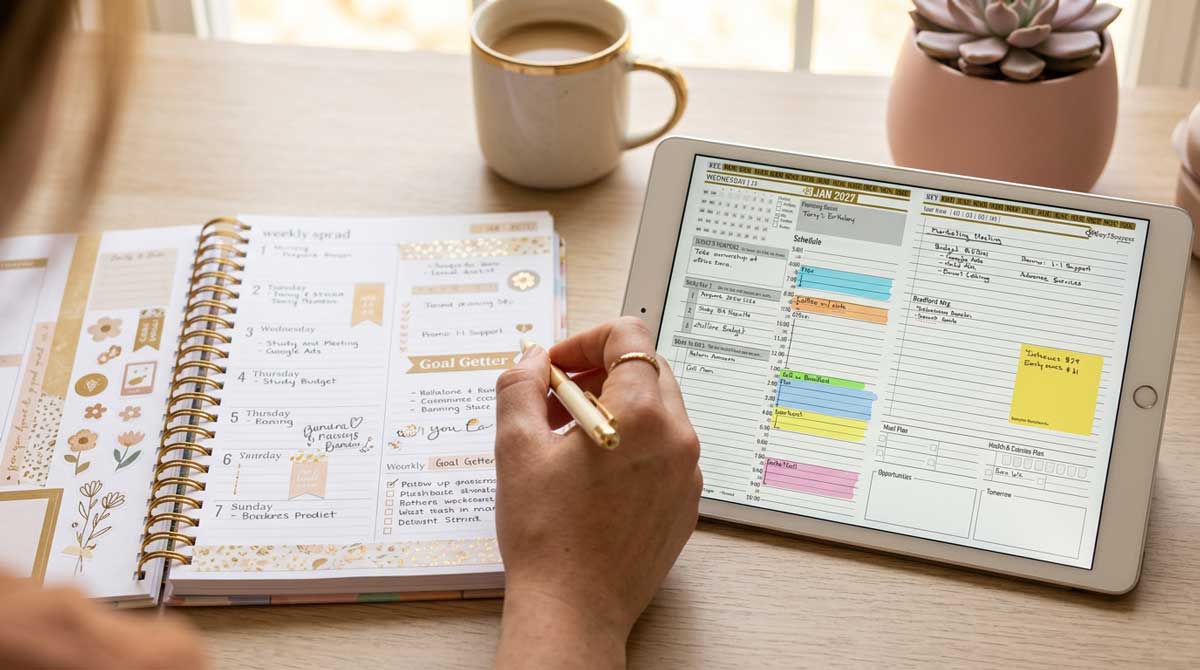
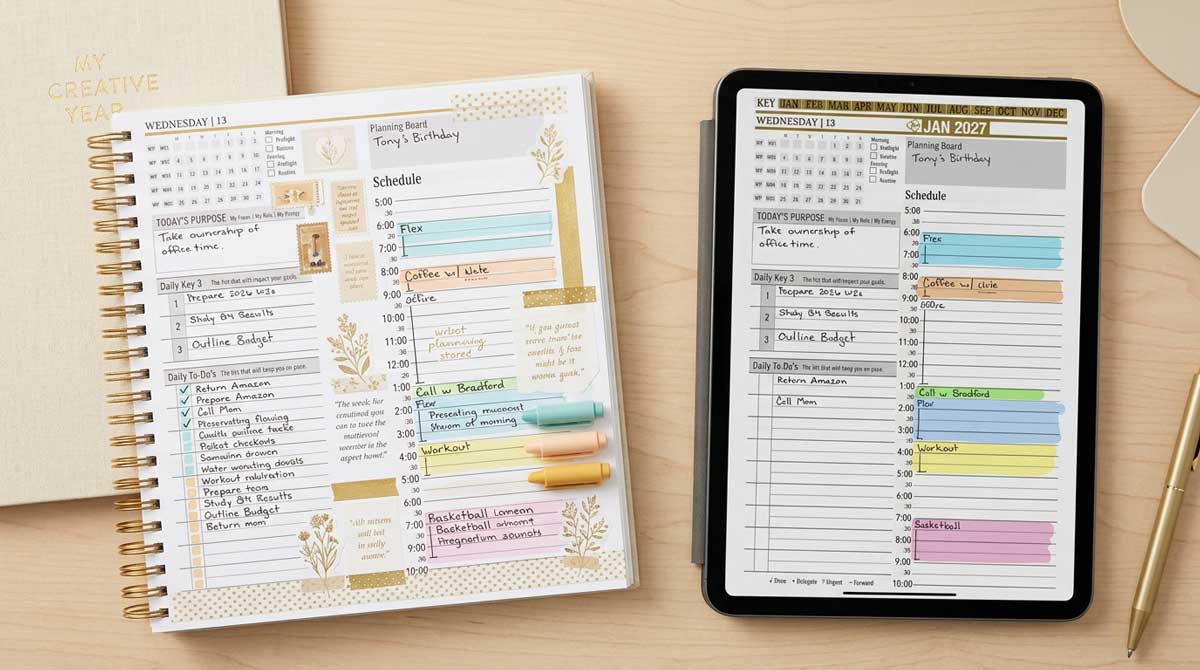
The Erin Condren vertical weekly maps directly to the Key2Success weekly layout, now searchable, synced, and tied to the daily Key 3.
How an Erin Condren user moves to Key2Success, step by step
This is specific to how you already plan.
Map your layout first. The Erin Condren vertical weekly maps directly to the Key2Success weekly layout. You keep the week view you are used to, and the daily Key 3 adds the three priorities that matter most each day.
Rebuild your customization as function, not decoration. The pages you used to personalize with stickers, you now build for real with the Tiles system, which lets you design your own pages. That is customization that changes what the planner does, not just how it looks.
Pick the device you already know. This is the most common question our support inbox gets, so start here. Use the tablet or computer you are most comfortable with, then decide which other devices you want it to sync across. The Planner Finder quiz matches you to the planner and app that will sync across the exact devices you own.
Carry forward only what repeats. Move your recurring commitments and forward-dated goals. Everything past is already done.
Watch the setup videos before you judge it. This is the biggest predictor of whether the switch sticks. The Getting Started series walks you through installing on one device and letting it finish syncing before you add the rest.
Which Key2Success edition fits an Erin Condren user
Most Erin Condren users land on the Personal or Professional edition, which lines up with the vision, weekly, daily, and monthly structure you already know, connected together. If your planning carries real professional weight, the Business or Executive edition adds tools no paper planner offers. And because customization is the thing you loved most, the Tiles system is where you will feel most at home, since it lets you build your own pages instead of decorating a fixed one.
I have not planned in an Erin Condren LifePlanner, so I will not pretend to. What I can tell you is the pattern I see across the Key2Success community: Erin Condren switchers almost always come for the customization and stay for the professional planning layer. They love designing their setup, and in Tiles they finally get to build pages that do something, not just look nice. My own move to digital came from the Full Focus Planner, where after years of paper I had a stack of books I could not search. The Erin Condren version of that story is a shelf of past LifePlanners and a drawer of leftover stickers, and a plan that still cannot find what you wrote last spring.
Start your Erin Condren digital planner alternative
The Key2Success Planner runs in one app across every device. See the full planner and pick your edition on the Key2Success Planner page, or jump to the version for your app: GoodNotes, OneNote, or reMarkable.
Move from Erin Condren to Key2Success in 5 steps
- Map your vertical weekly to the Key2Success weekly layout and the daily Key 3.
- Rebuild your favorite custom pages with Tiles, as function rather than decoration.
- Choose the device you know best, then list the devices you want it to sync across.
- Run the Planner Finder quiz to confirm the planner and one app for those devices.
- Install on one device, let it sync, then add the rest and plan this week first.
Erin Condren digital planner alternative FAQ
Does Erin Condren have a digital planner?
Erin Condren is primarily a paper brand. It does not offer an official cross-device digital LifePlanner that syncs across your devices. Most Erin Condren digital planner files are printable PDFs or third-party templates, none of which connect to your goals or sync the way a purpose-built digital planner does.
What is the best Erin Condren digital planner alternative?
The Key2Success Planner is the closest alternative for Erin Condren fans. It keeps the vertical weekly layout, adds real page-level customization through Tiles, and syncs across your phone, tablet, and computer from one app, with searchable handwriting and goals connected to your week and day.
Does the Key2Success layout change depending on my device?
No. The Key2Success template is built so the layout, the look, and the action steps are identical on every device. Your planner looks and works the same on your phone, your tablet, and your computer.
Can I still customize it the way I did my LifePlanner?
Yes, and more deeply. Instead of covers and stickers that change how the book looks, the Key2Success Tiles system lets you build your own pages, which changes what the planner does. It is functional customization rather than cosmetic.
Which Key2Success layout is closest to the Erin Condren LifePlanner?
The Erin Condren vertical weekly maps directly to the Key2Success weekly layout, with the daily Key 3 adding a clear set of priorities for each day.
Common questions from Erin Condren switchers
The takeaway
Here is the contrarian part. Erin Condren built its following on customization that is mostly decoration, covers and stickers that change how the planner looks but not what it does. Digital flips that. The reason to move the vertical weekly you love onto a digital planner is not prettier stickers. It is customization that changes the page itself, a plan you can search, one planner synced across every device, and a line from your goals to today. Keep the layout you love. Build the planner instead of decorating it.
About the Author
Branden Bodendorfer is the creator of the Key2Success Planner, used by professionals in 52 countries, and a digital planning pioneer who has been building planning systems since 2013. His work has been featured on ABC World News, the NBC Today Show, ESPN, CNN, and Disney.
Sources
- Erin Condren planners and LifePlanner line, erincondren.com