2026 Personal planner is FREE with any 2027 planner — or save 80% when you bundle your matching edition. Get Started
digital appointment book onenote
Articles / News / vLog Mar 13
By Branden Bodendorfer 0 Comments

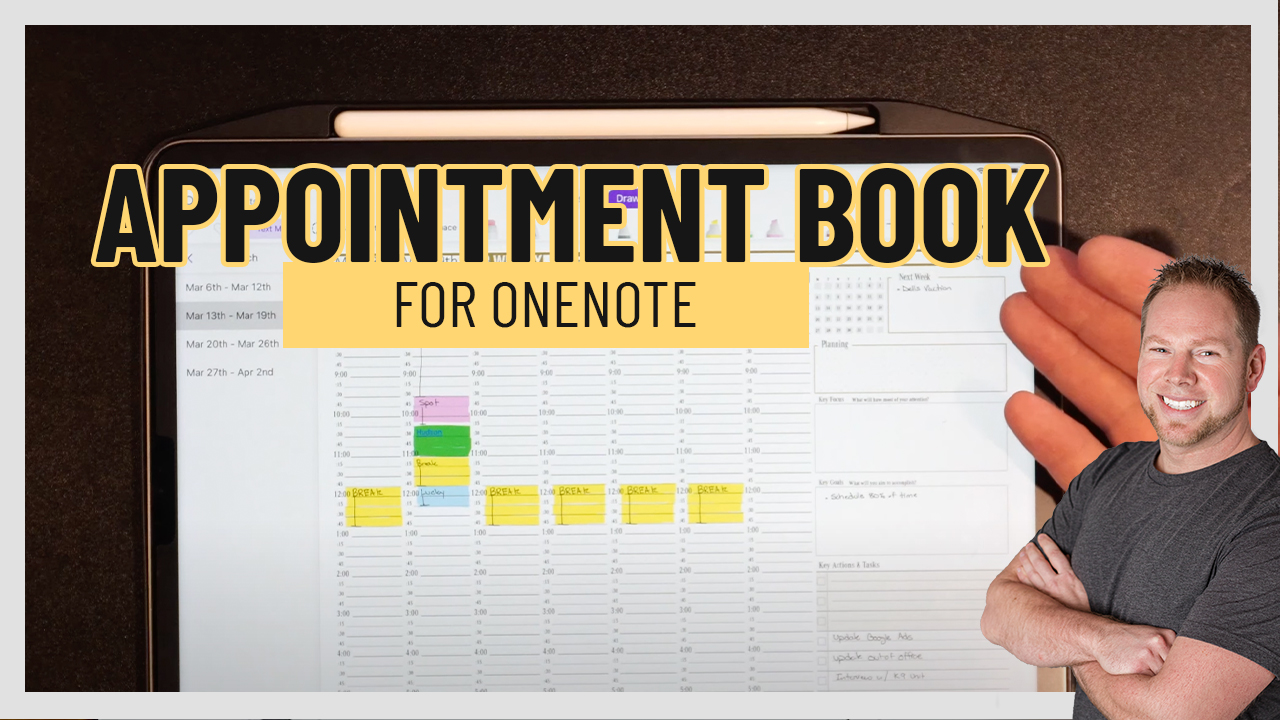
At Key2Success, we’re excited to announce the launch of a new digital appointment book, providing even more convenience and flexibility for users in various industries. The OneNote version is available now, with PDF version to follow. This digital appointment book is perfect for salons, pet groomers, spas, snow plowers, and all service industries. Also great for those who work as an attorney, real estate agent, or in sales.

A digital appointment book for OneNote can be a useful tool for individuals or teams who want to keep their schedules and tasks organized and easily accessible within their digital notebooks.

Here are just some of the benefits of the digital appointment book:

  1. Easily search for notes
  2. Move notes using the lasso tool (no erasing/crossing out/mess)
  3. Keep records of all previous appointments and easily link them together, back up on the cloud for forever access

The digital appointment book is a natural extension of the Key2Success Planner, offering a streamlined solution for scheduling and managing appointments. The new digital tool allows users to schedule appointments, set reminders, and keep track of important deadlines all in one place. This digital tool is perfect for anyone who prefers to have their schedule easily accessible on their phone or computer.

Today is the best day to start planning with Key2Success digital planner, featuring a money-back guarantee, promotional savings, and a call to action for personal and professional planners.

A digital appointment book for OneNote is a tool that allows you to schedule and manage your appointments, tasks, and events directly within the OneNote app. OneNote is a note-taking application developed by Microsoft that allows you to organize notes, ideas, and information in a digital notebook format.

With a digital appointment book for OneNote, you can create and manage your schedule directly within the app, without needing to switch to a separate scheduling or calendar tool.

One of the benefits of using a digital appointment book within OneNote is that you can easily link appointments or tasks to related notes, projects, or ideas. This allows you to keep all of your relevant information in one place and easily access it when you need it.

The appointment book comes with tiles that allow you to customize your planner. Tiles include:

  • Client information featuring name, address, company, etc
  • Service log including client, location, date of service, mileage, etc
  • Notes
  • Appointment log (perfect for attorneys, realtors, sales)
Add a digital appointment book to your digital planner today!

Key2Success Planners

Choose the Application that you plan to use for digital planning.

OneNote

OneNote logo featuring a purple notebook icon, representing a digital planning tool for effective organization and note-taking.

Application works across Windows, Android and Apple. Also Web version all available. Great for Desktop, Laptop and Mobile users.

GoodNotes

GoodNotes app icon featuring a notepad with lines and a stylus, representing digital planning and note-taking tools for Apple devices.

Application works across Apple devices. Great for iPad, Mac and iPhone users. PDF Annotation App designed for Note-Taking

Noteshelf

Noteshelf app icon featuring a blue background with a white pen, representing digital planning and note-taking tools for Apple devices.

Application works across Apple devices. Great for iPad, Mac and iPhone users. PDF Annotation App designed for Note-Taking

Notability

Notability app icon featuring a pencil on a blue background, representing digital note-taking tools for Apple devices in the context of digital planning.

Application works across Apple devices. Great for iPad, Mac and iPhone users. PDF Annotation App designed for Note-Taking

Samsung Notes

Samsung Notes application icon, designed for digital planning on Samsung devices, highlighting note-taking features.

Application works across Samsung devices. Great for Samsung Tab and Samsung Galaxy Users. Including Z Fold 3, S6, S7, S8 and S22. 

reMarkable

reMarkable logo on a black background, representing ePaper devices for digital note-taking and PDF annotation.

Works with ePaper Devices, like the reMarkable, SuperNote and many more. A PDF Annotation Planner allows users to take digital notes.

Today is the best day to start planning with Key2Success digital planner, featuring a money-back guarantee, promotional savings, and a call to action for personal and professional planners.

Leave a Comment

FREE WORKSHEET | KEY2SUCCESS

Q4 Forward

Finish 2026 Strong. Set Up 2027.

The first week of Q4 wraps up October 7. Download the free worksheet and have your plan in place before then: one hour, three goals, three first moves.

Plan before October 7
00Days00Hrs00Min00Sec

Free. Instant PDF download. Print it or use it in your note app.

FREE Q4 WORKSHEET  Get your Q4 plan set before October 7.

00Days00Hrs00Min00Sec