How the Remarkable Paper Pro Move and Key2Success Planner Work Together
The Remarkable Paper Pro Move has quickly become a favorite for people looking to combine the feel of paper with the power of digital planning. At Key2Success, we’ve developed a planner system that turns this companion device into a productivity hub for your personal, professional, and business life.
In this article, we’ll walk through how the Paper Pro Move works with the Key2Success Planner, why it’s more than just a digital notebook, and how it can help you build better habits, reach goals, and stay organized.
Why the Paper Pro Move Is a Companion Device
Unlike the larger Remarkable tablets, the Paper Pro Move isn’t designed to replace your entire planning system. Instead, it acts as a companion device—a second brain that goes with you anywhere.
- Capture quick notes and ideas on the go
- Record schedule changes instantly
- Write journal entries or daily reflections
- Sync everything seamlessly across your other Remarkable devices
The Key2Success Planner on the Paper Pro Move
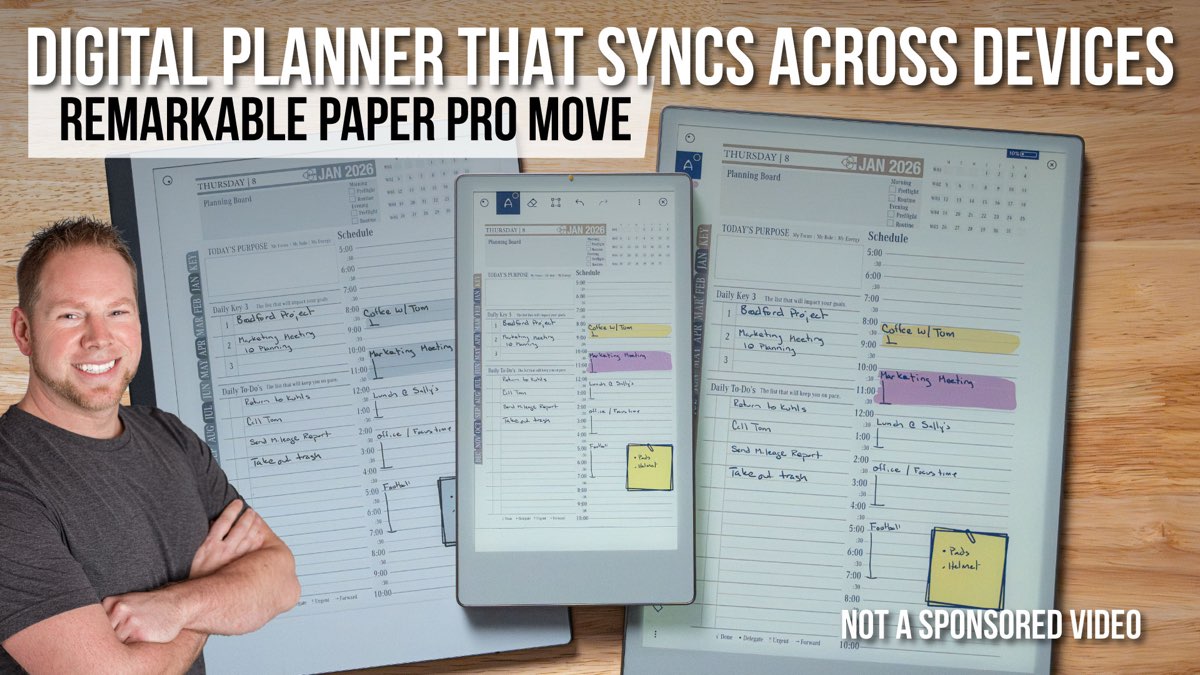
The Key2Success Planner was built to work with both the Remarkable 2 and the Paper Pro. With the Move, we’ve re-optimized the system to create the Keys Planner Move edition.

Key features include:
- Daily Key 3 – Focus on the three most important tasks each day
- Year-to-View Navigation – Jump to any day instantly
- Portrait or Landscape Layouts – Choose the view that fits your workflow
- Color Support – Enhanced visuals on the Paper Pro’s front-lit, color display
- Customizable Pages – Add sticky notes, blocks, or widgets (eTiles) to tailor your planner
eTiles: Widgets for Personalization
One of the most powerful features is the ability to use eTiles. These are digital widgets you can copy into your planner for extra flexibility.
Examples include:
- Sticky notes for reminders
- 24-hour time blocks
- Reading logs or prayer journals
- Custom note pages
Seamless Sync Across Devices
The Remarkable system allows you to sync up to three tablets per account, plus the desktop and mobile apps. That means notes written on the Paper Pro Move will appear on your Remarkable 2 or Pro, ensuring nothing gets lost.
Planner Editions for Every Role
The Key2Success Planner comes in four editions:
- Personal – For everyday life and goal-setting
- Professional – Includes meeting and project pages, budgeting, and habit tracking
- Business – Adds the Business Operating System, a one-page business plan framework
- Executive – Expands with team planning, vision goals, and accountability tools
Free Training and Coaching Support
Every planner comes with free training resources to help you get the most out of the system.
- 5-video productivity course – Learn how to master your week and reach goals
- 8-video framework series – Break down big ideas into manageable steps
Executive users also receive a 30-minute one-on-one session to discuss workflow and planning strategies.
Why the Paper Pro Move + Key2Success Planner Works
When you combine the Remarkable Paper Pro Move with the Key2Success Planner, you get more than a digital notebook. You get a flexible, portable productivity system that adapts to your lifestyle, keeps you focused on daily priorities, and helps you reach long-term goals.
Whether you’re a student, entrepreneur, professional, or executive, this system helps you stay intentional about your time and decisions.
Ready to Get Started?