
2026 Personal planner is FREE with any 2027 planner — or save 80% when you bundle your matching edition. Get Started
how to use a digital business planner header image
Key2Success Product & Offers Sep 19
By Branden Bodendorfer 0 Comments

How to Use a Digital Business Planner

A digital business planner is an electronic version of a traditional business planner designed to help entrepreneurs, professionals, and business owners manage their tasks, goals, and strategies more effectively.

It integrates all the essential elements of business planning, such as scheduling, goal setting, project tracking, and financial planning, into one digital format that can be accessed across various devices like tablets, computers, or smartphones.

Visit the OneNote Planner Shop
Visit the GoodNotes/PDF Shop
Visit the Samsung Notes Shop
Visit the Nebo Shop
Visit the Penly Shop
Visit the Amazon Scribe Shop
Visit the reMarkable Shop
Visit the Onyx Boox Shop
Visit the Noteshelf Shop

Key Features of a Digital Business Planner

  1. Goal Setting and Tracking: A digital business planner allows users to set business goals (both short-term and long-term) and track progress toward achieving them. Many digital planners include sections for breaking down goals into manageable tasks or milestones.

    Today is the best day to start planning with Key2Success digital planner, featuring a money-back guarantee, promotional savings, and a call to action for personal and professional planners.
  2. Task and Project Management: It provides tools for managing tasks and projects, organizing them by priority, due date, or project. Users can create to-do lists, track deadlines, and monitor the status of various business activities.

  3. Calendar and Scheduling: A built-in calendar helps users schedule appointments, meetings, and key business events. It allows for daily, weekly, and monthly views, often integrated with reminders to stay on top of deadlines and schedules.

  4. Financial Planning: Digital business planners often include templates for budgeting, expense tracking, revenue forecasting, and even profit and loss analysis. This helps business owners monitor their financial health and make informed decisions.

  5. Notes and Documentation: Instead of keeping physical notebooks, digital business planners offer spaces to jot down ideas, meeting notes, or strategic plans. Some planners allow for handwriting with stylus support, especially on devices like the iPad, reMarkable, or Samsung tablets.

  6. Templates for Business Planning: Many digital business planners come with ready-to-use templates, such as business strategy maps, SWOT analysis tools, customer journey mapping, or marketing plans. These templates streamline the planning process and help with business development.

  7. Collaboration and Sharing: Many digital planners can be shared with team members or collaborators. This feature is especially useful for business leaders who work with remote teams or need to share updates with partners and stakeholders.

  8. Cross-Device Syncing: A digital business planner can sync across multiple devices (with the right app), ensuring that users have access to their business plans, schedules, and tasks whether they are on a computer, phone, or tablet.
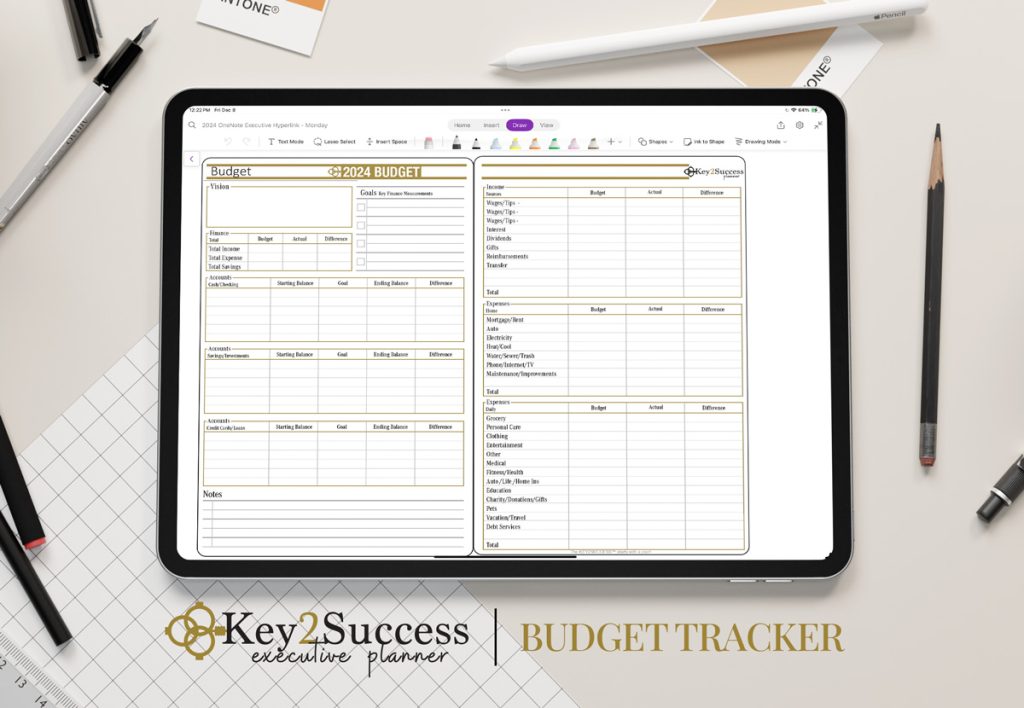

Key2Success Planner Budget Tracker

Get Started with a Digital Business Planner

Why Use a Digital Business Planner?

  1. Portability and Accessibility: A digital planner is accessible anywhere, as long as you have your device, and it’s easily portable compared to carrying multiple notebooks and binders.

  2. Efficiency and Customization: You can customize the planner to suit your business needs, whether you need to focus on sales, marketing, HR, or general operations. Features like drag-and-drop functionality, digital tags, and hyperlinks allow for easy navigation.

  3. Sustainability: By using a digital planner, you’re reducing paper use, which can be beneficial for businesses that prioritize environmental sustainability.

  4. Enhanced Organization: Digital planners allow users to easily search for information, categorize notes, and organize files digitally, providing a clutter-free solution to traditional planners.

  5. Flexibility in Formats: Depending on the device and app you’re using (e.g., GoodNotes, OneNote, Notability), digital planners allow for both typing and handwriting, accommodating different working styles.

Popular Devices and Apps for Digital Business Planners

  • Devices: iPad (with Apple Pencil), reMarkable, Onyx Boox, Samsung Galaxy tablets, Microsoft Surface
  • Apps: OneNote, GoodNotes, Notability, Noteshelf, Nebo

A digital business planner ultimately helps professionals stay organized, increase productivity, and streamline the planning process, all in a convenient and accessible digital format.

Visit the OneNote Planner Shop
Visit the GoodNotes/PDF Shop
Visit the Samsung Notes Shop
Visit the Nebo Shop
Visit the Penly Shop
Visit the Amazon Scribe Shop
Visit the reMarkable Shop
Visit the Onyx Boox Shop
Visit the Noteshelf Shop

Today is the best day to start planning with Key2Success digital planner, featuring a money-back guarantee, promotional savings, and a call to action for personal and professional planners.

Leave a Comment

FREE WORKSHEET | KEY2SUCCESS

Q4 Forward

Finish 2026 Strong. Set Up 2027.

The first week of Q4 wraps up October 7. Download the free worksheet and have your plan in place before then: one hour, three goals, three first moves.

Plan before October 7
00Days00Hrs00Min00Sec

Free. Instant PDF download. Print it or use it in your note app.

FREE Q4 WORKSHEET  Get your Q4 plan set before October 7.

00Days00Hrs00Min00Sec