Mastering the Key2Success Planner in OneNote: Find the Edition That Fits Your Life
Explore how to use the Key2Success Digital Planner for OneNote to align your goals, build habits, and plan your personal and professional life.

If you’ve tried digital planners before but never found one that truly works for your lifestyle, it’s time to look at the Key2Success Digital Planner for OneNote. Unlike template-based systems, Key2Success is a complete ecosystem built to help you plan with purpose, stay organized, and align your personal, professional, and spiritual goals.
This article is part two in our series on using OneNote as your Second Brain. In Part 1 we explored how to capture ideas, organize goals, and build a framework for daily success. In this post, we’ll walk through the different Key2Success editions—Personal, Professional, Business, Executive, and Complete—so you can find the one that’s right for you.
Why the Key2Success System Works
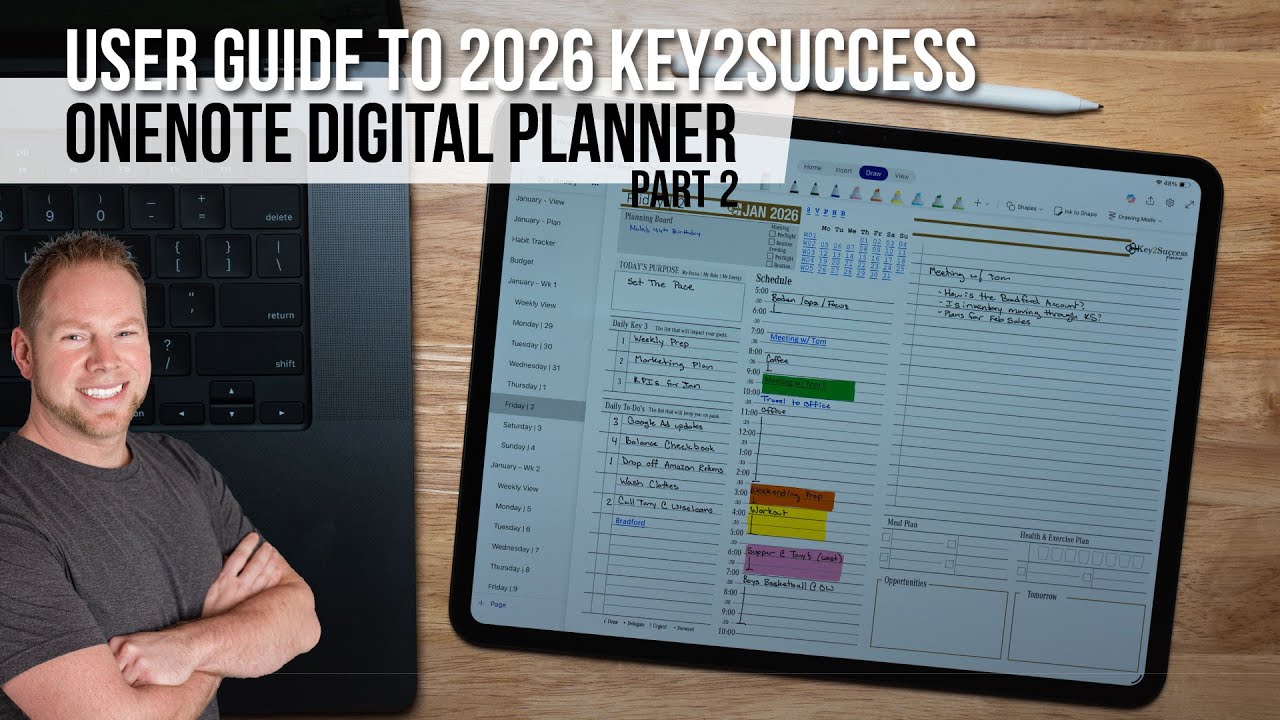
The Key2Success Planner is more than a collection of digital pages. It’s a productivity ecosystem that combines proven planning principles with the flexibility of Microsoft OneNote. You can sync the planner across Windows, Apple, and Android devices, so your plans, notes, and tasks stay with you wherever you go.

The system also includes free training series to help you get started:
- Series 1: Build daily productivity through focus and organization
- Series 2: Create a long-term framework to achieve meaningful goals
The Four Editions of the Key2Success Planner
Each edition builds upon the previous one, adding tools and pages tailored to your stage of personal or professional growth.
1. Personal Edition: Build Balance and Vision

The Personal Edition focuses on creating harmony between your goals and daily actions. It begins with developing your vision board and defining your annual keys—four cornerstones that shape your year:
- Self-Development
- Career and Professional Growth
- Community
- Relationships
This edition also includes:
- Goal Planner and Journal – Define motivation, challenges, and progress.
- Quarterly Planning Tools – Based on the 12-Week Year concept for effective execution.
- Decision Journal – Reflect and improve on major life and work choices.
- Ideal Week Planner – Balance habits, routines, and commitments.
- Daily Key3 Framework – Focus each day on three actions that drive real results.
If your goal is to create structure and balance in everyday life, this is the perfect place to start.
2. Professional Edition: Build Better Habits and Manage Projects
The Professional Edition includes everything in the Personal Edition, plus tools to help manage work responsibilities, meetings, and personal growth:
- Bucket List Page – Plan personal and professional milestones for the year.
- Project Planner – Organize tasks, deadlines, and priorities visually.
- Meetings Page – Prepare questions, take notes, and track action steps.
- Habit Tracker – Monitor progress and adjust routines weekly.
- Budget Tracker – Plan monthly income, expenses, and financial goals.
Ideal for professionals who juggle multiple roles and projects, this edition keeps your goals and habits aligned.
3. Business Edition: Plan, Lead, and Grow Strategically
The Business Edition adds a strategic layer for entrepreneurs, managers, and team leaders. The core feature is the One-Page Business Plan, a framework to define your vision, challenges, and growth targets.
- 3-Year Vision and Core Values
- Key Challenges and Resources
- Organizational Goals and “Absolutes”
- Action Steps and Growth Impacts
It also introduces the Business Operating System (BOS), connecting long-term planning with daily execution. You can identify risks, define roles, and align strengths with growth opportunities.
This edition includes Essential Tiles—customizable widgets you can add to any OneNote page for greater flexibility.
4. Executive Edition: Lead Teams with Vision and Clarity

The Executive Edition helps leaders mentor, build teams, and align people with organizational goals. It introduces the Team Builder tool and includes personalized coaching.
- Organizational Chart and Staffing Planner
- Team Member Templates – Track career goals, strengths, and performance.
- Progress Summaries and Mentorship Tools
- 30-Minute Coaching Call with the creator for personalized setup.
- Access to the Communication Planner and CRM Toolkit
By helping team members understand how their goals support the larger mission, this edition strengthens collaboration and accountability.
Complete Edition: The All-Inclusive Experience
The Complete Edition includes everything in the Executive Edition plus:
- The Decision Journal
- The Full Tile Set for advanced customization
- Year-Round Support for installation and workflow setup
It’s the most comprehensive way to experience the Key2Success ecosystem.
Why OneNote and Key2Success Work Together
Microsoft OneNote provides the digital flexibility to store, link, and organize every aspect of your planner. With the Key2Success system, you can:
- Sync seamlessly across all devices
- Add PDFs, images, and tiles
- Customize pages and layouts
- Integrate notes, plans, and goals in one hub
This combination transforms OneNote into your digital command center—your true “second brain.”
Getting Started
Ready to organize your life, career, or business with purpose? Explore all editions at Key2SuccessPlanner.com. You’ll also find links to the free training series and video tutorials on using OneNote with the planner.