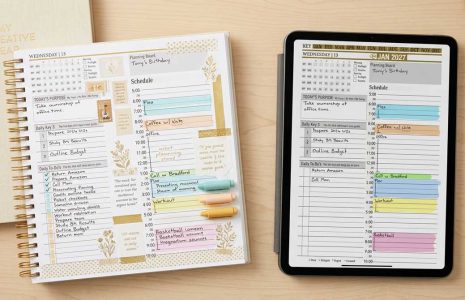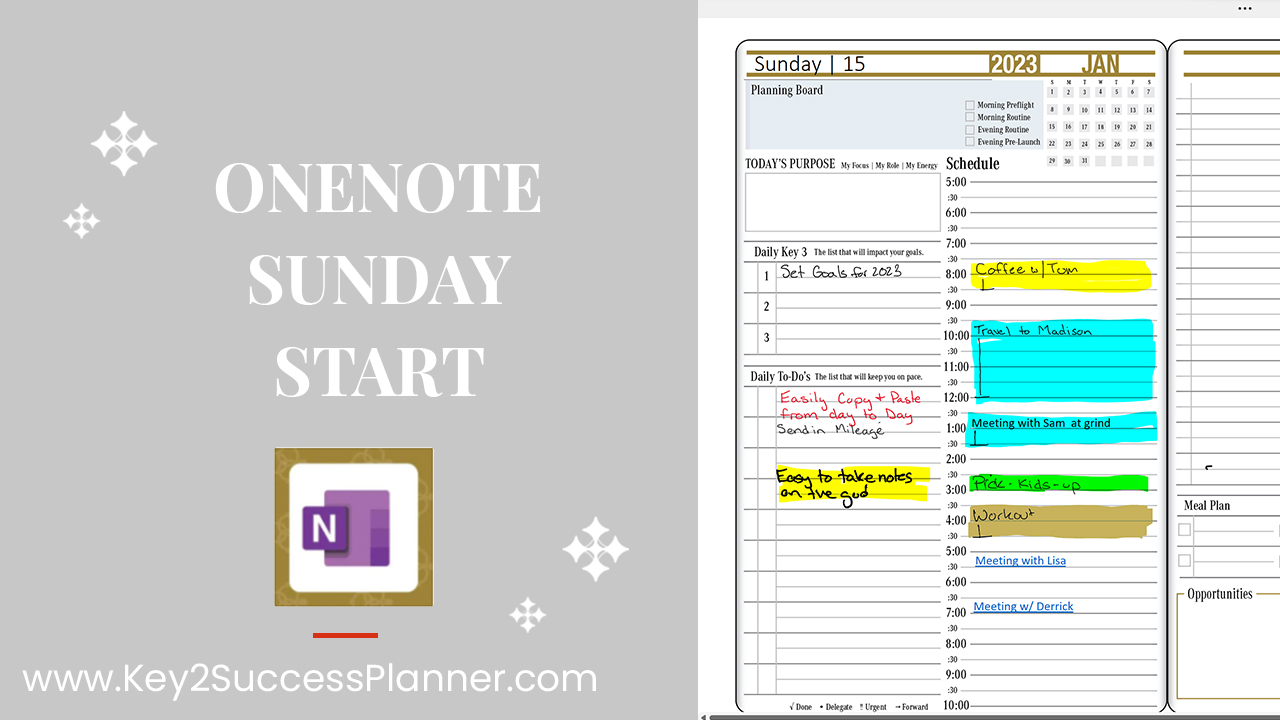
OneNote digital planner page featuring a Sunday start date, including a schedule and tasks for January 15, 2023, with highlighted sections and the OneNote logo.
Articles / News / vLog Jun 02
By Branden 0 Comments

Starting in 2023, the Key2Success Digital Planning System is offering a Sunday start date! Depending on your preference, you may want to start your weekly planning on Sunday instead of Monday. Or, you just are used to seeing your week start on Sunday. Whatever the reason, the choice is now yours! (Each version – Sunday Start and Monday Start – is included in your purchase.)

 The Key2Success Planner, is a professional planning system that focuses on your own goal achievement, while providing you the daily, weekly and monthly management that is required for those who are thriving in their professional life.

The focus of the planner goes beyond just career development with establishing 4 key development area, self, community, relationship and career. This digital planner will be the one that will move you forward each week. Weekly planning is an important part of the Key2Success Planning System.

The exclusive KEY2SUCCESS™ Planner has been designed as a OneNote planner that can be used on any device on which the OneNote app is installed. This includes Windows, Android and Apple users.

Promotional banner for Key2Success planner offering discounts and a money-back guarantee, emphasizing digital planning benefits and a call to action for users on Samsung devices.

If you are new to OneNote and want a brief tutorial, check out this video:

OneNote is a powerful tool for digital planning. The Key2Success Planner is the same content across platforms, but OneNote offers more ability to sync across devices and supplies a different navigational structure. 

To get the most out of your OneNote experience, check out Branden’s 12 Tips for Better Productivity here:

Key2Success Planners

Choose the Application that you plan to use for digital planning.

Sunday Start Date Option for OneNote Digital Planner

OneNote logo featuring a purple notebook icon, representing a digital planning tool for effective organization and note-taking.

Application works across Windows, Android and Apple. Also Web version all available. Great for Desktop, Laptop and Mobile users.

GoodNotes

GoodNotes app icon featuring a notepad with lines and a stylus, representing digital planning and note-taking tools for Apple devices.

Application works across Apple devices. Great for iPad, Mac and iPhone users. PDF Annotation App designed for Note-Taking

Noteshelf

Noteshelf app icon featuring a blue background with a white pen, representing digital planning and note-taking tools for Apple devices.

Application works across Apple devices. Great for iPad, Mac and iPhone users. PDF Annotation App designed for Note-Taking

Notability

Notability app icon featuring a pencil on a blue background, representing digital note-taking tools for Apple devices in the context of digital planning.

Application works across Apple devices. Great for iPad, Mac and iPhone users. PDF Annotation App designed for Note-Taking

Samsung Notes

Samsung Notes application icon, designed for digital planning on Samsung devices, highlighting note-taking features.

Application works across Samsung devices. Great for Samsung Tab and Samsung Galaxy Users. Including Z Fold 3, S6, S7, S8 and S22. 

reMarkable

reMarkable logo on a black background, representing ePaper devices for digital note-taking and PDF annotation.

Works with ePaper Devices, like the reMarkable, SuperNote and many more. A PDF Annotation Planner allows users to take digital notes.

Promotional banner for Key2Success planner offering discounts and a money-back guarantee, emphasizing digital planning benefits and a call to action for users on Samsung devices.

Leave a Comment